
Brandmotion 60-HMLKV5BLK
Brandmotion HomeLink Wireless Control System
Model: 60-HMLKV5BLK / 20004101
User Manual
Introduction
The Brandmotion HomeLink Wireless Control System is an advanced vehicle-integrated solution designed to simplify the operation of your home automation devices. This system allows you to control garage doors, security gates, home lighting, and other HomeLink-compatible devices directly from your vehicle using three programmable buttons.
The HomeLink system offers a seamless, factory-integrated appearance and is designed for universal compatibility with HomeLink Version 5 technology, including Quicktrain functionality for easier setup. This manual provides essential information for the proper installation, programming, and operation of your HomeLink system.
Important Safety Information
- Always ensure your vehicle is parked and the ignition is off before attempting any installation or wiring procedures.
- Incorrect installation can lead to electrical damage or malfunction. If you are unsure about any step, consult a qualified automotive technician.
- Do not operate garage door openers or gate systems if people, pets, or objects are in the path of the door or gate.
- Keep remote controls and HomeLink buttons out of reach of children.
- Ensure all wiring connections are secure and properly insulated to prevent short circuits.
- This device is approved for use in the US, Canada, and Mexico.
Package Contents
Verify that all items are present in your package:
- HomeLink Control Panel with three programmable buttons
- HomeLink Control Module
- Wiring Harness
- Mounting Bezel/Gasket
- Wire Connectors (may vary)

Image: All components included in the Brandmotion HomeLink Wireless Control System package, showing the button panel, control module, wiring harness, and mounting gasket.
Installation Guide
The HomeLink system is designed for integration into your vehicle's interior, typically in the overhead console, sun visor, or dashboard. Professional installation by a qualified dealer is recommended to ensure proper integration and functionality.
General Installation Steps:
- Choose Mounting Location: Select a suitable location in your vehicle that allows for easy access to the buttons and provides space for the control module and wiring. Common locations include the overhead console, sun visor, or a custom dashboard panel.
- Prepare Mounting Surface: Depending on the chosen location, you may need to cut an opening for the HomeLink control panel. Use the provided bezel/gasket as a template for precise cutting.
- Mount the Control Panel: Securely install the HomeLink control panel into the prepared opening. Ensure it sits flush and is stable.
- Connect Wiring: Route the wiring harness from the control panel to the control module. Connect the control module to a switched 12-volt power source (e.g., ignition-switched fuse) and a ground point in your vehicle. It is crucial to connect to an ignition-switched power source to prevent unauthorized use when the vehicle is off.
- Secure Components: Secure the control module and excess wiring to prevent rattling or interference with other vehicle components.
- Test Functionality: Before reassembling interior panels, perform initial power-on tests to ensure the buttons illuminate and the module receives power.
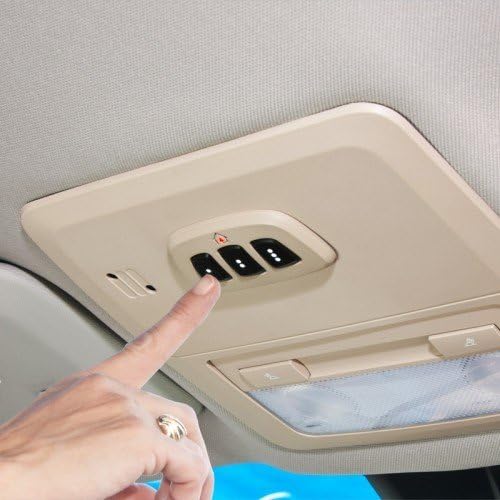
Image: A hand pressing one of the three buttons on the HomeLink system, which is seamlessly integrated into a vehicle's overhead console, demonstrating its factory-like appearance.
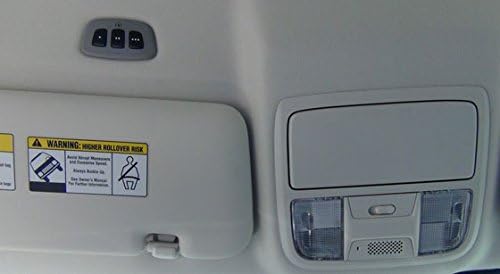
Image: The HomeLink system installed in a vehicle's interior, positioned above the sun visor, showcasing an alternative mounting location.
Programming Your HomeLink System
The HomeLink system utilizes Quicktrain technology for efficient programming. Ensure your vehicle is parked in a safe location with the ignition on (engine off).
Initial Programming (First Time Use):
- Clear Existing Codes: Press and hold the two outer HomeLink buttons (buttons 1 and 3) simultaneously until the indicator light begins to flash rapidly (after approximately 20 seconds). Release both buttons. This clears all pre-programmed codes. Do not perform this step when programming additional buttons.
- Position Original Remote: Hold the original hand-held remote control for the device you wish to program (e.g., garage door opener) 1-3 inches away from the HomeLink buttons.
- Program Button: Simultaneously press and hold both the desired HomeLink button and the button on your original remote control. Do not release until the HomeLink indicator light changes from a slow flash to a rapid flash. This rapid flash indicates successful programming.
- Test: Press the newly programmed HomeLink button. If the device operates, programming is complete. If not, proceed to the "Rolling Code Programming" section.
Rolling Code Programming (If Initial Programming Fails):
Many modern garage door openers use rolling code technology for enhanced security. If your device does not respond after initial programming, follow these steps:
- Locate Learn Button: On your garage door opener motor head unit (usually mounted on the ceiling of your garage), locate the "Learn" or "Smart" button. The color and location of this button vary by manufacturer.
- Activate Learn Mode: Press and immediately release the "Learn" or "Smart" button on the garage door opener. The indicator light on the opener will illuminate for approximately 30 seconds, indicating it is in "learn" mode.
- Complete Programming: Immediately return to your vehicle and firmly press and hold the HomeLink button you wish to program for two seconds, then release. Repeat this press/hold/release sequence up to three times. The garage door should activate on the second or third press.
- Test: Press the programmed HomeLink button to confirm it operates the garage door.
For detailed programming instructions specific to your garage door opener or gate system, refer to the original device's manual or visit the official HomeLink website.

Image: A close-up view of the HomeLink control panel, featuring three distinct buttons with embossed dots for tactile identification, and a small house icon above the center button.
Operating Your HomeLink System
Once programmed, operating your HomeLink system is straightforward.
- Activation: With the vehicle's ignition on, simply press and release the desired HomeLink button to activate the programmed device (e.g., open/close garage door, turn on lights).
- Backlit Buttons: The buttons are backlit for easy visibility and operation during nighttime driving.
- Multiple Devices: Each of the three buttons can be programmed to control a different HomeLink-compatible device.
Maintenance
The Brandmotion HomeLink Wireless Control System requires minimal maintenance.
- Cleaning: Clean the control panel with a soft, damp cloth. Avoid using harsh chemicals or abrasive cleaners.
- Battery (Not Applicable): The HomeLink system is powered by your vehicle's electrical system and does not require battery replacement.
- Regular Testing: Periodically test your programmed devices to ensure they are still functioning correctly.
Troubleshooting
| Problem | Possible Cause | Solution |
|---|---|---|
| HomeLink indicator light does not flash during programming. | Original remote too far away or battery low in original remote. | Hold original remote 1-3 inches from HomeLink buttons. Replace battery in original remote if needed. |
| Device does not respond after programming. | Device uses rolling code technology. | Follow the "Rolling Code Programming" steps. Ensure you press the "Learn" button on your garage door opener. |
| HomeLink buttons do not illuminate or function. | No power to the HomeLink module; incorrect wiring. | Check vehicle's ignition status. Verify all wiring connections (power, ground) are secure and correct. Consult installation professional if necessary. |
| Previously programmed HomeLink button stops working after programming another. | Garage door opener has a maximum number of codes it can learn. | Clear all codes from your garage door opener (usually by holding the "Learn" button for 10 seconds) and then reprogram all desired HomeLink buttons. |
Specifications
| Brand: | Brandmotion |
| Model Numbers: | 60-HMLKV5BLK, 20004101 |
| Color: | Black |
| Mounting Type: | Door Mount (referring to general vehicle integration, not a literal door) |
| Special Feature: | Wireless |
| Voltage: | 12 Volts |
| Item Weight: | 7 ounces |
| Package Dimensions: | 6.18 x 6.02 x 1.73 inches |
| UPC: | 700953353580, 718196966009, 826003002212, 785422154264 |
Warranty and Support
For warranty information and technical support regarding your Brandmotion HomeLink Wireless Control System, please refer to the documentation provided with your purchase or visit the official Brandmotion website. HomeLink also provides dedicated support for programming assistance.
HomeLink Official Website: www.homelink.com
Brandmotion Contact: Refer to Brandmotion's official website for the most current contact information for customer service and technical support.
Ask a question about this manual
Ask about setup, troubleshooting, compatibility, parts, safety, or missing instructions. Manuals+ will review the question and use this page’s manual context to help answer it.