Introduction
This manual provides comprehensive instructions for the Nautica A14631G (Model T20205) men's quartz analog chronograph watch. This timepiece features a durable stainless steel case and bracelet, a multi-function black dial with chronograph capabilities, and is designed for reliability and style. Please read this manual carefully to ensure proper use and maintenance of your watch.
Product Overview

Image 1: Front view of the Nautica A14631G watch face. This image highlights the multi-function dial with chronograph sub-dials, day, date, and 24-hour indicators.
The Nautica A14631G watch is equipped with a precise quartz movement, ensuring accurate timekeeping. Its analog display includes hour, minute, and a running small seconds hand, along with a chronograph function and additional sub-dials for day, date, and 24-hour indication. The watch is water-resistant, making it suitable for various activities.
Setup and Initial Adjustment
1. Setting the Time
- Pull the crown out to position 2 (the outermost position). The small seconds hand (at 6 o'clock) will stop.
- Turn the crown clockwise or counter-clockwise to set the hour and minute hands to the desired time. Ensure the 24-hour sub-dial (at 3 o'clock) is correctly set to reflect AM/PM.
- Push the crown back into position 0 (normal position) to start the watch.
2. Setting the Date and Day
This watch features sub-dials for day (at 9 o'clock) and date (at 3 o'clock). The 24-hour sub-dial (at 3 o'clock, sharing with date) synchronizes with the main time.
- Pull the crown out to position 1 (the middle position).
- Turn the crown clockwise to adjust the date sub-dial.
- Turn the crown counter-clockwise to adjust the day of the week sub-dial.
- Once the date and day are set, push the crown back into position 0.
Note: Avoid setting the date or day between 9:00 PM and 3:00 AM, as this can damage the movement. If adjustment is needed during this period, first set the time outside this window, adjust the date/day, then reset the time.
3. Adjusting the Bracelet
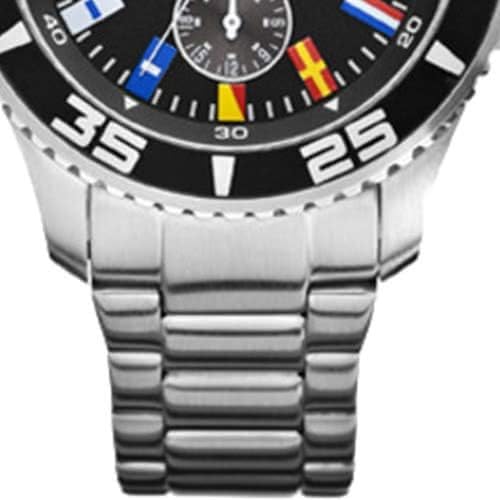
Image 2: Side view of the Nautica A14631G watch and bracelet. This image illustrates the construction of the stainless steel bracelet and the watch case with its pushers.
The stainless steel bracelet can be adjusted by adding or removing links. This procedure typically requires specialized tools and should be performed by a qualified jeweler or watch technician to prevent damage to the bracelet or watch.
Operating Your Watch
Basic Timekeeping
Once the time, date, and day are set, your watch will operate continuously. The small seconds hand at the 6 o'clock position indicates the running time. The main large second hand is for the chronograph function.
Using the Chronograph
The chronograph function allows you to measure elapsed time. It is operated by the two pushers located on the side of the watch case, above and below the crown.
- Start/Stop: Press the top pusher to start the chronograph. The large second hand will begin to move, and the chronograph minute sub-dial (at 12 o'clock) will record elapsed minutes. Press the top pusher again to stop the chronograph.
- Reset: While the chronograph is stopped, press the bottom pusher to reset all chronograph hands (large second hand and minute sub-dial) to their zero positions.
Water Resistance
This watch is water-resistant to 100 meters (10 ATM). This rating means it is suitable for swimming, snorkeling, and showering. However, it is not suitable for scuba diving. Always ensure the crown is fully pushed in before exposing the watch to water.
- 100M (10 ATM): Suitable for swimming, snorkeling, and showering.
- Important: Do not operate the crown or pushers while the watch is wet or submerged, as this can compromise the water resistance.
- Avoid exposing the watch to extreme temperature changes (e.g., hot shower immediately followed by cold water), as this can affect seals.
Maintenance and Care
Cleaning Your Watch
To maintain the appearance of your watch:
- Wipe the case and bracelet regularly with a soft, dry cloth.
- For stainless steel bracelets, a slightly damp cloth can be used, followed by a dry cloth. Ensure no moisture enters the watch case.
- Avoid using chemical cleaners, solvents, or abrasive materials, as these can damage the finish.
Battery Replacement
Your quartz watch is powered by a battery. When the battery runs low, the small seconds hand (at 6 o'clock) may start to skip seconds (End-of-Life indicator) or stop entirely. Battery replacement should be performed by a qualified watch technician to ensure the correct battery type is used and the water resistance seal is properly re-installed.
Storage
When not wearing your watch, store it in a cool, dry place, away from direct sunlight and extreme temperatures. The original watch box (see Image 3) provides excellent protection.

Image 3: Nautica watch box. This image shows the protective packaging for the watch, ideal for storage.
Troubleshooting
- Watch Not Running:
Check if the crown is fully pushed into position 0. If the watch still does not run, the battery may need replacement. Consult a professional watch technician.
- Incorrect Time/Date/Day:
Refer to the "Setting the Time" and "Setting the Date and Day" sections. Ensure the crown is pulled out to the correct position for adjustment.
- Chronograph Not Functioning/Resetting:
Ensure the chronograph is stopped before attempting to reset. If hands do not reset to zero, a calibration or service may be required by a professional.
- Condensation Under Crystal:
If condensation appears under the watch crystal, it indicates a breach in the water resistance. This requires immediate attention from a watch technician to prevent further damage to the movement.
Specifications
| Brand | Nautica |
| Model Number | T20205 (A14631G) |
| Movement Type | Quartz |
| Display Type | Analog |
| Case Material | Stainless Steel |
| Case Diameter | 44 Millimeters |
| Case Thickness | 13 Millimeters |
| Band Material | Stainless Steel |
| Band Width | 21 Millimeters |
| Dial Window Material | Mineral |
| Dial Color | Black |
| Water Resistance Depth | 100 Meters (10 ATM) |
| Special Features | Water Resistant, Chronograph, Day and Date Sub-dials, 24-hour Indicator |
| Item Shape | Round |
Warranty Information
This Nautica watch comes with a 2-year warranty from the date of purchase. The warranty covers manufacturing defects in materials and workmanship under normal use. It does not cover damage resulting from improper handling, accidents, unauthorized repairs, or normal wear and tear (e.g., battery, crystal, strap, or bracelet damage).
For warranty service, please retain your proof of purchase and contact an authorized Nautica service center. Attempting repairs by unauthorized personnel will void the warranty.
Customer Support
If you have any questions or require assistance with your Nautica watch, please refer to the official Nautica website or contact their customer service department. Always provide your watch model number (T20205) and purchase details when seeking support.


