
Introduction
The SilverStone FHP-141 is a high-performance 140mm fan engineered for efficient cooling of CPU heatsinks and computer cases. Its distinctive 38mm thick profile features steeply raked fan blades, optimizing both high airflow and static pressure. This fan includes an integrated switch, allowing users to select between two operational modes: a Power mode (500 ~ 2000 RPM) for maximum cooling performance and a Quiet mode (500 ~ 1200 RPM) for reduced noise levels, both controllable via PWM fan headers.

Figure 1: Front view of the SilverStone FHP-141 fan.
Setup and Installation
1. Unpacking and Inspection
Carefully remove the fan and all accessories from the packaging. Inspect for any visible damage. Ensure all components listed in the 'Included Accessories' section are present.
2. Mounting the Fan
The FHP-141 fan is designed for both 120mm and 140mm mounting holes. Use the provided mounting adapters if your case or heatsink requires 120mm spacing for a 140mm fan. Due to its 38mm thickness, verify sufficient clearance in your installation area before proceeding.

Figure 2: Detail of mounting holes and optional adapters for 120mm compatibility.
- Position the fan in the desired location, ensuring correct airflow direction.
- If using 120mm mounting points, attach the provided adapters to the fan's corners.
- Secure the fan using the included screws or rubber anti-vibration mounts. Do not overtighten.
3. Connecting the Fan
The FHP-141 features a 3 and 4-pin combo power connector for broad compatibility. Connect the fan to an available 4-pin PWM fan header on your motherboard or a compatible fan controller.

Figure 3: Rear view of the fan, illustrating the wiring and product label.
4. Included Accessories
- Mounting Screws
- Rubber Anti-Vibration Mounts
- 120mm Mounting Adapters (4 pieces)
- 3-pin to 4-pin power adapter cable
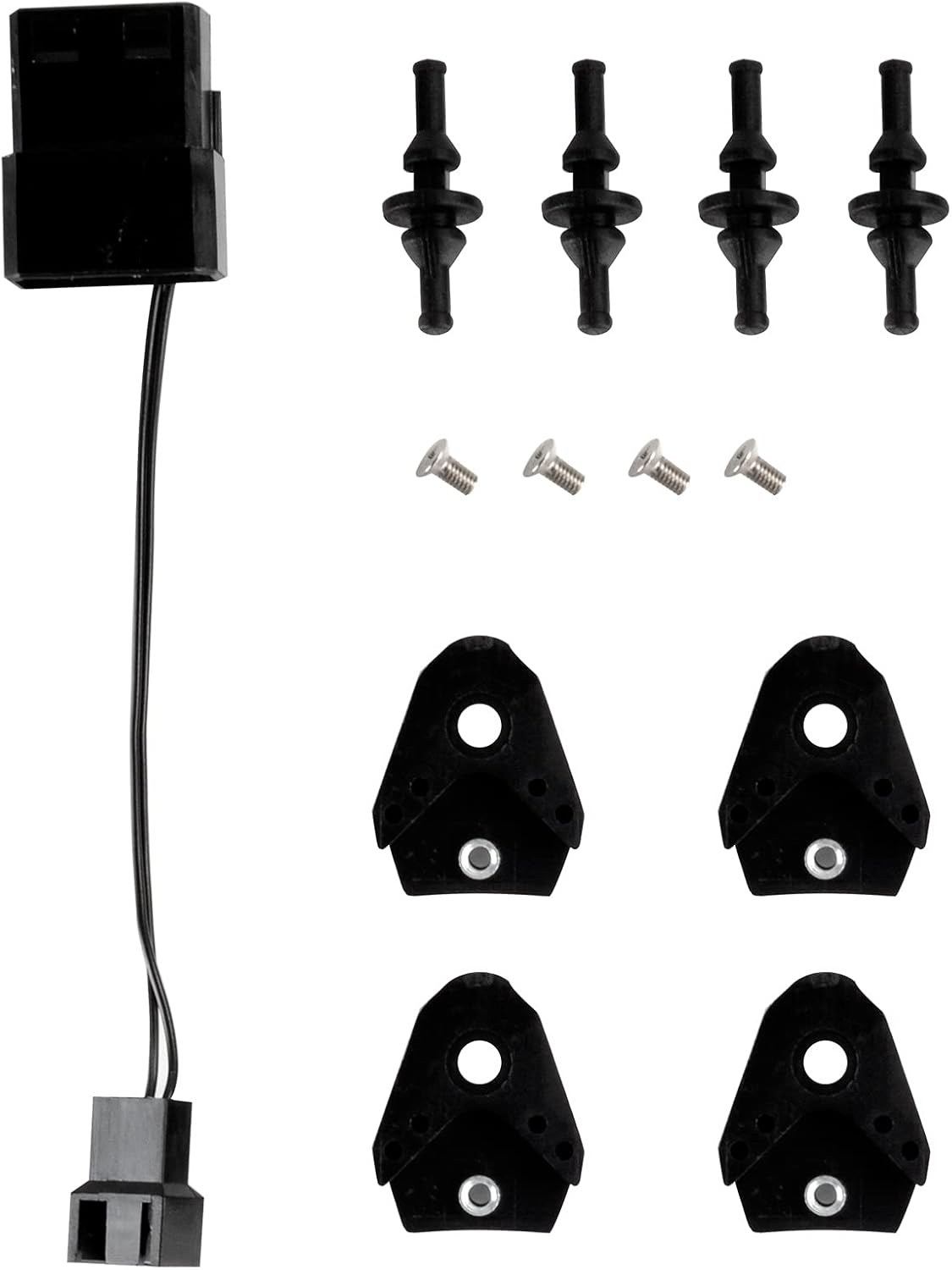
Figure 4: All included accessories for the FHP-141 fan.
Operating Instructions
Dual Mode Operation
The FHP-141 fan features an integrated switch on its side, allowing you to select between two distinct operating modes:
- Power Mode (P): This mode allows the fan to operate within a speed range of 500 to 2000 RPM. It is ideal for situations requiring maximum airflow and static pressure for optimal cooling performance.
- Quiet Mode (Q): In this mode, the fan operates within a speed range of 500 to 1200 RPM. This setting prioritizes lower noise output, suitable for systems where acoustic performance is critical.
The fan speed within each mode is dynamically controlled by the motherboard's PWM signal, adjusting based on system temperature requirements.

Figure 5: The integrated switch for selecting Power (P) or Quiet (Q) mode.
To change modes: Ensure your system is powered off before adjusting the switch. Slide the switch to the desired 'P' (Power) or 'Q' (Quiet) position.
Maintenance
Regular maintenance ensures optimal performance and longevity of your SilverStone FHP-141 fan.
1. Cleaning
- Frequency: Clean the fan blades and frame every 3-6 months, or more frequently in dusty environments.
- Procedure: Power off your computer and disconnect the fan. Use compressed air to remove dust from the fan blades and motor housing. A soft, dry cloth can be used to wipe down the blades and frame. Avoid using liquid cleaners.
2. Inspection
- Periodically check the fan for any signs of damage, such as cracked blades or loose wiring.
- Ensure the fan is securely mounted and that no cables or other components are obstructing its rotation.
Troubleshooting
If you encounter issues with your SilverStone FHP-141 fan, refer to the following common problems and solutions:
| Problem | Possible Cause | Solution |
|---|---|---|
| Fan not spinning |
|
|
| Excessive noise or vibration |
|
|
| Poor cooling performance |
|
|
Specifications
Detailed technical specifications for the SilverStone FHP-141 fan:

Figure 6: Side profile of the FHP-141 fan, highlighting its 38mm thickness.
- Model: FHP-141
- Dimensions: 140mm (L) x 140mm (W) x 38mm (H)
- Fan Speed:
- Power Mode: 500 ~ 2000 RPM (PWM controlled)
- Quiet Mode: 500 ~ 1200 RPM (PWM controlled)
- Noise Level: Up to 43 dBA (at maximum RPM in Power Mode)
- Power Connector: 3 and 4-pin Combo
- Rated Voltage: 12V DC
- Compatible Devices: Desktop computers (CPU coolers, computer cases)
- Cooling Method: Air
- Manufacturer: Silverstone Tek
- First Available Date: November 5, 2012
Warranty Information
SilverStone products are covered by a limited warranty from the date of purchase. The specific terms and duration of the warranty may vary by region and product. Please retain your proof of purchase for warranty claims.
For detailed warranty information, including coverage, limitations, and the claims process, please refer to the official SilverStone website or contact their customer support directly.
Customer Support
If you require further assistance, have questions not covered in this manual, or need technical support, please contact SilverStone customer service.
- Online Resources: Visit the official SilverStone website for FAQs, updated manuals, and driver downloads.
- Contact Information: Refer to the 'Contact Us' section on the SilverStone website for regional phone numbers and email support.


