
Rocktile GP-10
Rocktile GP-10 Headphone Amplifier with Multi Effects
Model: GP-10 (Item Model Number: 00029431)
Introduction
Thank you for purchasing the Rocktile GP-10 Headphone Amplifier with Multi Effects. This portable device is designed to provide guitarists with a versatile practice tool, offering a range of amp models, effects, a drum machine, and a tuner, all in a compact form factor. This manual will guide you through the setup, operation, and maintenance of your GP-10 to ensure optimal performance and longevity.
Safety Information
Please read and understand the following safety precautions before using the Rocktile GP-10:
- Power Source: Use only the supplied 9V DC power adapter or two AAA batteries. Ensure the correct polarity when inserting batteries.
- Water and Moisture: Do not expose the unit to rain, moisture, or extreme humidity. Do not operate near water sources.
- Heat: Keep the unit away from heat sources such as radiators, heat registers, stoves, or other apparatus that produce heat.
- Ventilation: Do not block any ventilation openings. Ensure proper airflow around the unit.
- Cleaning: Clean only with a dry cloth. Avoid using liquid cleaners or aerosols.
- Servicing: Do not attempt to service this product yourself. Refer all servicing to qualified service personnel.
- Headphone Volume: Prolonged listening at high volume levels can cause permanent hearing damage. Always start with a low volume and gradually increase it to a comfortable level.
Package Contents
Verify that all items listed below are included in your package:
- Rocktile GP-10 Headphone Amplifier
- 9V DC Power Adapter
- User Manual (this document)
Product Overview
Controls and Connections
Familiarize yourself with the various controls and connection points on your GP-10 unit.

Figure 1: Front view of the Rocktile GP-10, showing all knobs, buttons, and the display.
| Control/Port | Description |
|---|---|
| On/Off/Cab Sim. Switch | Powers the unit On/Off. Also activates/deactivates cabinet simulation for direct recording or line out. |
| DC IN | Input for the 9V DC power adapter. |
| GAIN Knob | Adjusts the input gain, affecting the amount of distortion or overdrive. |
| DRIVE Knob | Selects between 6 high-quality amp models: Clean (CL), Overdrive (OD), Distortion (DS), Fuzz (FZ), Crunch (CR), and Metal (MT). |
| TONE Knob | Adjusts the overall tonal character, from darker to brighter. |
| Aux In (3.5mm Jack) | Input for connecting external audio sources like MP3 players or smartphones for practice along with music. |
| Output (6.3mm Jack) | Main output for connecting to an amplifier, recording interface, or other audio equipment. |
| Headphone Output (3.5mm Stereo Jack) | Dedicated output for connecting headphones for silent practice. |
| VOL +/- Buttons | Adjusts the overall output volume. |
| MOD Knob | Selects between 4 modulation effects: Chorus (CH), Flanger (FL), Phaser (PH), and Tremolo (TR). |
| DLY/REV Knob | Selects between 4 delay/reverb effects: Delay, Echo, Room, and Hall. |
| DRUM/VALUE Knob (Press for Tuner) | Rotates to select drum patterns or adjust values. Press and hold to activate the built-in tuner. |
| Patch Button | Cycles through preset and user memory patches. |
| Store Button | Saves current settings to a user memory patch. |
Setup
Powering the Device
The Rocktile GP-10 can be powered by either a 9V DC power adapter or two AAA batteries.
- Using the AC Adapter:
- Connect the supplied 9V DC power adapter to the "DC IN" jack on the GP-10.
- Plug the adapter into a standard wall outlet.

Figure 2: The included 9V DC power adapter.
- Using Batteries (Optional):
- Open the battery compartment cover on the back of the unit.
- Insert two AAA batteries, ensuring correct polarity (+/-).
- Close the battery compartment cover securely.

Figure 3: Rear view of the Rocktile GP-10 with the battery compartment open.
Connecting Your Instrument and Headphones
Follow these steps to connect your guitar and headphones for practice:
- Plug your guitar cable into the 6.3mm "Output" jack on the GP-10.
- Connect your headphones to the 3.5mm "Headphone Output" jack.
- (Optional) If you wish to play along with external audio, connect your MP3 player or smartphone to the 3.5mm "Aux In" jack.
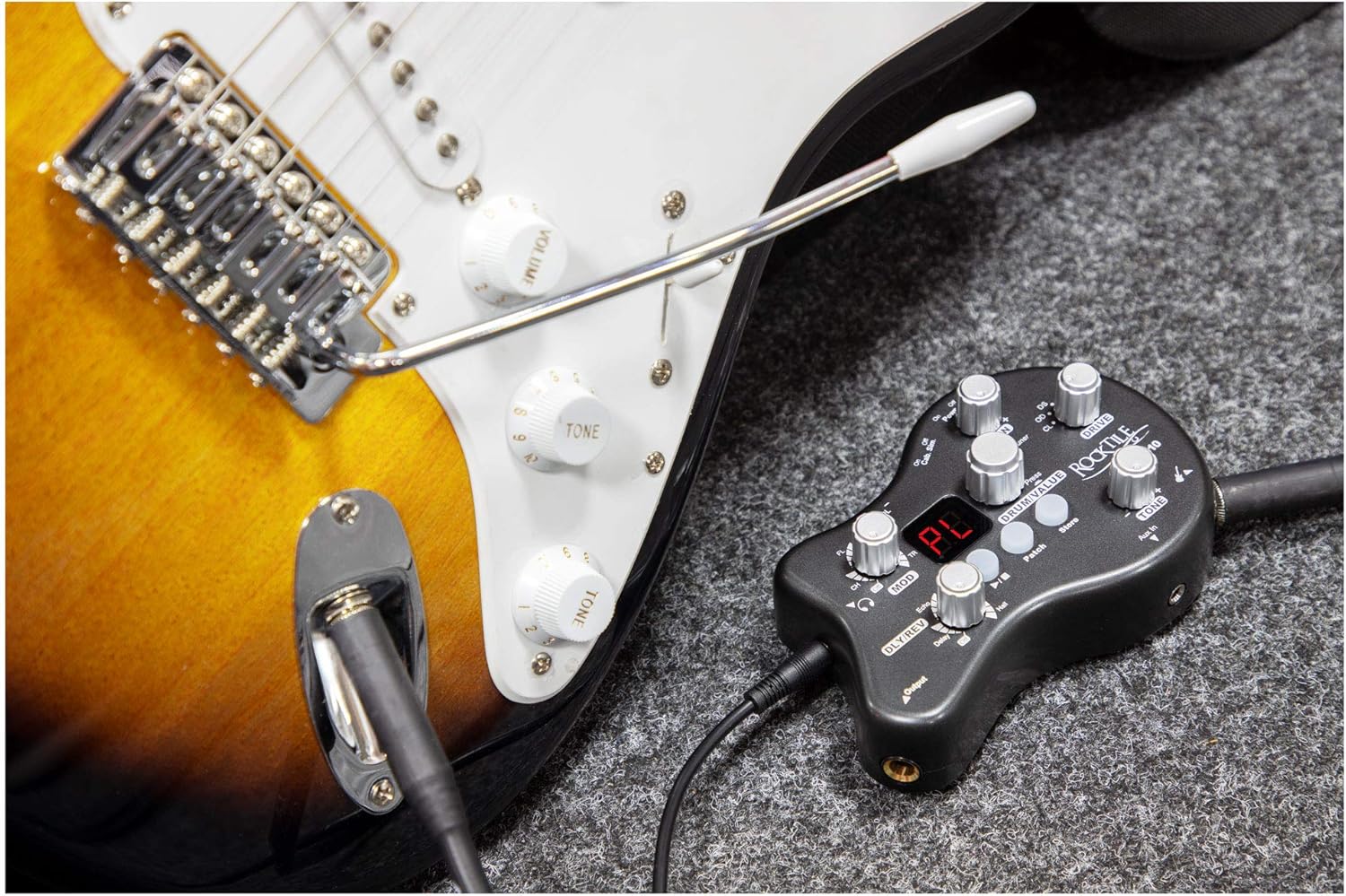
Figure 4: The Rocktile GP-10 connected to a guitar.
Operating Instructions
Basic Operation
- Turn on the GP-10 by sliding the "On/Off/Cab Sim." switch to the "On" position.
- Adjust the overall output volume using the "VOL +/-" buttons. Start with a low volume and increase gradually.
- Use the "GAIN" knob to control the input gain, which influences the amount of distortion.
- Adjust the "TONE" knob to shape the overall sound.
Amp Models (DRIVE Knob)
The "DRIVE" knob allows you to select from 6 different amp models, each offering a distinct tonal character:
- CL (Clean): Provides a clear, uncolored guitar tone.
- OD (Overdrive): Offers a warm, natural tube-like overdrive.
- DS (Distortion): Delivers a heavier, more aggressive distorted sound.
- FZ (Fuzz): Produces a thick, vintage fuzz tone.
- CR (Crunch): A mid-gain setting suitable for classic rock and blues.
- MT (Metal): High-gain setting for modern metal tones.
Effects (MOD and DLY/REV Knobs)
The GP-10 includes a variety of modulation, delay, and reverb effects:
- MOD Knob:
- CH (Chorus): Adds a shimmering, swirling effect.
- FL (Flanger): Creates a sweeping, jet-plane like sound.
- PH (Phaser): Produces a swirling, phase-shifted sound.
- TR (Tremolo): Varies the volume of the signal, creating a pulsating effect.
- DLY/REV Knob:
- Delay: Creates distinct echoes of the original signal.
- Echo: Similar to delay, often with a more pronounced repetition.
- Room: Simulates the natural reverberation of a small room.
- Hall: Simulates the longer, more expansive reverberation of a large hall.
Drum Machine and Tuner
- Drum Machine:
- Rotate the "DRUM/VALUE" knob to select from 40 different rhythm patterns.
- Adjust the rhythm volume using the "VOL +/-" buttons while a drum pattern is playing.
- Tuner:
- Press and hold the "DRUM/VALUE" knob for two seconds to activate the built-in tuner.
- The display will show the note being played. Adjust your guitar's tuning until the display indicates the correct pitch.
- Press the "DRUM/VALUE" knob again to exit tuner mode.
Memory Patches (Patch and Store Buttons)
The GP-10 features 32 memory patches (16 presets, 16 user definable) to save and recall your favorite settings.
- Recalling Patches: Press the "Patch" button to cycle through the available memory patches.
- Storing Patches:
- Adjust the amp model, effects, gain, and tone to your desired settings.
- Press and hold the "Store" button until the display indicates the patch has been saved.
- You can select a specific user patch location (1-16) before storing by using the "Patch" button.

Figure 5: A user demonstrating the portable use of the Rocktile GP-10 with headphones.
Maintenance
Proper care and maintenance will extend the life of your Rocktile GP-10.
- Cleaning: Wipe the unit with a soft, dry cloth. Do not use abrasive cleaners, waxes, or solvents.
- Storage: When not in use for extended periods, store the unit in a cool, dry place away from direct sunlight and extreme temperatures.
- Batteries: Remove batteries if the unit will not be used for a long time to prevent leakage and damage.
- Connections: Periodically check all cables and connections for wear and tear.
Troubleshooting
If you encounter issues with your GP-10, refer to the following table for common problems and solutions.
| Problem | Possible Cause | Solution |
|---|---|---|
| No sound output. | Unit is off, volume is too low, cables are not connected properly, dead batteries. | Ensure unit is on. Increase volume. Check all cable connections (guitar, headphones, power). Replace batteries or use AC adapter. |
| Distorted or poor sound quality. | GAIN knob too high, incorrect amp model selected, faulty cable. | Reduce GAIN. Experiment with different DRIVE settings. Try a different guitar cable. |
| Drum machine not working. | Drum volume too low, tuner mode active. | Increase drum volume using VOL +/- buttons. Ensure tuner mode is off (press DRUM/VALUE knob). |
| Unit does not power on with batteries. | Batteries are dead or inserted incorrectly. | Replace batteries with new ones. Check battery polarity. |
| Excessive noise or hum. | Interference from other electronics, faulty power adapter, ground loop. | Move unit away from other electronic devices. Try a different power outlet. Ensure power adapter is the original one. |
Technical Specifications
| Feature | Specification |
|---|---|
| Product Dimensions | 12.9 x 8.4 x 4.5 cm |
| Item Weight | 130 g (without batteries) |
| Power Supply | 9V DC power adapter (supplied) or 2 x AAA batteries (optional) |
| Amp Models | 6 (Clean, Overdrive, Distortion, Fuzz, Crunch, Metal) |
| Effects Types | 8 (Chorus, Flanger, Phaser, Tremolo, Delay, Echo, Room, Hall) |
| Drum Loop Player | 40 different rhythms |
| Memory Patches | 32 (16 presets, 16 user) |
| Input Jack | 6.3 mm (Guitar In) |
| Output Jack | 6.3 mm (Amp / Rec output) |
| Headphone Output | 3.5 mm stereo jack |
| Aux In | 3.5 mm jack |
| Item Model Number | 00029431 |
| GTIN (UPC/EAN) | 04260309220172 |
Warranty and Support
Rocktile products are manufactured to high quality standards. For information regarding warranty coverage, technical support, or service, please refer to the warranty card included with your purchase or visit the official Rocktile website. Please retain your proof of purchase for any warranty claims.
Ask a question about this manual
Ask about setup, troubleshooting, compatibility, parts, safety, or missing instructions. Manuals+ will review the question and use this page’s manual context to help answer it.