
1. Introduction
The Canon Speedlite 155A is a compact automatic flash unit designed to provide supplementary lighting for your photography. It features two automatic flash ranges and a manual mode, utilizing thyristorized circuitry for efficient power consumption and extended battery life. This manual provides comprehensive instructions for the proper setup, operation, maintenance, and troubleshooting of your Speedlite 155A.
2. Safety Information
- Always ensure the flash unit is securely mounted to the camera's hot shoe to prevent accidental detachment.
- Do not expose the Speedlite 155A to water, high humidity, or extreme temperatures.
- Keep the unit out of reach of children.
- Use only the recommended battery types (4 AA batteries) and ensure correct polarity during installation.
- Avoid direct eye exposure to the flash, especially at close range, as it can cause temporary vision impairment.
- Do not attempt to disassemble or repair the unit yourself. Refer to qualified service personnel for repairs.
3. Package Contents
Verify that your package contains the following items:
- Canon Speedlite 155A Flash Unit
- Protective Case
4. Product Overview
The Canon Speedlite 155A is designed for ease of use and reliable performance. Familiarize yourself with its main components:

Image 1: Front view of the Canon Speedlite 155A. This image displays the flash head, light sensor, and the main body of the unit.
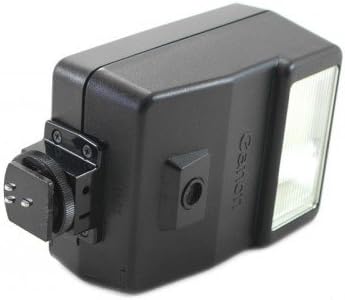
Image 2: Side view of the Canon Speedlite 155A. This image highlights the power switch, mode selector, and the battery compartment cover.
- Flash Head: Emits the light for illumination.
- Light Sensor: Detects ambient light for automatic exposure control.
- Power Switch: Turns the flash unit on and off.
- Mode Selector: Allows selection between automatic (A1, A2) and manual (M) flash modes.
- Battery Compartment: Houses the 4 AA batteries required for operation.
- Hot Shoe Mount: Connects the flash unit to the camera's hot shoe for communication and secure attachment.
5. Setup
5.1. Battery Installation
- Locate the battery compartment cover on the side or rear of the Speedlite 155A.
- Open the cover by sliding or unlatching it.
- Insert four (4) AA batteries, ensuring that the positive (+) and negative (-) terminals align with the markings inside the compartment.
- Close the battery compartment cover securely until it clicks into place.
5.2. Mounting to Camera
- Ensure both the camera and the Speedlite 155A are turned off.
- Slide the hot shoe mount of the Speedlite 155A into your camera's hot shoe slot.
- Push the flash unit forward until it is fully seated and locked into position. Some cameras or flashes may have a locking mechanism; ensure it is engaged.
6. Operating Instructions
6.1. Power On/Off
To turn the Speedlite 155A on, slide the power switch to the 'ON' position. To turn it off, slide the switch to 'OFF'. A ready lamp will illuminate when the flash is charged and ready to fire.
6.2. Automatic Flash Modes (A1, A2)
The Speedlite 155A offers two automatic flash ranges, typically labeled A1 and A2, which correspond to different aperture settings or subject distances. Consult your camera's manual or the flash's guide for specific aperture recommendations for each mode.
- Set the mode selector switch on the flash to either A1 or A2.
- Set your camera's aperture to the corresponding f-stop for the selected automatic mode.
- The flash will automatically adjust its output based on the light reflected from the subject, ensuring correct exposure.
6.3. Manual Flash Mode (M)
In manual mode, the flash fires at full power, providing consistent light output. This mode offers greater creative control but requires manual adjustment of camera settings.
- Set the mode selector switch on the flash to 'M'.
- Adjust your camera's aperture, shutter speed, and ISO settings to achieve the desired exposure, considering the flash's guide number and your subject distance.
7. Maintenance
7.1. Cleaning
- Use a soft, dry cloth to gently wipe the exterior of the flash unit.
- For stubborn dirt, slightly dampen the cloth with water. Do not use solvents, alcohol, or abrasive cleaners.
- Keep the flash tube and light sensor free of dust and fingerprints for optimal performance.
7.2. Battery Care
- Remove batteries from the unit if it will not be used for an extended period (e.g., one month or more) to prevent battery leakage and potential damage.
- Always use fresh, high-quality batteries for optimal flash recycling times and number of flashes.
7.3. Storage
Store the Speedlite 155A in its protective case in a cool, dry place, away from direct sunlight and extreme temperatures. Avoid storing it in areas with high humidity.
8. Troubleshooting
| Problem | Possible Cause | Solution |
|---|---|---|
| Flash not firing | Low or dead batteries Incorrect battery insertion Flash not powered on Flash not securely mounted Dirty hot shoe contacts | Replace batteries Reinsert batteries with correct polarity Turn flash power switch to 'ON' Ensure flash is fully seated and locked on hot shoe Clean camera and flash hot shoe contacts with a dry cloth |
| Incorrect exposure (too dark/bright) | Incorrect automatic mode selected Camera aperture not matched to auto mode Subject too far/close for selected mode Flash sensor obstructed Incorrect manual settings | Select appropriate A1/A2 mode Set camera aperture to recommended f-stop Adjust shooting distance or mode Ensure flash sensor is clear Adjust camera aperture, shutter speed, ISO in manual mode |
| Long recycling time | Low battery power Using non-rechargeable batteries repeatedly | Replace batteries with fresh ones Consider using NiCd rechargeable batteries for faster recycling |
9. Specifications
| Feature | Specification |
|---|---|
| Model Number | 155A |
| Guide Number | 56 (at ISO 100, meters) |
| Recycling Time | Approx. 7 seconds (Alkaline-Manganese) Approx. 5 seconds (NiCd) |
| Flash Coverage | 35mm lens angle |
| Number of Flashes | 300 or more (Alkaline) 90 or more (NiCd) |
| Power Source | 4 AA batteries |
| Mount Type | Hot Shoe Mount |
| Weight | 8.48 ounces (approx. 240g) |
| Manufacturer | Canon |
10. Warranty and Support
10.1. Warranty Information
Please refer to the warranty card or documentation included with your original purchase for detailed information regarding the warranty period, terms, and conditions for your Canon Speedlite 155A. Keep your proof of purchase for warranty claims.
10.2. Customer Support
For further assistance, technical support, or service inquiries, please contact Canon customer support. You can also visit the official Canon website for product information, FAQs, and service center locations.
Official Canon Store: Canon Store on Amazon


