
Speaka SP-3957092
Speaka Professional TV Wall Mount Instruction Manual
Model: SP-3957092
For 32" – 63" Televisions
1. Introduction
This manual provides detailed instructions for the safe and proper installation, operation, and maintenance of your Speaka Professional TV Wall Mount. This mount is designed to securely hold televisions ranging from 32 inches (81.3 cm) to 63 inches (160 cm) with a maximum load capacity of 75 kg (165 lbs). It supports all VESA standards up to 600 x 400 mm and features a tiltable design for optimal viewing angles.
Please read this manual thoroughly before beginning installation and keep it for future reference. Ensure all components are present and undamaged before proceeding.
2. Safety Information
- Weight Capacity: Do not exceed the maximum load capacity of 75 kg (165 lbs). Overloading can result in serious injury or damage to equipment.
- VESA Compatibility: Ensure your TV's VESA mounting pattern is compatible with this mount (up to 600x400 mm).
- Wall Type: This mount is designed for installation on solid concrete walls, brick walls, or wood stud walls. Do not install on drywall alone without proper stud support.
- Professional Installation: If you are unsure about the installation process or wall type, consult a qualified professional.
- Tools: Use appropriate tools for installation. Wear safety glasses and gloves.
- Children: Keep children and pets away during installation.
- Damage: Do not use the mount if any parts are damaged or missing. Contact customer support for replacement parts.
- Ventilation: Ensure adequate ventilation around the TV after mounting to prevent overheating.
3. Package Contents
Carefully unpack the box and ensure all items listed below are present and undamaged. If any parts are missing or damaged, do not proceed with installation and contact customer support.

Image: Main components of the Speaka Professional TV Wall Mount, including the wall plate and TV brackets.
- Wall Plate Assembly
- TV Bracket Arms (2x)
- Mounting Hardware Kit (screws, anchors, washers, spacers for wall and TV attachment)
- Instruction Manual (this document)
Note: The exact quantity and type of fasteners may vary slightly. The kit includes various screws to fit most TV models and wall types.
4. Setup and Installation
Before installation, identify your wall type and ensure you have the necessary tools (e.g., drill, level, stud finder, screwdriver, measuring tape). It is highly recommended to have at least two people for installation, especially when lifting the TV.
4.1 Attaching TV Brackets to Your TV
- Carefully place your TV face down on a soft, clean surface to prevent screen damage.
- Locate the VESA mounting holes on the back of your TV.
- Select the appropriate screws (M4, M6, or M8) and spacers from the hardware kit that fit your TV's mounting holes. Ensure the screws are long enough to secure the brackets without damaging internal components.
- Attach the two TV bracket arms to the back of your TV using the selected screws and washers. Ensure the hooks on the brackets are facing downwards and are aligned. Do not overtighten.
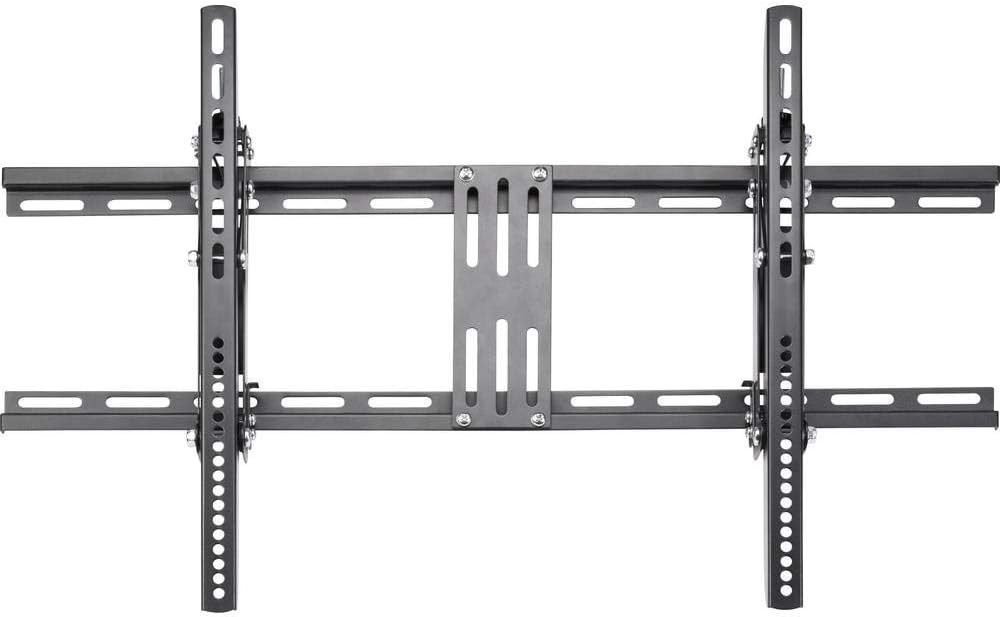
Image: Rear view of the TV wall mount, illustrating the various VESA mounting points and the overall structure.
4.2 Mounting the Wall Plate to the Wall
- Determine the desired height for your TV. Mark the center of where the TV will be mounted.
- Hold the wall plate against the wall at the desired height and use a level to ensure it is perfectly horizontal. Mark the drilling locations through the holes on the wall plate.
- Drill pilot holes at the marked locations. The drill bit size will depend on your wall type and the anchors/screws used.
- For wood studs: Drill pilot holes and use wood screws.
- For concrete/brick: Drill holes, insert concrete anchors, then use concrete screws.
- Secure the wall plate to the wall using the appropriate screws and washers. Ensure it is firmly attached and level.

Image: Side view of the TV wall mount, highlighting the robust construction of the wall plate and the attachment points.
4.3 Hanging the TV on the Wall Plate
- With assistance, carefully lift the TV with the attached brackets.
- Align the hooks on the TV brackets with the top edge of the wall plate.
- Gently lower the TV, ensuring the hooks engage securely with the wall plate.
- Once the TV is hanging, locate the safety screws or locking mechanisms on the bottom of the TV brackets. Tighten these to secure the TV to the wall plate and prevent accidental dislodgement.
5. Operating the Mount (Tilt Function)
This Speaka Professional TV Wall Mount features a tilt function, allowing you to adjust the viewing angle of your television. The maximum tilt angle is 15 degrees.

Image: A television mounted on the wall, demonstrating the downward tilt capability of the mount for improved viewing angles.
To adjust the tilt:
- Gently push the bottom of the TV forward or pull it back to achieve the desired tilt angle.
- The mount is designed to hold the TV securely at the chosen angle. No locking mechanism is typically required for tilt adjustment on this type of mount.
Note: Always adjust the tilt carefully and avoid excessive force.
6. Maintenance
- Cleaning: Clean the mount with a soft, dry cloth. Do not use abrasive cleaners or solvents.
- Inspection: Periodically check all screws and connections to ensure they remain tight and secure. Retighten if necessary.
- Damage: If you notice any signs of wear, damage, or corrosion, discontinue use and contact customer support.
7. Troubleshooting
| Problem | Possible Cause | Solution |
|---|---|---|
| TV is not level after mounting. | Wall plate was not level during installation. | Carefully remove the TV, loosen wall plate screws, adjust level, and retighten. Use a level during re-installation. |
| Mount feels unstable. | Screws are not fully tightened or incorrect anchors used. Wall type not suitable. | Ensure all screws are securely tightened. Verify wall type and correct anchors were used. If unsure, consult a professional. |
| TV does not fit the mount. | Incorrect VESA pattern or TV size. | Verify your TV's VESA pattern and size against the mount's specifications (up to 600x400mm, 32"-63"). |
8. Specifications
| Feature | Detail |
|---|---|
| Model Number | SP-3957092 |
| Brand | Speaka |
| Compatible TV Sizes | 32" - 63" (81.3 cm - 160 cm) |
| Maximum Load Capacity | 75 kg (165 lbs) |
| VESA Compatibility | Up to 600 x 400 mm |
| Mounting Type | Wall Mount |
| Movement Type | Tilt |
| Maximum Tilt Angle | 15 Degrees |
| Material | Alloy Steel |
| Product Dimensions | 3.07 x 31.89 x 19.69 inches (approx.) |
| Item Weight | 8.16 pounds (approx.) |
9. Warranty and Support
For information regarding warranty coverage, technical support, or replacement parts, please refer to the official Speaka Professional website or contact their customer service directly. Keep your purchase receipt as proof of purchase.
You can typically find support contact information on the manufacturer's official product page or within the packaging materials.
Related documentsSP-3957092


Ask a question about this manual
Ask about setup, troubleshooting, compatibility, parts, safety, or missing instructions. Manuals+ will review the question and use this page’s manual context to help answer it.