Introduction
Thank you for choosing the Brondi Sydney DECT Phone. This manual provides comprehensive instructions for the proper setup, operation, and maintenance of your new cordless telephone. Please read this manual carefully before using the device to ensure optimal performance and longevity.
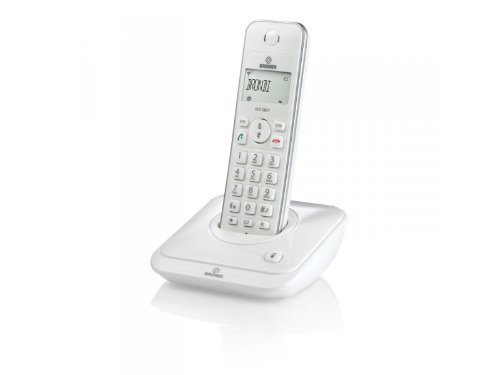
Figure 1: Brondi Sydney DECT Phone. This image shows the cordless handset resting on its charging base station.
1. Setup
1.1 Unpacking and Components
Carefully remove all items from the packaging. Ensure all components are present:
- Brondi Sydney Handset
- Brondi Sydney Base Station
- Power Adapter for Base Station
- Telephone Line Cord
- Rechargeable Batteries (AAA, quantity 2) (May be sold separately)
- User Manual (this document)
1.2 Battery Installation
Install the rechargeable batteries into the handset:
- Locate the battery compartment cover on the back of the handset.
- Slide the cover downwards or press the latch to open it.
- Insert the two AAA rechargeable batteries, observing the correct polarity (+ and -) as indicated inside the compartment.
- Replace the battery compartment cover, ensuring it clicks securely into place.
Figure 2: Battery installation. This image illustrates the correct way to insert batteries into the handset's battery compartment.
1.3 Base Station Connection
Connect the base station to power and the telephone line:
- Plug one end of the telephone line cord into the TEL LINE port on the base station.
- Plug the other end of the telephone line cord into your telephone wall jack.
- Connect the power adapter to the DC IN port on the base station.
- Plug the power adapter into a standard electrical outlet.
- Place the handset on the base station to charge. The charging indicator on the handset or base station should illuminate. Allow at least 12-15 hours for the initial charge.
Figure 3: Base station connections. This image shows the power adapter and telephone line cord connected to the base station ports.
1.4 Handset Registration (If Needed)
Your handset is usually pre-registered to the base station. If the handset displays "Unregistered" or similar, follow these steps:
- On the base station, press and hold the PAGE/LOCATE button for approximately 5 seconds until the registration indicator light flashes.
- On the handset, navigate to the MENU, then select REGISTRATION or REGISTER HANDSET.
- Enter the PIN (default is usually 0000 or 1234) and press OK.
- The handset will display "Registering..." and then "Registered" upon successful completion.
2. Operating Instructions
2.1 Making and Receiving Calls
To Make a Call:
- Press the TALK or GREEN button.
- Dial the desired phone number.
- Press TALK again or wait for the call to connect.
To Receive a Call:
- When the phone rings, press the TALK or GREEN button.
To End a Call:
- Press the END or RED button, or place the handset back on the base station.
2.2 Caller ID
If you subscribe to Caller ID service, the caller's number and name (if available) will be displayed on the handset screen before you answer the call. You can review past calls in the Caller ID log.
- To access the Caller ID log, press the CALL LOG or CID button.
- Use the UP/DOWN arrow keys to scroll through entries.
- To call back an entry, press the TALK button while the entry is displayed.
2.3 Phonebook (20 Entries)
Your Brondi Sydney phone can store up to 20 phonebook entries.
To Add an Entry:
- Press the MENU button.
- Select PHONEBOOK, then ADD NEW ENTRY.
- Enter the name using the alphanumeric keypad.
- Press OK.
- Enter the phone number.
- Press SAVE or OK.
To Dial from Phonebook:
- Press the PHONEBOOK button or navigate via MENU.
- Use the UP/DOWN arrow keys to find the desired entry.
- Press the TALK button to dial.
2.4 Volume Adjustment
During a call, press the UP/DOWN arrow keys on the handset to adjust the earpiece volume. To adjust the ringer volume, navigate to MENU > SETTINGS > RINGER VOLUME when the phone is idle.
3. Maintenance
3.1 Cleaning Instructions
To keep your Brondi Sydney phone in good condition:
- Wipe the handset and base station with a soft, damp cloth.
- Do not use harsh cleaning agents, abrasive cloths, or chemical solvents, as these can damage the surfaces.
- Ensure no liquid enters the openings of the device.
3.2 Battery Care
- Always use the supplied rechargeable batteries. Using non-rechargeable batteries can damage the handset.
- For optimal battery life, place the handset on the base station when not in use.
- If the phone will not be used for an extended period, remove the batteries to prevent leakage.
- Dispose of old batteries responsibly according to local regulations.
3.3 Storage
Store the phone in a cool, dry place away from direct sunlight and extreme temperatures when not in use for long periods.
4. Troubleshooting
If you encounter issues with your Brondi Sydney phone, refer to the table below for common problems and solutions.
| Problem | Possible Cause | Solution |
|---|---|---|
| No dial tone | Telephone line cord is disconnected. | Ensure the telephone line cord is securely plugged into the base station and the wall jack. |
| No dial tone | Base station power is off. | Check that the power adapter is securely connected to the base station and a working electrical outlet. |
| Handset displays "Unregistered" | Handset lost connection or was not registered. | Follow the handset registration steps in Section 1.4. |
| Poor sound quality / Static | Handset is too far from the base station. | Move closer to the base station. |
| Poor sound quality / Static | Interference from other electronic devices. | Move the base station away from other electronic devices (e.g., Wi-Fi routers, microwaves). |
| Handset not charging | Handset not properly seated on the base. | Ensure the handset is correctly placed on the base station and the charging contacts are clean. |
| Handset not charging | Batteries are depleted or faulty. | Allow sufficient charging time (12-15 hours for initial charge). If issues persist, replace with new rechargeable AAA batteries. |
5. Specifications
| Feature | Detail |
|---|---|
| Brand | Brondi |
| Model | SIDNEY_BIANCO |
| Type | DECT Cordless Telephone |
| Caller ID | Yes |
| Phonebook Entries | 20 |
| Model Year | 2012 |
| Dimensions (Package) | 18.2 x 14 x 7.2 cm |
| Weight (Package) | 479.99 g |
| Batteries Required | 2 x AAA Rechargeable (Not included in package, but required for operation) |
| ASIN | B009WRN180 |
6. Warranty and Support
6.1 Warranty Information
Brondi products are covered by a limited warranty. Please refer to the warranty card included in your product packaging or visit the official Brondi website for detailed warranty terms and conditions. Keep your proof of purchase for warranty claims.
6.2 Customer Support
For technical assistance, troubleshooting beyond this manual, or service inquiries, please contact Brondi customer support. Contact details can typically be found on the Brondi official website or on the product packaging.
- Online Support: Visit the official Brondi website.
- Telephone Support: Refer to your product packaging or Brondi's website for regional contact numbers.


