Introduction
Thank you for choosing the Morphy Richards 46610 Digital 3-in-1 Stainless Steel Kitchen Scale. This manual provides essential information for the safe and efficient operation, maintenance, and troubleshooting of your new kitchen scale. Please read these instructions thoroughly before first use and retain them for future reference.
Safety Information
- Always place the scale on a firm, flat, and stable surface.
- Do not immerse the scale in water or other liquids. Clean with a damp cloth only.
- Avoid dropping the scale or subjecting it to strong impacts, as this may damage the internal sensors.
- Do not overload the scale beyond its maximum capacity of 5 kg (1.5 liters for liquids).
- Keep the scale away from heat sources, direct sunlight, and extreme temperature changes.
- This appliance is for domestic use only.
Product Overview
The Morphy Richards 46610 Digital Kitchen Scale is designed for precise measurement of both dry and liquid ingredients. Its 3-in-1 design includes a stainless steel bowl for versatile use.
Key Features:
- Stainless steel platform and bowl.
- Maximum capacity: 5 kg (dry ingredients) / 1.5 liters (liquid ingredients).
- Measures in imperial and metric units (g, oz, ml, cup).
- Graduations: 1g / 1oz / 1ml.
- Easy-to-read LCD display.
- "Add & Weigh" (Tare/Zero) function for measuring multiple ingredients in one bowl.
- Liquid measurement function for water, milk, oil, and flour.

Figure 1: Morphy Richards 46610 Digital Kitchen Scale in use with ingredients.
Setup
- Unpacking: Carefully remove the scale and all accessories from the packaging. Retain packaging for future storage or transport.
- Power Source: Locate the battery compartment (usually on the underside of the scale). Insert the required batteries, ensuring correct polarity (+/-). Note: The product specifications indicate batteries are neither included nor required, which is unusual for a digital kitchen scale. Please check your specific model for power requirements (e.g., AAA batteries, button cell, or mains adapter).
- Placement: Place the scale on a hard, flat, and level surface to ensure accurate readings.
- Initial Use: Before first use, wipe the scale with a damp cloth.
Operating Instructions

Figure 2: Control panel and LCD display.
- Power On/Off:
- Press the ON/ZERO button to turn the scale on. The display will show "0" or "0.0".
- To turn off, press and hold the ON/ZERO button for a few seconds, or the scale will automatically shut off after a period of inactivity.
- Unit Conversion:
- With the scale on, press the UNIT button to cycle through available units: grams (g), ounces (oz), milliliters (ml), and cups.
- Select the desired unit before weighing.
- "Add & Weigh" (Tare/Zero) Function:
- Place an empty container (e.g., the stainless steel bowl) on the scale. The display will show its weight.
- Press the ON/ZERO button. The display will reset to "0".
- Add your first ingredient. The display will show its weight.
- To add another ingredient, press the ON/ZERO button again to reset the display to "0", then add the next ingredient. Repeat as needed.
- Liquid Measurement Function:
- Place an empty container on the scale and press ON/ZERO to tare.
- Press the MODE button to select the type of liquid you are measuring (Water, Milk, Oil, Flour). The scale will adjust its calculation based on the density of the selected liquid/ingredient.
- Add the liquid to the container. The display will show the volume.
Maintenance and Cleaning
- Cleaning: Wipe the scale body with a soft, damp cloth. Do not use abrasive cleaners or immerse the scale in water. The stainless steel bowl can be washed with warm soapy water.
- Storage: Store the scale in a clean, dry place when not in use.
- Battery Replacement: If the display shows a low battery indicator or becomes dim, replace the batteries according to the instructions in the "Setup" section.
Troubleshooting
| Problem | Possible Cause | Solution |
|---|---|---|
| Scale does not turn on. | Dead or incorrectly installed batteries. | Check battery polarity or replace batteries. |
| Inaccurate readings. | Scale not on a flat surface; overloaded; damaged sensor. | Ensure scale is on a level surface. Do not exceed 5 kg. If problem persists, contact support. |
| "Err" or "O-Ld" displayed. | Scale is overloaded. | Remove items immediately to prevent damage. Do not exceed 5 kg. |
| Display is dim or flickering. | Low battery power. | Replace batteries. |
Specifications
| Model Number | 46610 |
| Material | Stainless Steel |
| Maximum Capacity | 5 kg / 1.5 Liters |
| Graduation | 1g / 1oz / 1ml |
| Display Type | LCD |
| Dimensions (L x W x H) | 21.31 x 29.01 x 11.99 cm |
| Item Weight | 890 Grams |
| Measurement Precision | +/- 1% or better |
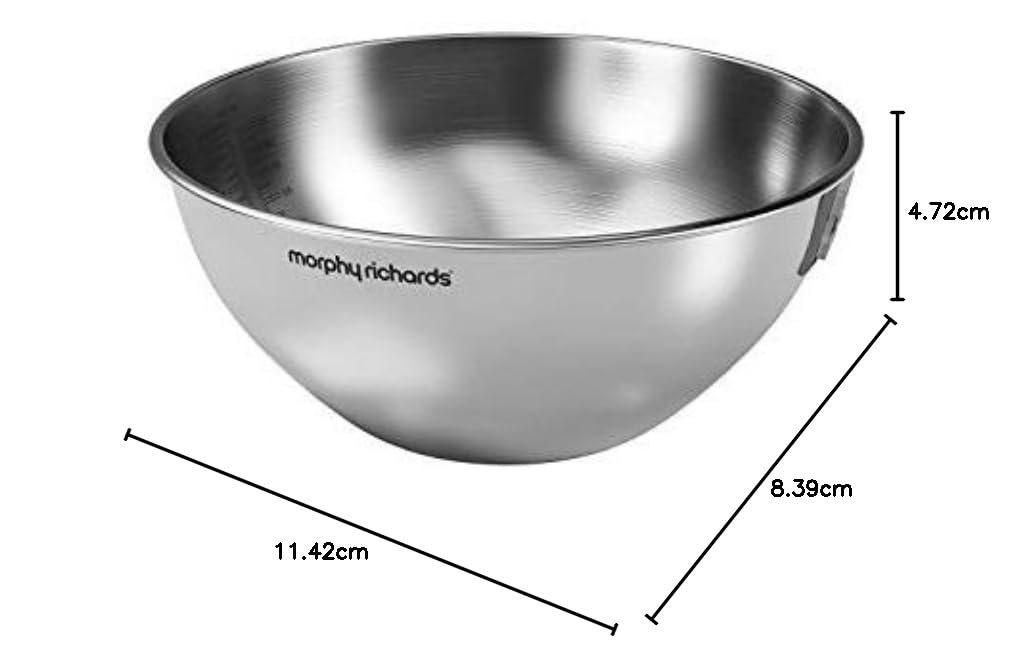
Figure 3: Dimensions of the stainless steel bowl.
Warranty and Support
For warranty information or technical support, please refer to the warranty card included with your product or contact Morphy Richards customer service directly. Keep your proof of purchase for any warranty claims.
For further assistance, please visit the official Morphy Richards website or contact their customer support line.


