
Introduction
This manual provides essential information for the safe and effective use of your Yamaha MX61 61-Key Keyboard Production Station. Please read this manual thoroughly to understand the features and functions of your instrument. Keep this manual in a safe place for future reference.
Safety Information
Always observe the following basic precautions to avoid the possibility of serious injury or even death from electrical shock, short-circuiting, damages, fire or other hazards.
- Power Supply: Use only the specified AC adaptor. Do not place the power cord near heat sources or bend it excessively.
- Location: Do not expose the instrument to rain, use it near water, or in damp or wet conditions. Avoid placing it in direct sunlight or near heat sources.
- Handling: Do not insert foreign objects into the instrument. Do not open the instrument or attempt to disassemble the internal parts.
- Ventilation: Ensure proper ventilation. Do not block the ventilation holes.
Setup
1. Unpacking
Carefully remove the MX61 from its packaging. Retain all packaging materials for future transport or storage. Verify that all included accessories are present.
2. Connecting Power
Connect the included AC power adapter to the DC IN jack on the rear panel of the MX61. Plug the other end of the adapter into a suitable AC outlet.
3. Connecting Audio Output
The MX61 does not have built-in speakers. To hear sound, connect the instrument to an external audio system (e.g., amplifier, powered speakers, or headphones).
- Line Output: Use standard 1/4-inch phone cables to connect the L/MONO and R OUTPUT jacks to your audio system's input.
- Headphones: Connect stereo headphones to the PHONES jack (3.5mm) for private monitoring.
4. Connecting to a Computer (USB)
The MX61 functions as a USB Audio/MIDI interface. Connect a standard USB cable from the USB TO HOST port on the MX61 to a USB port on your computer. Install necessary drivers if prompted by your operating system.

Figure 1: Front view of the Yamaha MX61 61-Key Keyboard Production Station. This image displays the full keyboard layout, including the 61 keys, pitch bend and modulation wheels on the left, and the main control panel with display screen on the right.
Operating the MX61
1. Power On/Off
Press the [POWER] switch located on the rear panel to turn the instrument on or off. Allow a few seconds for the system to boot up.
2. Sound Selection
The MX61 features over 1000 sounds derived from the MOTIF series. Sounds are organized into categories for easy access.
- Use the CATEGORY buttons (e.g., PIANO, KEYBOARD, ORGAN) to select a sound category.
- Use the [INC/YES] and [DEC/NO] buttons or the data dial to scroll through sounds within the selected category.

Figure 2: Close-up of the Yamaha MX61's sound category selection buttons. This image highlights the buttons for selecting different instrument categories like Piano, Keyboard, Organ, Guitar, Bass, Strings, Brass, Sax/Woodwind, and various synthesizer and percussion types.
3. Performance Mode (Split/Layer)
The Performance Mode allows you to combine multiple sounds (layers) or split the keyboard into different sound zones. This is ideal for creating rich, complex textures or playing different instruments with each hand.
- Press the [PERFORMANCE] button to enter Performance Mode.
- Use the [LAYER] button to stack sounds.
- Use the [SPLIT] button to divide the keyboard into different sound sections.
- Adjust parameters for each part using the dedicated controls and display.
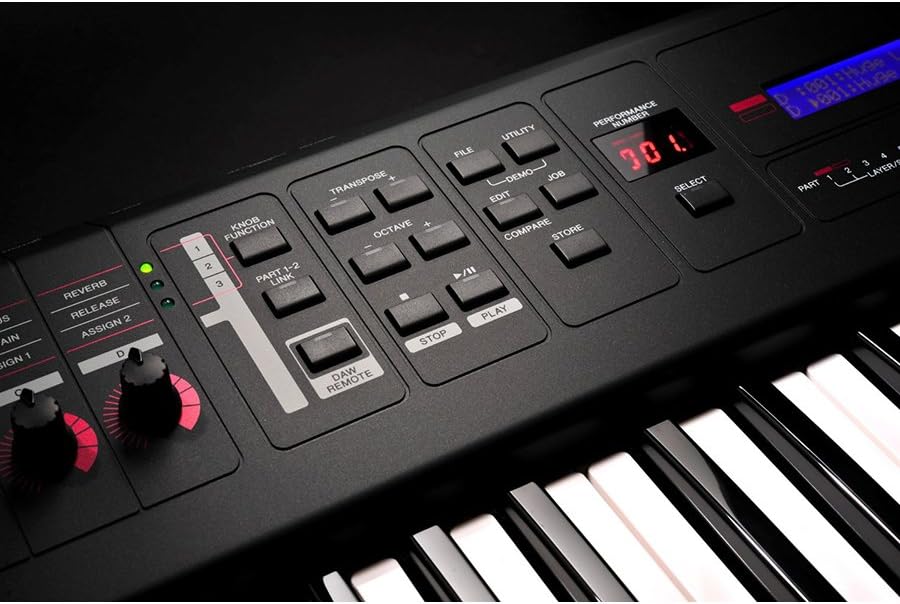
Figure 3: Detail of the Yamaha MX61's performance controls and display. This image shows the central control area with buttons for File, Utility, Performance Number, Transpose, Octave, and playback controls, along with the main LCD screen displaying performance information.
4. Effects (VCM)
The MX61 is equipped with Virtual Circuitry Modeling (VCM) effects, which accurately reproduce the sound of classic analog effects. These can be applied to individual sounds or entire performances.
- Access effect settings through the UTILITY menu.
- Adjust effect parameters using the assignable knobs on the left side of the control panel.
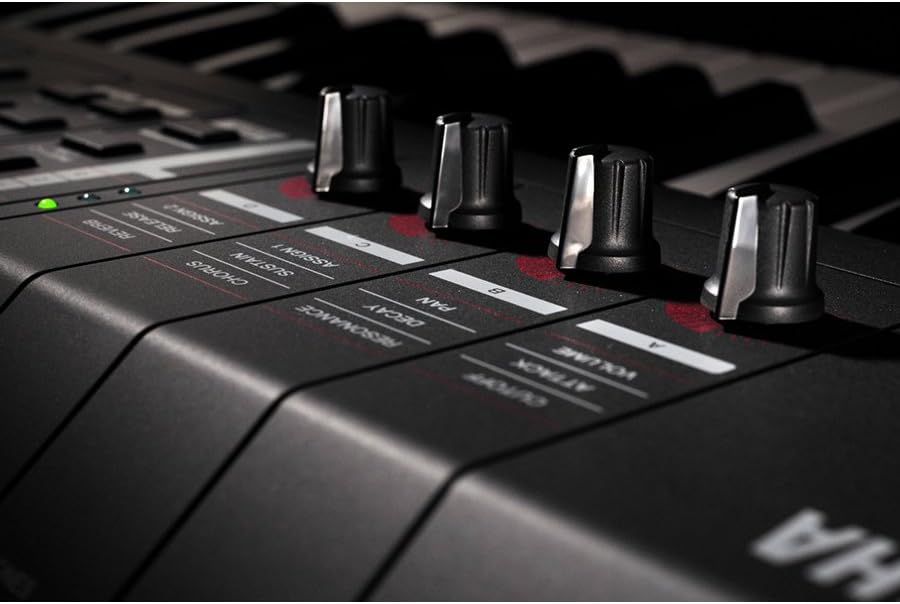
Figure 4: Close-up of the Yamaha MX61's assignable control knobs. This image focuses on the four rotary knobs and their associated labels (Cutoff, Resonance, Attack, Decay, Volume, Pan, Sustain, Chorus, Reverb, Release, Assign 1, Assign 2), used for real-time sound manipulation.
5. Music Production Software Integration
The MX61 includes a suite of music production software, such as Cubase AI. When connected via USB, the MX61 can act as a controller and audio interface for these applications, allowing for seamless recording and production.
- Install the included software on your computer.
- Configure the MX61 as your MIDI input and audio output device within the software settings.
Maintenance
Cleaning
Wipe the instrument with a soft, dry cloth. Do not use paint thinners, solvents, cleaning fluids, or chemical-impregnated wiping cloths. Avoid using excessive force when cleaning the keys or control surfaces.
Storage
When not in use for extended periods, disconnect the power adapter. Store the instrument in a cool, dry place away from direct sunlight and extreme temperatures. If possible, cover the instrument to protect it from dust.
Troubleshooting
- No Sound:
• Check if the power is on and the volume is turned up.
• Ensure headphones or external speakers are properly connected and their volume is adjusted.
• Verify that a sound is selected and not muted. - No MIDI/USB Connection:
• Ensure the USB cable is securely connected to both the MX61 and the computer.
• Check if the necessary drivers are installed on your computer.
• Verify MIDI/audio settings within your music software. - Distorted Sound:
• Reduce the volume level of the MX61 or the connected audio system.
• Check cable connections for damage or loose contacts.
Specifications
| Model Name | MX61 |
| Number of Keys | 61 |
| Sound Engine | AWM2 (Advanced Wave Memory 2) |
| Polyphony | 128 notes |
| Voices | Over 1000 MOTIF series voices |
| Effects | VCM effects, Reverb, Chorus |
| Connectivity | USB TO HOST, USB TO DEVICE, MIDI IN/OUT, LINE OUT (L/MONO, R), PHONES (3.5mm), FOOT CONTROLLER, SUSTAIN |
| Dimensions (W x D x H) | 44.72 x 15.39 x 8.22 inches (approx.) |
| Weight | 5.13 kg (11.31 lbs) |
| Power Supply | AC Adaptor (PA-150 or equivalent recommended by Yamaha) |
Warranty and Support
Warranty Information
The Yamaha MX61 comes with a 1-year warranty covering parts and labor from the date of purchase. Please retain your proof of purchase for warranty claims. This warranty covers manufacturing defects and does not cover damage caused by misuse, accidents, unauthorized modifications, or normal wear and tear.
Customer Support
For further assistance, technical support, or service inquiries, please visit the official Yamaha website or contact your local authorized Yamaha dealer. Online resources, including FAQs and driver downloads, are available on the Yamaha support pages.
Product Videos
No official product videos from the seller were found in the provided data.


