1. Introduction and Overview
The SMART1500LCDT SmartPro® LCD 120V 1500VA/900W Line-Interactive Uninterruptible Power Supply provides battery backup and AC power protection against blackouts, brownouts, power surges, and line noise. This UPS ensures connected equipment continues running long enough to save files and shut down safely during power disturbances.
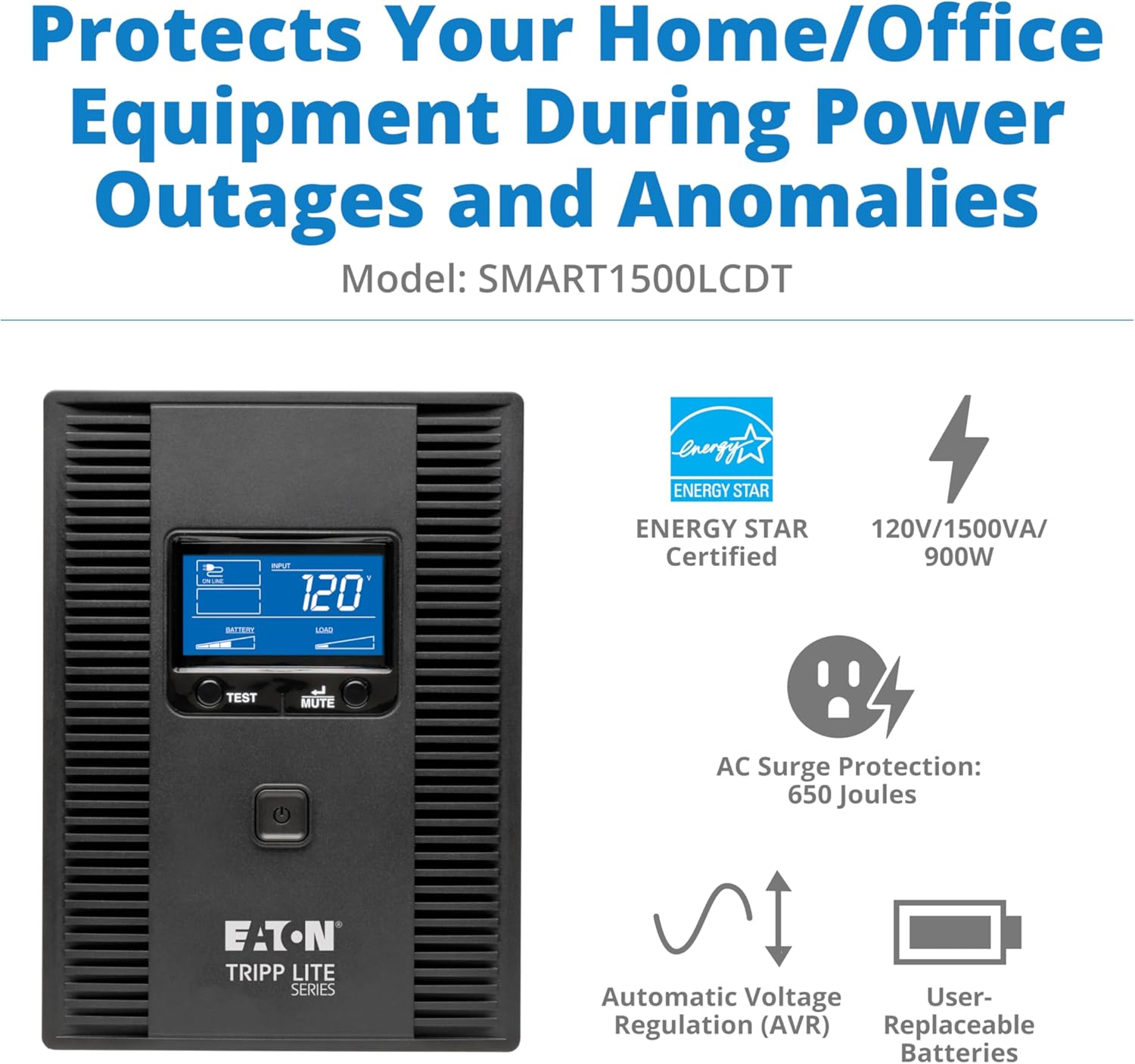
It features Automatic Voltage Regulation (AVR) to correct undervoltages and overvoltages without using battery power, EMI/RFI noise filtering, and 650 joules of surge suppression. The unit includes ten NEMA 5-15R outlets, with five providing UPS battery support and all ten offering surge protection.

Video 1.1: Overview of the Tripp Lite UPS with AVR. This video provides a general overview of the UPS unit's features and benefits for power protection.
2. Setup and Installation
Before connecting any equipment, ensure the UPS unit is placed in a well-ventilated area. Connect the UPS to a standard household outlet using its integrated 6-foot NEMA 5-15P extension cord.
2.1 Connecting Equipment
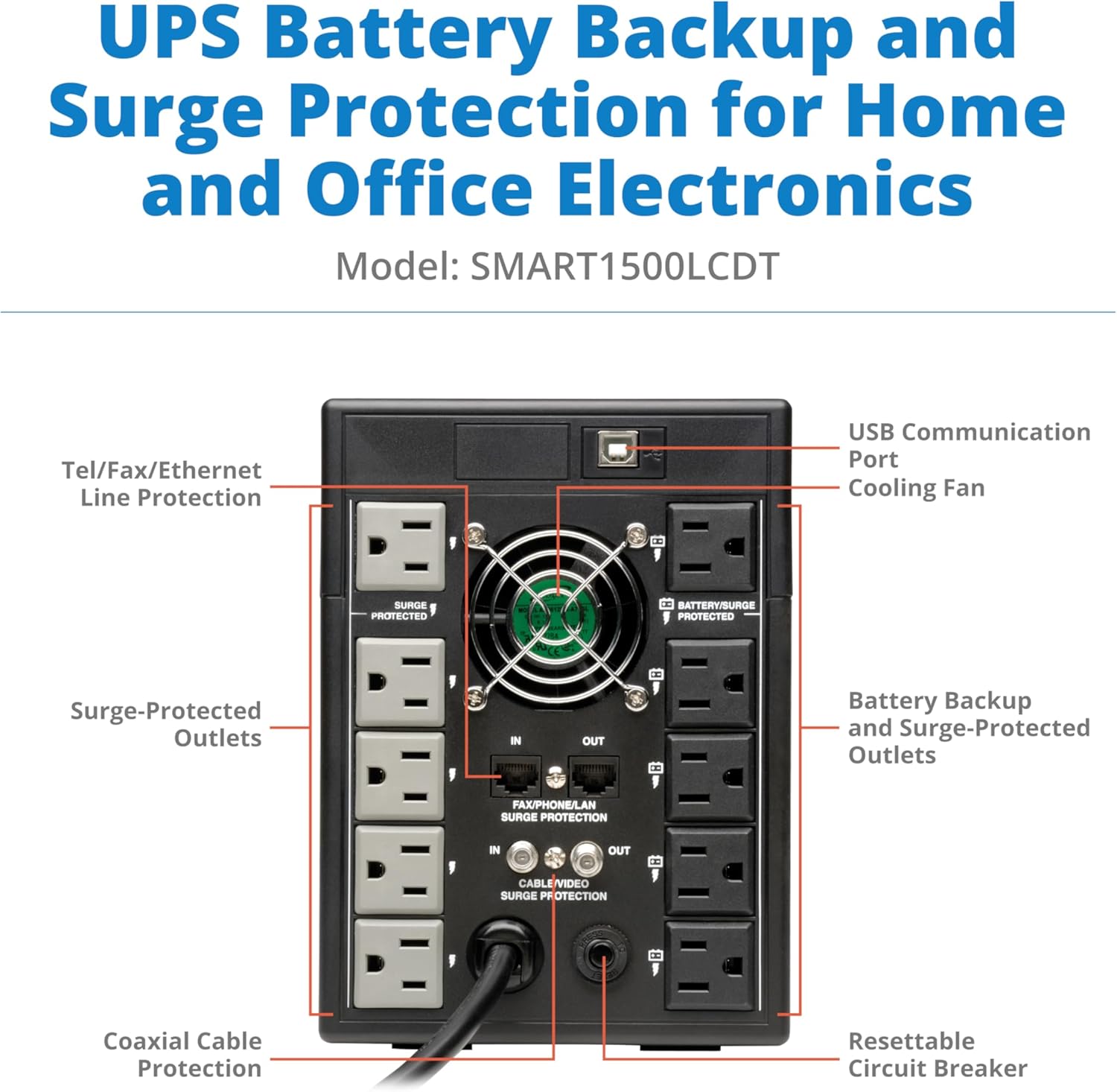
- Battery Backup & Surge Protected Outlets: Five NEMA 5-15R outlets provide both battery backup and surge protection. Connect critical equipment such as computers, monitors, network devices, and other peripherals that require continuous power during outages to these outlets.
- Surge-Protected Outlets: The remaining five NEMA 5-15R outlets offer surge protection only. Connect non-critical equipment that does not require battery backup but still needs protection from power surges to these outlets.
- USB Communication Port: Connect the UPS to your computer using the HID-compliant USB port. This enables data-saving unattended system shutdown in case of prolonged power failure when used with PowerAlert software (available via free download from tripplite.eaton.com/products/power-alert).
- Ethernet RJ45 Port Protection: The unit features 100 Mbps Ethernet RJ45 port protection to safeguard network connections from surges.
- Telephone/DSL RJ11 Port Dataline Protection: Protect telephone or DSL lines from power surges.

3. Operating Instructions
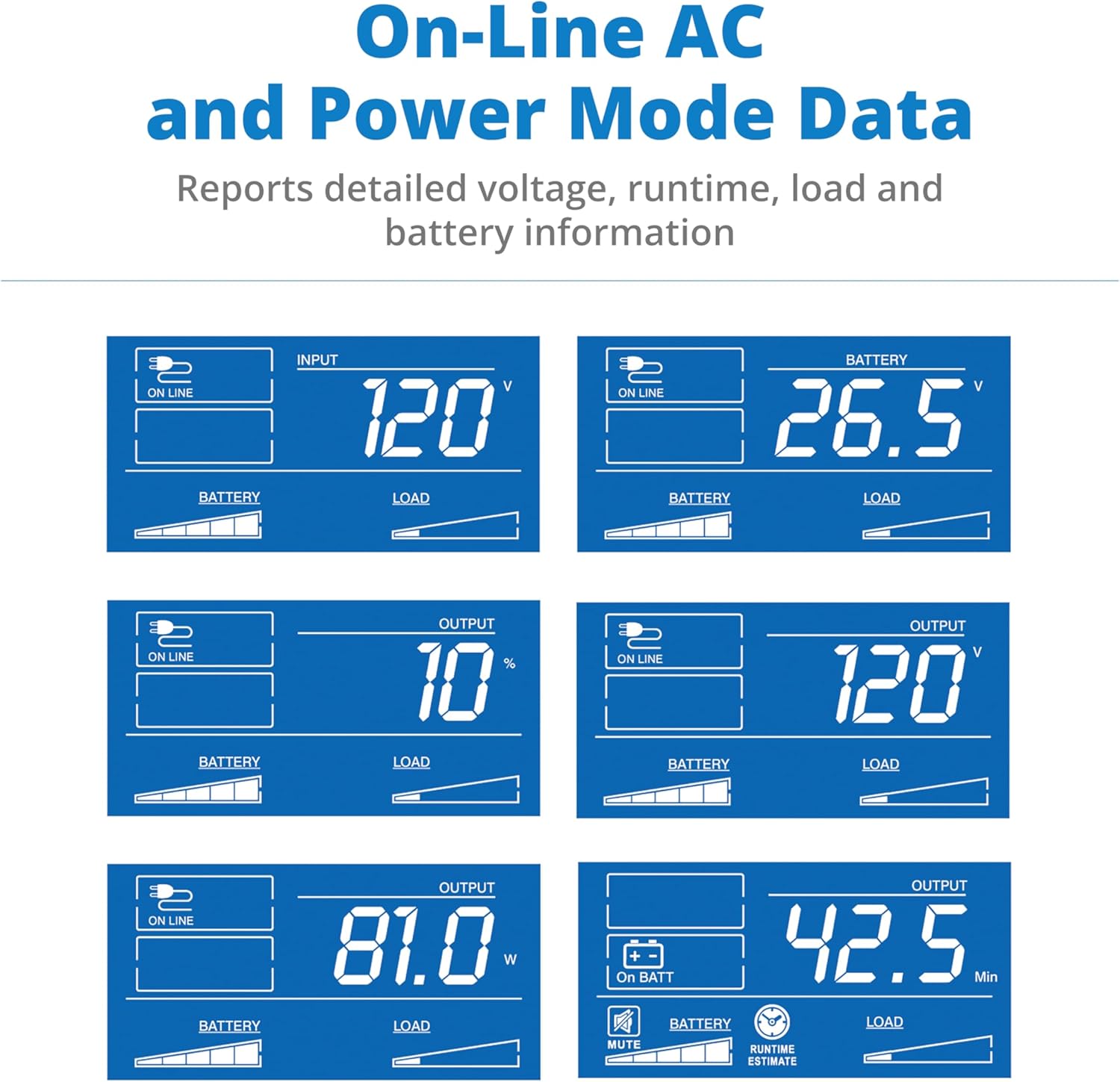
The SMART1500LCDT features an easy-to-read LCD screen that displays UPS modes and operating conditions, providing real-time information about your power status.
3.1 LCD Display and Controls
- Input Voltage: Displays the current incoming AC voltage.
- Output Voltage: Shows the voltage supplied by the UPS to connected equipment.
- Load Percentage/Watts: Indicates the percentage or wattage of the UPS's capacity currently being used by connected equipment.
- Battery Level: Shows the current charge level of the internal batteries.
- Estimated Runtime: Provides an estimate of how long the UPS can supply power on battery, based on the current load.
- Overload Indicator: Alerts if the connected load exceeds the UPS's capacity.
- AVR Indicator: Shows when Automatic Voltage Regulation is active.
- Test Button: Initiates a self-test of the UPS and its batteries.
- Mute/Select Button: Used to silence alarms or cycle through display information.

4. Maintenance
4.1 Battery Replacement
The internal batteries of the SMART1500LCDT are user-replaceable. The unit requires two Tripp Lite RBC51 battery cartridges. Refer to the detailed instructions in the full user manual for safe and proper battery replacement procedures. Always ensure the UPS is powered off and disconnected from the AC power source before attempting battery replacement.

5. Troubleshooting
For common issues such as unexpected shutdowns, continuous beeping, or incorrect display readings, consult the full user manual for detailed troubleshooting steps. Ensure all connections are secure and that the connected load does not exceed the UPS's capacity. If the unit is making unusual noises, verify proper ventilation and ensure no internal components are obstructed.
6. Specifications
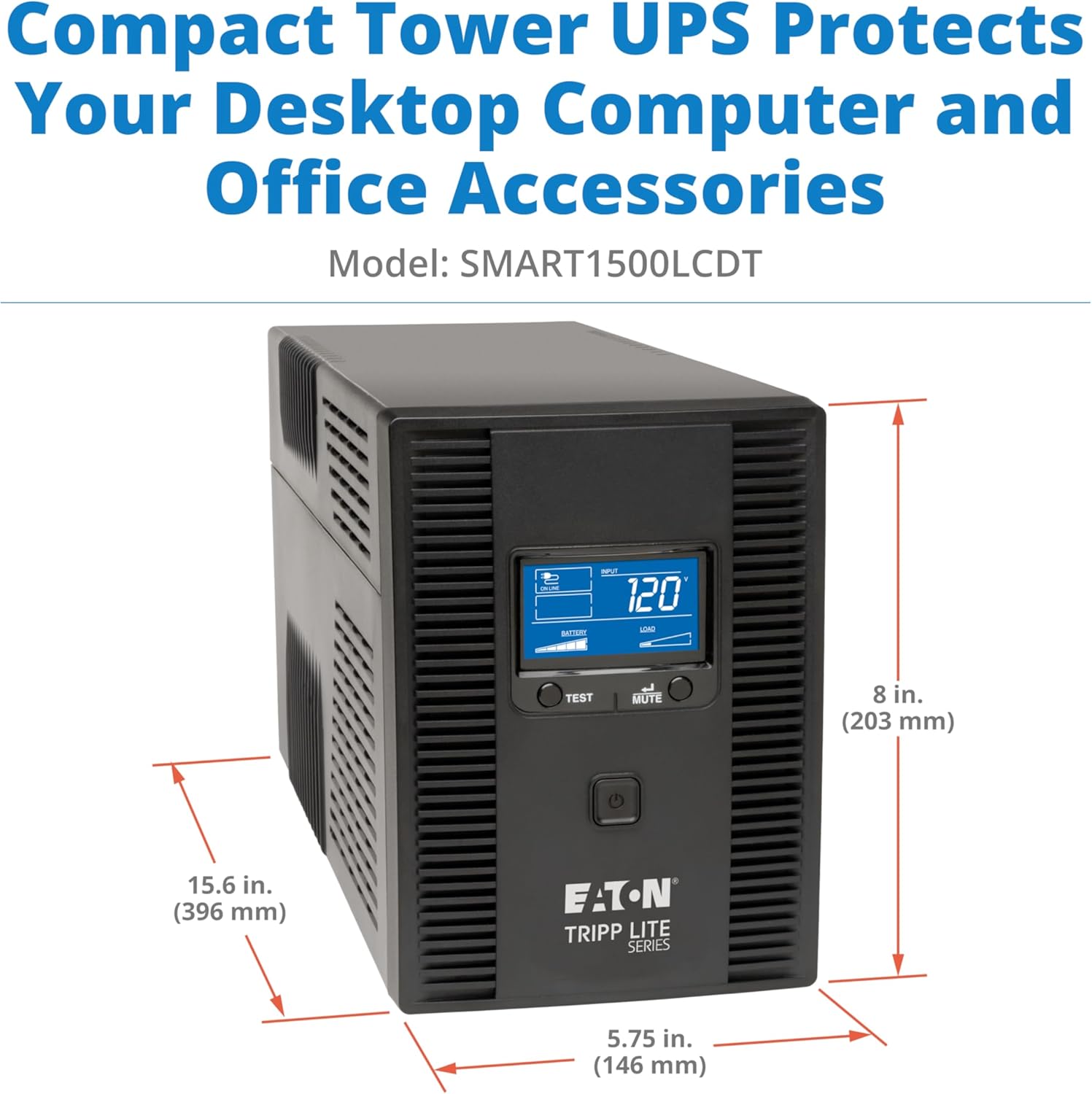
- Product Dimensions: 15.4"D x 5.75"W x 8"H (396 mm D x 146 mm W x 203 mm H)
- Item Weight: 27.3 pounds
- Item Model Number: SMART1500LCDT
- Batteries: 2 x 12V Lead Acid batteries (included, user-replaceable)
- Voltage: 120 Volts
- Color: Black
- Manufacturer: Tripp Lite
- Capacity: 1500VA / 900W
- Outlets: 10 NEMA 5-15R (5 battery backup + surge, 5 surge only)
- Surge Suppression: 650 Joules
- Automatic Voltage Regulation (AVR): Corrects undervoltages as low as 92V and overvoltages as high as 150V.
7. Runtime Examples
The following are example runtimes for various devices connected to the SMART1500LCDT UPS. Actual runtime may vary depending on load, battery age, and environmental factors.
- Wi-Fi router (20W): 276 minutes
- Office PC and monitor (100W): 67 minutes
- Gaming console (150W): 42 minutes
- Network closet server (200W): 31 minutes
- Home theater system (350W): 16 minutes
- Gaming PC (500W): 9 minutes
- Small server room equipment (750W): 5.1 minutes

8. What's in the Box
The product package includes the following items:
- SMART1500LCDT UPS Unit
- USB Cabling
- Manual with Warranty Information

9. Warranty and Support
The SMART1500LCDT is protected by a 3-Year Limited Manufacturer's Warranty and a $250,000 Ultimate Connected Equipment Insurance. For technical assistance or any concerns, Eaton's expert technical team is available via phone, web, or email.


