1. Introduction
This user manual provides comprehensive instructions for the RM Series Replacement Remote Control, designed specifically for TOSHIBA 22L1334G television models. This remote offers a direct replacement solution, ensuring seamless operation with your compatible Toshiba TV. Please read this manual carefully to ensure proper setup and optimal performance.
2. Product Overview
The RM Series Replacement Remote Control is an ergonomic, infrared-based device designed for intuitive control of your Toshiba television. It features a standard button layout for easy navigation and function access.
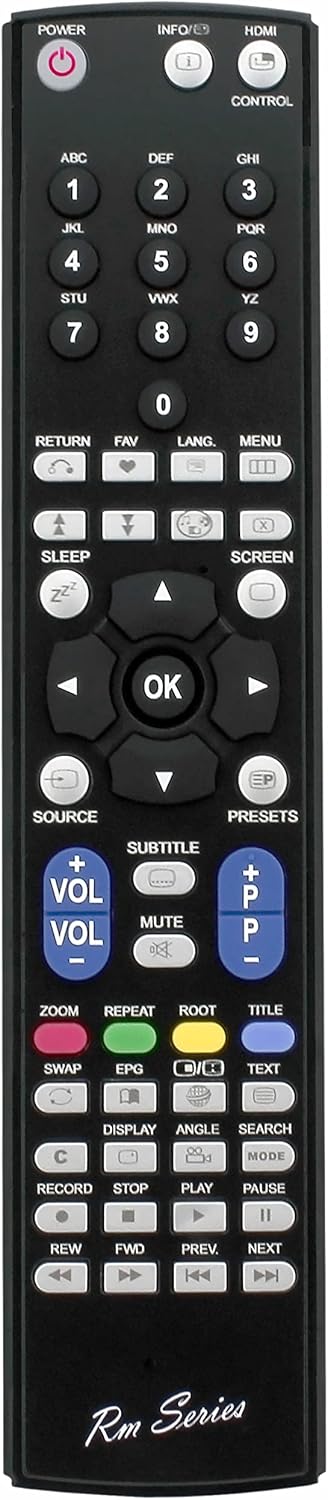
Figure 2.1: Front view of the RM Series Replacement Remote Control, showing all buttons including power, number pad, navigation, volume, and channel controls.

Figure 2.2: Angled view of the remote control, highlighting its ergonomic design and button layout from a side perspective.

Figure 2.3: A different angled view, providing another perspective of the remote's form factor and button arrangement.

Figure 2.4: Rear view of the remote control, showing the open battery compartment and the battery cover detached.
3. Setup
3.1 Battery Installation
The remote control requires two (2) AAA batteries (not included) for operation. Follow these steps to install the batteries:
- Locate the battery compartment on the back of the remote control.
- Slide the battery cover downwards and lift it off.
- Insert two AAA batteries, ensuring the positive (+) and negative (-) terminals align correctly with the markings inside the compartment.
- Replace the battery cover by sliding it back into place until it clicks securely.
Note: Always use new batteries and replace both batteries at the same time. Do not mix old and new batteries, or different types of batteries.
4. Operating Instructions
This replacement remote control is pre-programmed to work with your TOSHIBA 22L1334G television. No additional programming is required. Simply point the remote control directly at your TV's infrared receiver.
4.1 Basic Functions
- Power (●): Turns the TV on or off.
- Number Buttons (0-9): Directly select channels.
- Volume Up/Down (VOL +/-): Adjusts the sound volume.
- Channel Up/Down (CH +/-): Changes the TV channel.
- Mute (🔇): Mutes or unmutes the TV sound.
- Navigation Buttons (▲ ▼ ◀ ▶): Navigate through menus and options.
- OK: Confirms selections in menus.
- Menu: Opens the TV's main menu.
- Source: Selects input sources (HDMI, AV, etc.).
- Return/Exit: Returns to the previous screen or exits a menu.
- Playback Controls (Play, Pause, Stop, Rewind, Fast Forward): Control media playback if supported by your TV.
Refer to your Toshiba TV's original user manual for specific functions and menu navigation details.
5. Maintenance
5.1 Cleaning the Remote Control
To maintain the remote control's appearance and functionality:
- Wipe the surface with a soft, dry cloth.
- For stubborn dirt, slightly dampen the cloth with water or a mild, non-abrasive cleaner.
- Do not use harsh chemicals, abrasive cleaners, or spray liquids directly onto the remote.
5.2 Battery Replacement
Replace batteries when the remote control's response becomes sluggish or stops working. Follow the battery installation steps in Section 3.1. Dispose of used batteries responsibly according to local regulations.
6. Troubleshooting
- Remote control not working:
- Ensure batteries are inserted correctly with the correct polarity (+/-).
- Replace old batteries with new ones.
- Check for any obstructions between the remote control and the TV's infrared receiver.
- Ensure you are within the maximum operating range (up to 10 meters).
- Limited range or intermittent response:
- Replace batteries.
- Ensure there are no strong light sources (e.g., direct sunlight, fluorescent lights) interfering with the infrared signal.
7. Specifications
| Brand | RM-Series |
| Model Number | 22L1334G |
| Product Dimensions | 22.7 x 5 x 2.4 cm |
| Item Weight | 86.18 g (0.19 Pounds) |
| Connectivity Technology | Infrared |
| Controller Type | Button Control |
| Maximum Range | 10 Metres |
| Special Feature | Ergonomic |
8. Warranty and Support
Specific warranty information for this RM Series Replacement Remote Control is not provided in this manual. For details regarding warranty coverage, returns, or technical support, please contact the seller or retailer from whom you purchased the product. You may also refer to the product listing on the retailer's website for additional information.
For general inquiries or assistance, please visit the RM-Series brand page or contact their customer service if available.


