
1. Introduction
This manual provides comprehensive instructions for the installation, operation, and maintenance of the Phoenix P-ZB Meter Profile. Please read this manual thoroughly before using the product to ensure safe and efficient operation.
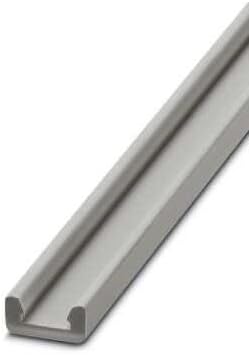
Figure 1: Phoenix P-ZB Meter Profile. This image displays the grey, elongated rail designed for mounting various electrical and electronic components.
2. Safety Information
Always observe the following safety precautions to prevent injury or damage to the product:
- Ensure all power is disconnected before installation or maintenance.
- Only qualified personnel should perform installation and wiring.
- Do not expose the profile to extreme temperatures or corrosive environments.
- Verify that the mounting surface is stable and capable of supporting the profile and mounted components.
3. Setup
3.1 Unpacking
Carefully unpack the P-ZB Meter Profile and inspect it for any signs of damage. Retain the packaging for future transport or storage.
- Remove the profile from its protective packaging.
- Check for any visible defects or missing parts.
- Confirm that the product matches the model number on your order.
3.2 Installation
The P-ZB Meter Profile is designed for secure mounting of various components. Follow these steps for proper installation:
- Select a suitable, flat, and stable mounting surface.
- Mark the drilling points according to the profile's mounting holes.
- Drill pilot holes if necessary, ensuring appropriate drill bit size for your fasteners.
- Secure the profile to the surface using appropriate screws or fasteners (not included). Ensure it is level and firmly attached.
- Mount your desired components onto the profile following their respective installation guides.
4. Operating
The Phoenix P-ZB Meter Profile is a passive mounting component. Its operation is directly tied to the components mounted upon it. Ensure all mounted devices are correctly installed and functioning according to their individual specifications.
5. Maintenance
The P-ZB Meter Profile requires minimal maintenance. Regular inspection will ensure its longevity and proper function.
- Periodically check all mounting screws for tightness.
- Clean the profile with a dry, soft cloth. Avoid abrasive cleaners or solvents.
- Inspect for any signs of corrosion or physical damage. Replace if significant damage is observed.
6. Troubleshooting
This section addresses common issues that may arise with the P-ZB Meter Profile.
| Problem | Possible Cause | Solution |
|---|---|---|
| Profile feels loose after installation. | Mounting screws are not tight enough or incorrect fasteners used. | Tighten all mounting screws. Ensure appropriate fasteners are used for the mounting surface. |
| Components do not fit securely on the profile. | Incompatible components or incorrect mounting technique. | Verify component compatibility with P-ZB profile. Refer to component's installation guide. |
7. Specifications
Key technical specifications for the Phoenix P-ZB Meter Profile:
| Feature | Detail |
|---|---|
| Manufacturer | Phoenix |
| Part Number | 1051854 |
| Package Dimensions | 100 x 4 x 0.11 cm |
| Item Weight | 40 g |
| Model Number | p-zb metro |
| Number of Items in Package | 1 |
| Batteries Required? | No |
| ASIN | B009RNBJ88 |
| First Available Date | October 30, 2022 |
8. Warranty and Support
This Phoenix product is manufactured to high quality standards. For specific warranty terms and conditions, please refer to the documentation provided with your purchase or visit the official Phoenix Contact website.
For technical support or inquiries, please contact Phoenix Contact customer service through their official channels. Provide your product model number (P-ZB Metro) and part number (1051854) when seeking assistance.


