
1. Introduction
This manual provides detailed instructions for the safe and effective installation, operation, and maintenance of the ICM Controls ICM280C OEM Furnace Control Board. This board is designed as a direct replacement for specific Goodman furnace models, ensuring proper control of the furnace's fan and other critical functions. Please read this manual thoroughly before proceeding with installation or operation.
2. Safety Information
WARNING: Improper installation, adjustment, alteration, service, or maintenance can cause property damage, injury, or death. Read these instructions thoroughly before installing or servicing this equipment.
- Always disconnect all power to the furnace unit before installing or servicing the control board. Failure to do so can result in electrical shock, fire, or death.
- Installation and servicing must be performed by a qualified installer or service agency.
- Ensure all wiring connections are secure and comply with local and national electrical codes.
- Do not operate the furnace with damaged wiring or components.
- Wear appropriate personal protective equipment (PPE) such as safety glasses and gloves during installation.
3. Product Overview
The ICM Controls ICM280C is an Original Equipment Manufacturer (OEM) replacement control board specifically designed for Goodman furnace systems. It manages the operational sequence of the furnace, including ignition, fan control, and safety monitoring. This board ensures reliable and efficient performance of your heating system.
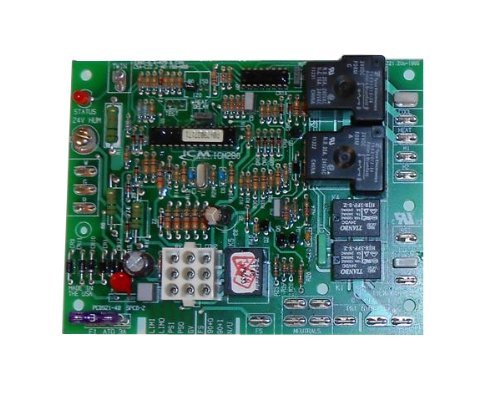
Figure 1: ICM Controls ICM280C OEM Furnace Control Board. This image shows the front view of the control board with various terminals and components.
4. Setup and Installation
This section outlines the steps for safely replacing your existing furnace control board with the ICM Controls ICM280C.
4.1. Pre-Installation Checks
- Verify that the ICM280C board is the correct replacement for your specific Goodman furnace model. Refer to your furnace's documentation.
- Gather necessary tools: screwdriver set, wire strippers, multimeter (optional for diagnostics), and safety glasses.
- Take clear photographs of the existing wiring connections on your old control board before disconnecting anything. This will serve as a crucial reference during re-installation.
4.2. Installation Procedure
- Disconnect Power: Locate the main power switch for your furnace and turn it OFF. Additionally, turn off the circuit breaker supplying power to the furnace at your electrical panel. Verify power is off using a multimeter if available.
- Access Control Board: Open the furnace access panel(s) to expose the existing control board.
- Disconnect Wiring: Carefully disconnect all wires from the old control board. Refer to your photographs taken in step 4.1. Ensure each wire is noted for its original connection point.
- Remove Old Board: Unscrew or unclip the old control board from its mounting brackets.
- Install New Board: Position the ICM Controls ICM280C board in the same location as the old board and secure it using the original screws or clips.
- Reconnect Wiring: Carefully reconnect all wires to the corresponding terminals on the new ICM280C board. Use your photographs as a guide. Double-check every connection for accuracy and tightness.
- Close Access Panels: Once all wiring is secure and verified, close and secure the furnace access panel(s).
- Restore Power: Turn on the circuit breaker for the furnace, then turn on the main power switch for the furnace unit.
5. Operating Instructions
After successful installation and power restoration, the ICM Controls ICM280C board will initiate the furnace's normal operating sequence. The board is designed to automatically manage the furnace's functions based on thermostat calls for heat or fan operation.
- Initial Power-Up: Upon first power-up, the board will perform a self-diagnostic check. Refer to your furnace's specific manual for expected diagnostic LED patterns (if applicable) during this phase.
- Normal Operation: When the thermostat calls for heat, the control board will sequence the ignition process, monitor flame presence, and activate the circulating fan at the appropriate time. When the thermostat calls for fan-only operation, the board will activate the fan.
- Safety Features: The board continuously monitors various safety sensors within the furnace. If a fault is detected (e.g., overheating, flame failure), the board will shut down the furnace and typically display a diagnostic code via an LED.
6. Maintenance
The ICM Controls ICM280C Furnace Control Board is a sealed electronic component and generally requires no routine maintenance. However, it is recommended to:
- Ensure the furnace area remains clean and free of dust and debris, which can accumulate on electronic components over time.
- During annual furnace servicing by a qualified technician, the control board and its connections should be visually inspected for any signs of wear, corrosion, or damage.
- Do not attempt to clean the board with liquids or abrasive materials.
7. Troubleshooting
If your furnace is not operating correctly after installing the ICM280C board, consider the following troubleshooting steps. Always disconnect power before inspecting internal components.
- No Power to Furnace:
- Check if the furnace power switch is ON.
- Check if the circuit breaker for the furnace is tripped.
- Verify all main power connections to the control board are secure.
- Furnace Not Igniting / No Heat:
- Ensure the thermostat is set to "Heat" and the temperature is above the ambient room temperature.
- Check for diagnostic fault codes displayed by an LED on the control board. Refer to your furnace's specific manual for the meaning of these codes.
- Verify gas supply is on.
- Fan Not Operating Correctly:
- If the fan runs continuously, check the thermostat setting (e.g., "Fan ON" instead of "Auto").
- If the fan does not run when it should, check for diagnostic codes.
- Ensure all fan motor wiring connections to the control board are secure.
- General Malfunction: If the board displays a persistent fault code or the furnace exhibits unusual behavior, it may indicate a more complex issue. In such cases, it is strongly recommended to contact a qualified HVAC technician for diagnosis and repair.
8. Specifications
| Part Number | ICM:280-C |
| Model | ICM280C |
| Compatibility | OEM replacement for Goodman furnace control boards |
| ASIN | B009PAX89G |
| Item Package Quantity | 1 |
| Date First Available | October 30, 2012 |
9. Warranty and Support
For specific warranty information regarding the ICM Controls ICM280C OEM Furnace Control Board, please refer to the documentation provided with your purchase or contact ICM Controls directly. Warranty terms typically cover manufacturing defects for a specified period.
For technical support or further assistance, please contact the retailer from whom the product was purchased or visit the official ICM Controls website for their customer support resources.


