
Bajaj ICX6 WOV Plus
Bajaj Majesty ICX 6 WOV Plus 1600-Watt Induction Cooktop User Manual
Model: ICX6 WOV Plus
Introduction
Thank you for choosing the Bajaj Majesty ICX 6 WOV Plus 1600-Watt Induction Cooktop. This manual provides essential information for the safe and efficient operation, maintenance, and troubleshooting of your new appliance. Please read it thoroughly before use and keep it for future reference.
Important Safety Instructions
WARNING: To reduce the risk of fire, electric shock, or injury, read and understand all instructions before using this appliance.
- Do not touch the ceramic plate immediately after cooking, as it may still be hot. Allow it to cool down completely.
- Ensure the cooktop is placed on a stable, flat, and heat-resistant surface.
- Do not immerse the appliance, cord, or plug in water or other liquids.
- Keep children away from the appliance during operation and when it is cooling down.
- Use only induction-compatible cookware.
- Do not operate the appliance if the power cord or plug is damaged, or if the appliance malfunctions or has been damaged in any manner.
- Ensure proper ventilation around the cooktop during use.
Product Overview
The Bajaj Majesty ICX 6 WOV Plus is a 1600-watt induction cooktop designed for efficient and safe cooking. It features a sleek black ceramic plate with gold accents and an intuitive control panel.
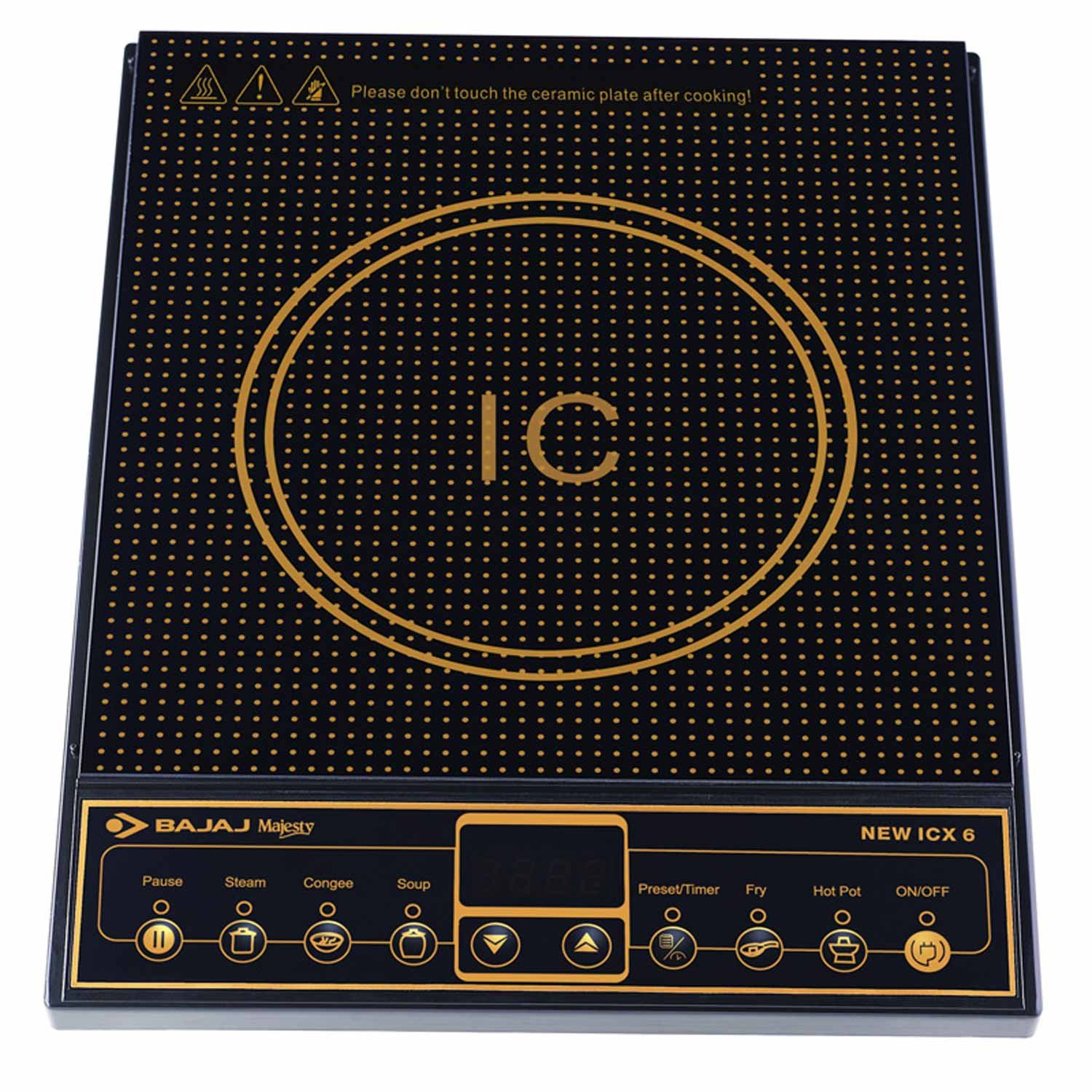
Figure 1: Bajaj Majesty ICX 6 WOV Plus Induction Cooktop. This image shows the top view of the induction cooktop, highlighting its black ceramic cooking surface with a central induction coil marked 'IC' in gold. The lower part displays the control panel with various touch buttons for functions like Pause, Steam, Congee, Soup, Preset/Timer, Fry, Hot Pot, and ON/OFF, along with up/down arrow controls and a digital display.
Key Features
- 1600 Watts of power for fast cooking.
- 5 preset menus for various cooking needs (e.g., Steam, Congee, Soup, Fry, Hot Pot).
- Keep warm mode to maintain food temperature.
- Tactile switch controls for easy operation.
- Flame-free and fume-free cooking.
- Automatic shut-off if no vessel is detected for 1 minute.
Setup and Installation
- Unpacking: Carefully remove the induction cooktop from its packaging. Retain packaging materials for future transport or storage.
- Placement: Place the cooktop on a dry, stable, and level surface. Ensure there is adequate space around the unit for ventilation (at least 10 cm from walls or other appliances).
- Power Connection: Plug the power cord into a grounded electrical outlet with the correct voltage (220-240V, 50Hz).
- Initial Cleaning: Before first use, wipe the ceramic surface with a soft, damp cloth.
Operating Your Induction Cooktop
Control Panel Overview
The control panel features various touch-sensitive buttons and a digital display. Refer to Figure 1 for visual identification.
- ON/OFF: Powers the unit on or off.
- Pause: Temporarily stops cooking and resumes with another press.
- Preset/Timer: Activates the timer function or cycles through preset cooking modes.
- Up/Down Arrows: Adjusts temperature, wattage, or timer settings.
- Steam, Congee, Soup, Fry, Hot Pot: Dedicated buttons for specific preset cooking functions.
Basic Operation
- Place an induction-compatible cooking vessel centrally on the ceramic plate.
- Plug in the cooktop. The unit will beep once, and the display will show '----'.
- Press the ON/OFF button to turn on the cooktop. The display will show '0000'.
- Select a cooking function:
- Manual Mode: Press the Preset/Timer button to cycle through power levels or temperature settings, then use the Up/Down Arrows to adjust.
- Preset Menu: Press one of the dedicated preset buttons (e.g., Steam, Fry). The cooktop will automatically set the appropriate power and time.
- To stop cooking, press the ON/OFF button.
Keep Warm Mode
After some cooking functions, the cooktop may automatically switch to a 'Keep Warm' mode to maintain the food's temperature. This feature can also be selected manually if available through the preset options.
Auto Shut-off
For safety and energy saving, the cooktop will automatically shut off if no suitable cooking vessel is detected on the ceramic plate for approximately 1 minute after being turned on or during operation.
Care and Maintenance
- Always unplug the cooktop and allow it to cool completely before cleaning.
- Wipe the ceramic surface with a soft, damp cloth and mild detergent. For stubborn stains, use a non-abrasive ceramic cooktop cleaner.
- Clean the control panel with a soft, dry cloth. Do not use abrasive cleaners or scourers.
- Ensure the ventilation openings are clear of dust and debris.
- Do not immerse the cooktop in water or spray liquids directly onto it.
Troubleshooting Guide
If you encounter an issue with your Bajaj Majesty ICX 6 WOV Plus Induction Cooktop, refer to the table below for common error codes and solutions.
| Error Code | Reason | Actionable Solution |
|---|---|---|
| E1 | Unsuitable pot on the plate | Replace with induction-suitable cookware. |
| E2 | IGBT temperature sensor open | Please contact Bajaj customer care. |
| E3 | Abnormal supply voltage (more than 280V) | Switch on the unit after power supply returns to normal. |
| E4 | Temperature sensor underplate open | Switch on the unit after power supply returns to normal. |
| E5 | Temperature under the pot is too high | Please contact Bajaj customer care. |
| E6 | Temperature of Induction too high | Wait for a few minutes before the temperature cools down. |
| E0 | Circuit of PCB is abnormal | Please contact Bajaj customer care. |
Technical Specifications
- Model: ICX6 WOV Plus
- Power: 1600 Watts
- Heating Elements: 1 (Induction Zone)
- Controls Type: Tactile Switch
- Special Features: 5 Preset Menus, Keep Warm Mode, Auto Shut-off
- Item Weight: Approximately 4.67 Pounds
- Included Components: 1 Induction Cooktop Unit
Warranty and Customer Support
This Bajaj Majesty Induction Cooktop comes with a 2-year warranty on the product from the date of purchase.
For any service, support, or queries regarding your product, please contact Bajaj customer care:
- Customer Service Number: 18001025963
Ask a question about this manual
Ask about setup, troubleshooting, compatibility, parts, safety, or missing instructions. Manuals+ will review the question and use this page’s manual context to help answer it.