
1. Introduction
Thank you for purchasing the Absolute USA PRO US15MP3 Portable Amplified Speaker. This manual provides essential information for the safe and efficient operation of your speaker. Please read it thoroughly before use and retain it for future reference.
2. Important Safety Instructions
- Power Source: Connect the speaker only to an AC power source as specified in the specifications section.
- Ventilation: Ensure proper ventilation around the speaker. Do not block any ventilation openings.
- Water and Moisture: Do not expose the speaker to rain, moisture, or any liquids.
- Heat Sources: Keep the speaker away from heat sources such as radiators, heat registers, stoves, or other apparatus that produce heat.
- Cleaning: Unplug the speaker from the power outlet before cleaning. Use a dry cloth only.
- Servicing: Do not attempt to service this product yourself. Refer all servicing to qualified service personnel.
- Placement: Place the speaker on a stable, flat surface. Avoid placing it in direct sunlight or near strong magnetic fields.
3. Package Contents
Verify that all items listed below are included in your package:
- Absolute USA PRO US15MP3 Portable Amplified Speaker
- Power Cable
- Remote Control
- User Manual (this document)
4. Product Features
The Absolute USA PRO US15MP3 speaker offers the following key features:
- 2-Way 15-Inch Portable Active PA Speaker
- Integrated MP3 Player with Built-in LCD Display
- SD Card Slot for media playback
- USB Connection Ready for media playback
- Equalizer (EQ) with Bass and Treble Level Controller
- 1-Inch Titanium Dome Horn Driver

Figure 4.1: Front view of the Absolute USA PRO US15MP3 Portable Amplified Speaker. This image shows the main speaker grille and the overall cabinet design.
5. Setup
5.1 Unpacking and Placement
- Carefully remove the speaker from its packaging. Retain the packaging for future transport or storage.
- Place the speaker on a stable, level surface. Ensure there is adequate space around the unit for ventilation.

Figure 5.1: The Absolute USA PRO US15MP3 speaker shown in its retail packaging. This image illustrates how the product is presented when new.
5.2 Power Connection
- Locate the power input on the rear panel of the speaker.
- Connect the provided power cable to the speaker's power input.
- Plug the other end of the power cable into a suitable AC power outlet.
- Ensure the power switch is in the "OFF" position before connecting to power.
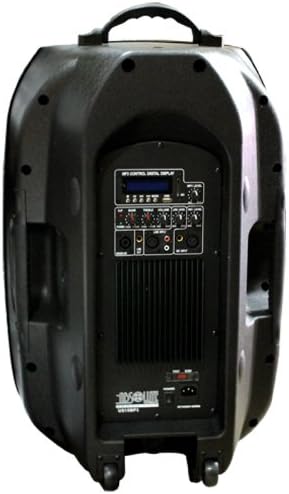
Figure 5.2: Rear panel of the Absolute USA PRO US15MP3 speaker. This view highlights the various input/output ports, controls, and the power connection area.
5.3 Connecting Audio Sources
The US15MP3 speaker supports various audio input methods:
- USB Drive: Insert a USB flash drive into the USB port on the control panel.
- SD Card: Insert an SD card into the SD card slot on the control panel.
- External Audio Devices: Use appropriate audio cables (not included) to connect external devices (e.g., mixers, microphones, other MP3 players) to the available input jacks on the rear panel.
6. Operating Instructions
6.1 Powering On/Off
- Ensure all connections are secure.
- Flip the main power switch on the rear panel to the "ON" position. The LCD display will illuminate.
- To power off, flip the main power switch to the "OFF" position.
6.2 MP3/SD/USB Player Operation
Once a USB drive or SD card is inserted, the speaker will automatically detect and begin playing compatible audio files (e.g., MP3 format).
- LCD Display: Shows track information, playback status, and mode.
- Mode Button: Press to switch between USB, SD, and Line Input modes.
- Play/Pause Button: Press to play or pause the current track.
- Previous/Next Buttons: Press to skip to the previous or next track. Hold to fast forward/rewind.
6.3 Volume and EQ Controls
- Master Volume: Adjust the main volume knob on the control panel to set the overall output level.
- Bass Control: Use the Bass knob to adjust the low-frequency response.
- Treble Control: Use the Treble knob to adjust the high-frequency response.
- Input Volume Controls: Individual volume knobs may be present for different inputs (e.g., Microphone, Line In) on the rear panel. Adjust these to balance input levels before using the Master Volume.
6.4 Remote Control Usage
The included remote control allows for convenient operation of the MP3/SD/USB player functions from a distance. Point the remote control towards the speaker's front panel sensor.
- Power Button: Turns the speaker on or off (standby mode).
- Mode Button: Switches input sources.
- Volume +/-: Adjusts the master volume.
- Play/Pause, Previous, Next: Controls media playback.
- Numeric Keypad: For direct track selection (if supported by the media player firmware).
7. Maintenance
7.1 Cleaning
- Always unplug the speaker from the power outlet before cleaning.
- Use a soft, dry cloth to wipe the exterior surfaces of the speaker.
- Do not use liquid cleaners, aerosol cleaners, or harsh chemicals, as these may damage the finish or internal components.
- Avoid getting moisture into any openings.
7.2 Storage
- If storing the speaker for an extended period, disconnect it from the power supply.
- Store the speaker in a cool, dry place, away from direct sunlight and extreme temperatures.
- It is recommended to use the original packaging for storage to protect the unit from dust and physical damage.
8. Troubleshooting
If you encounter issues with your speaker, refer to the following common problems and solutions:
| Problem | Possible Cause | Solution |
|---|---|---|
| No power | Power cable not connected; Power outlet faulty; Power switch off | Ensure power cable is securely connected. Try a different power outlet. Turn the power switch to "ON". |
| No sound output | Volume too low; Incorrect input mode selected; Audio source not playing; Faulty audio cable | Increase Master Volume. Press "Mode" button to select correct input (USB/SD/Line). Ensure audio source is playing. Check and replace audio cables if necessary. |
| MP3/SD/USB player not working | Incompatible file format; USB drive/SD card not inserted correctly; Corrupted media | Ensure audio files are in a compatible format (e.g., MP3). Reinsert USB drive/SD card. Try a different USB drive/SD card. |
| Distorted sound | Volume too high; EQ settings incorrect; Input signal too strong | Reduce Master Volume. Adjust Bass/Treble controls. Reduce volume from the audio source. |
If the problem persists after trying these solutions, please contact customer support.
9. Specifications
| Feature | Detail |
|---|---|
| Model Number | US15MP3 |
| Brand | Absolute USA |
| Speaker Type | 2-Way 15-Inch Portable Active PA Speaker |
| Power Output (P.M.P.O) | 2500 Watts |
| Driver | 1-Inch Titanium Dome Horn Driver |
| Media Player | Built-in MP3 Player with LCD Display |
| Connectivity | SD Card Slot, USB Connection, various audio inputs |
| Controls | Equalizer (Bass/Treble), Master Volume, Input Volume |
| Power Source | AC |
| Item Weight | 40 Pounds (approx. 18.14 kg) |
| Product Dimensions (L x W x H) | 30 x 20 x 17 inches (approx. 76.2 x 50.8 x 43.2 cm) |
| UPC | 847169012044, 133588559186 |
10. Warranty and Support
For warranty information or technical support, please refer to the documentation provided with your purchase or contact Absolute USA customer service. Keep your proof of purchase for warranty claims.
Note: Specific warranty terms and conditions may vary by region and retailer.