
1. Product Overview
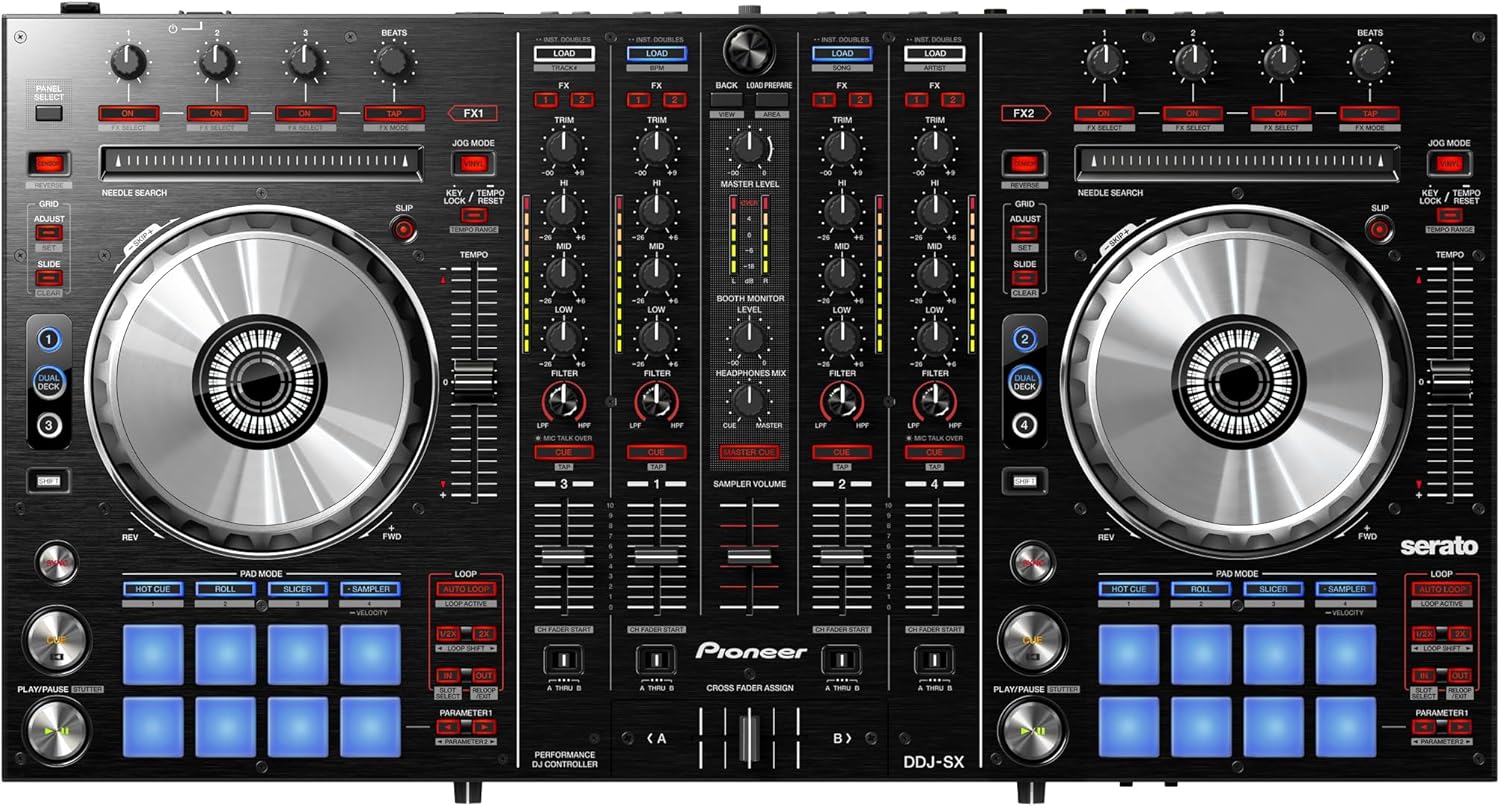
The Pioneer DDJ-SX is an advanced performance DJ controller designed specifically for Serato DJ Software. It utilizes the software as the basis for its configuration and ergonomic design, taking advantage of its features and integrating special trigger pads and controls. The DDJ-SX features larger jog wheels for precise mixing and scratching, multiple inputs for expandability, and 4-channel mixing flexibility.
- Industry's first 4-channel performance DJ controller/mixer for Serato DJ software.
- Performance DJ controller with pro-level build quality.
- Oversize jog wheels featuring CDJ-type on jog display.
- 8 soft-touch rubber controller/trigger pads per deck for loop/sample.
- Includes Serato DJ software featuring 4 decks, dual deck control, slip mode, sync-able sampler and high-quality FX. Can be used as a standalone 4-channel mixer to connect CDJs and/or turntables.

Official Product Videos
2. Setup Instructions
Follow these steps to set up your Pioneer DDJ-SX Digital Performance DJ Controller:
- Software Installation: Install the Serato DJ software on your computer. The DDJ-SX is designed to integrate seamlessly with this software.
- Power Connection: Connect the power adapter to the DDJ-SX and plug it into a power outlet.
- USB Connection: Connect the DDJ-SX to your computer using a USB cable. This enables communication with the Serato DJ software.
- Audio Output: Connect your speakers or sound system to the Master Out (XLR or RCA) and/or Booth Out terminals on the rear panel.
- Microphone Input: If using a microphone, connect it to one of the two mic inputs.
- External Sources (Optional): For turntables or CDJs, connect them to the appropriate Phono/Line inputs on the rear panel.


3. Operating Instructions
The DDJ-SX offers a comprehensive set of controls for dynamic DJ performances:
3.1. Mixer Section
- 4-Channel Mixer: Use the independent 4-channel mixer for both software control and external sources. Master level meters provide instant sound level adjustment.
- EQ and Filters: Each channel features dedicated EQ knobs (High, Mid, Low) and a filter knob for sound shaping.
- Crossfader: The crossfader allows smooth transitions between channels. Adjust the crossfader curve on the front panel for different mixing styles.
3.2. Deck Controls
- Large Jog Wheels: Utilize the oversized jog wheels for precise scratching, mixing, and track navigation. The 'On Jog' display provides visual feedback of playback status.
- Dual Deck Control: Control two tracks simultaneously, allowing scratching or setting hot cues on both tracks as if they were on a single track.
- Slip Mode: When activated, Slip Mode silently continues song playback during loops, scratches, or hot cues, resuming audible playback when the operation ends for seamless transitions.
3.3. Performance Pads
Eight soft-touch rubber performance pads per deck offer four functionalities:
- HOT CUE: Set and trigger cue points instantly.
- ROLL: Create rhythmic loop rolls.
- SLICER: Chop up and re-arrange sections of a track.
- SAMPLER: Trigger pre-loaded samples.

3.4. FX Section
- FX Powered by iZotope: Apply high-quality effects to your tracks for creative mixing.
4. Maintenance
To ensure the longevity and optimal performance of your DDJ-SX controller, follow these maintenance guidelines:
- Cleaning: Regularly wipe the surface with a soft, dry cloth. Avoid abrasive cleaners or solvents.
- Storage: Store the controller in a cool, dry place away from direct sunlight and extreme temperatures. Use a dust cover when not in use.
- Handling: Avoid dropping the unit or subjecting it to strong impacts. Do not place heavy objects on top of the controller.
- Liquid Exposure: Keep liquids away from the controller to prevent damage to internal components.
5. Troubleshooting
If you encounter issues with your DDJ-SX, refer to the following common solutions:
- No Sound Output:
- Check all audio cable connections (Master Out, Booth Out, headphones).
- Ensure volume levels on the controller, software, and connected speakers are not muted or too low.
- Verify that the correct audio device is selected in your computer's sound settings and Serato DJ software preferences.
- Confirm that the DDJ-SX drivers are correctly installed and updated.
- Laggy Performance/Scratching:
- Ensure your computer meets the minimum system requirements for Serato DJ.
- Close other demanding applications running on your computer.
- Adjust the USB buffer size (latency) in Serato DJ preferences. A lower buffer size reduces latency but requires more CPU power.
- Update your computer's operating system and DDJ-SX drivers.
- Controller Not Recognized by Software:
- Ensure the USB cable is securely connected to both the controller and the computer.
- Try a different USB port or cable.
- Restart your computer and the DDJ-SX.
- Reinstall the DDJ-SX drivers.
6. Specifications
- Item Weight: 16.5 pounds
- Product Dimensions: 17.7 x 29.9 x 6.9 inches
- Item Model Number: DDJ-SX
- Color Name: Black
- Power Source: Corded Electric
- First Available: November 1, 2012
7. Warranty and Support
For warranty information, technical support, or service inquiries, please contact Pioneer DJ customer support or visit their official website. Keep your proof of purchase for warranty claims.


