
MOMO MOMO-4525-14
MOMO Steering Wheel Hub Adapter User Manual
Model: MOMO-4525-14
1. Introduction
This manual provides detailed instructions for the installation, operation, and maintenance of your MOMO Steering Wheel Hub Adapter, specifically designed for 1984-1987 Mercury Capri models. Please read this manual thoroughly before beginning installation to ensure proper fitment and safe operation.
2. Safety Information
Always prioritize safety during installation and use. Improper installation can lead to serious injury or damage to your vehicle. If you are unsure about any step, consult a qualified automotive technician.
- Disconnect the vehicle's battery before starting any electrical work.
- Ensure the vehicle is parked on a level surface with the parking brake engaged.
- Wear appropriate personal protective equipment, such as gloves and eye protection.
- Do not overtighten fasteners; refer to vehicle-specific torque specifications if available.
- Verify all connections are secure before driving.
3. Package Contents
Please verify that all components are present before beginning installation:
- MOMO Steering Wheel Hub Adapter (Model: MOMO-4525-14)
- Mounting Hardware (bolts, washers, nuts - quantity may vary)
- Horn Button Retaining Ring (if applicable)
- Instruction Sheet (this manual)
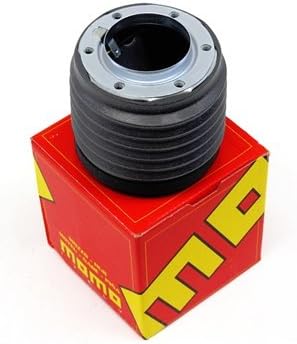
Image 1: The MOMO Steering Wheel Hub Adapter, shown with its red and yellow MOMO branded packaging box. The adapter itself is black with a chrome top ring, designed to connect an aftermarket steering wheel to the vehicle's steering column.
4. Setup (Installation)
This section outlines the general steps for installing the MOMO Steering Wheel Hub Adapter. Specific vehicle procedures may vary. Refer to your vehicle's service manual for detailed instructions on steering wheel removal.
- Preparation: Disconnect the negative terminal of the vehicle's battery. Ensure the front wheels are straight and the steering wheel is centered.
- Steering Wheel Removal: Carefully remove the horn button and any retaining nuts or bolts securing the original steering wheel. Gently pull the steering wheel off the splined shaft. Be mindful of any electrical connections for the horn or airbag (if present).
- Hub Adapter Installation: Slide the MOMO Steering Wheel Hub Adapter onto the steering column's splined shaft. Ensure it seats fully and aligns with any indexing marks.
- Secure Adapter: Use the provided mounting hardware (or original hardware if specified) to secure the hub adapter to the steering column. Tighten fasteners according to manufacturer specifications.
- Aftermarket Steering Wheel Attachment: Align your aftermarket MOMO steering wheel with the bolt pattern on the hub adapter. Secure the steering wheel using the appropriate bolts, ensuring they are tightened evenly and securely.
- Horn Connection: Connect the horn wire from the vehicle to the horn contact on the hub adapter, and then to the horn button of your new steering wheel. Test the horn function before reassembling.
- Final Checks: Reconnect the vehicle's battery. Test the steering wheel's rotation, horn function, and ensure no warning lights are illuminated (especially for airbag systems, if applicable).
5. Operating (Usage)
Once installed, the MOMO Steering Wheel Hub Adapter functions as a secure interface between your vehicle's steering column and an aftermarket MOMO steering wheel. Its primary purpose is to ensure proper fitment and maintain steering functionality.
- The adapter ensures the correct offset and spline engagement for your specific vehicle model.
- It provides a stable mounting point for the aftermarket steering wheel, preventing play or looseness.
- Integrated horn contacts allow for the continued functionality of the vehicle's horn.
6. Maintenance
The MOMO Steering Wheel Hub Adapter is designed for durability and requires minimal maintenance. Regular checks can help ensure its longevity and safe operation.
- Periodic Inspection: Annually, or during other vehicle maintenance, inspect the hub adapter and steering wheel mounting bolts for any signs of looseness or wear.
- Cleaning: Clean the adapter's exterior with a soft, damp cloth. Avoid harsh chemicals that could damage the finish.
- Fastener Torque: If any bolts appear loose, re-torque them to the appropriate specifications. Do not overtighten.
7. Troubleshooting
| Problem | Possible Cause | Solution |
|---|---|---|
| Steering wheel feels loose after installation. | Mounting bolts not tightened sufficiently or incorrect adapter fitment. | Ensure all mounting bolts are properly torqued. Verify the adapter is the correct model for your vehicle. |
| Horn does not work. | Horn wire disconnected, faulty horn button, or incorrect wiring. | Check all horn wire connections. Test the horn button. Consult a wiring diagram if necessary. |
| Adapter does not fit onto steering column. | Incorrect adapter model for vehicle or obstruction on steering shaft. | Double-check the product model number (MOMO-4525-14) against your vehicle's year and model (1984-1987 Mercury Capri). Inspect the steering shaft for any damage or debris. |
8. Specifications
- Brand: MOMO
- Model Number: MOMO-4525-14
- Compatibility: 1984-1987 Mercury Capri
- Material: High-quality automotive-grade materials
- Purpose: Adapts aftermarket MOMO steering wheels to specified vehicle models.
9. Warranty and Support
MOMO products are manufactured to high standards. For specific warranty information, please refer to the warranty card included with your product or visit the official MOMO website. For technical support or inquiries, please contact MOMO customer service through their official channels.
Note: This hub adapter is designed for specific vehicle applications. Use outside of the specified models may void warranty and compromise safety.
Ask a question about this manual
Ask about setup, troubleshooting, compatibility, parts, safety, or missing instructions. Manuals+ will review the question and use this page’s manual context to help answer it.