
Introduction
This manual provides detailed instructions for the safe and efficient operation, maintenance, and troubleshooting of your Carnation Mixed Denomination Bill Counter, model CR7. Please read this manual thoroughly before using the device to ensure proper functionality and to prevent damage.
Important Safety Information
- Always connect the device to a grounded power outlet.
- Do not operate the device with wet hands.
- Keep the device away from water and high humidity.
- Ensure proper ventilation around the machine during operation.
- Unplug the device before cleaning or performing any maintenance.
- Do not attempt to open or repair the device yourself. Refer to qualified service personnel.
Package Contents
Verify that all items are present in the package:
- Carnation CR7 Mixed Denomination Bill Counter
- Power Cord
- User Manual (this document)
- Cleaning Brush (may be included)
Setup
1. Unpacking and Placement
Carefully remove the bill counter from its packaging. Place the machine on a stable, flat, and level surface. Ensure there is adequate space around the unit for proper ventilation and operation.
2. Power Connection
- Connect the provided power cord to the power inlet on the rear of the bill counter.
- Plug the other end of the power cord into a suitable grounded electrical outlet.
- Locate the power switch on the rear of the machine and turn it to the 'ON' position. The display should illuminate.

Image: Rear view of the Carnation CR7 bill counter, highlighting the power inlet and power switch for connection.
3. Initial Inspection
Before first use, visually inspect the bill counter for any signs of damage. Ensure all moving parts, such as the hopper and stacker, operate smoothly.
Operating Instructions
1. Loading Bills
Fan out the bills and place them neatly into the hopper. Ensure the bills are aligned and not folded or creased. The machine will automatically start counting once bills are detected in the hopper.
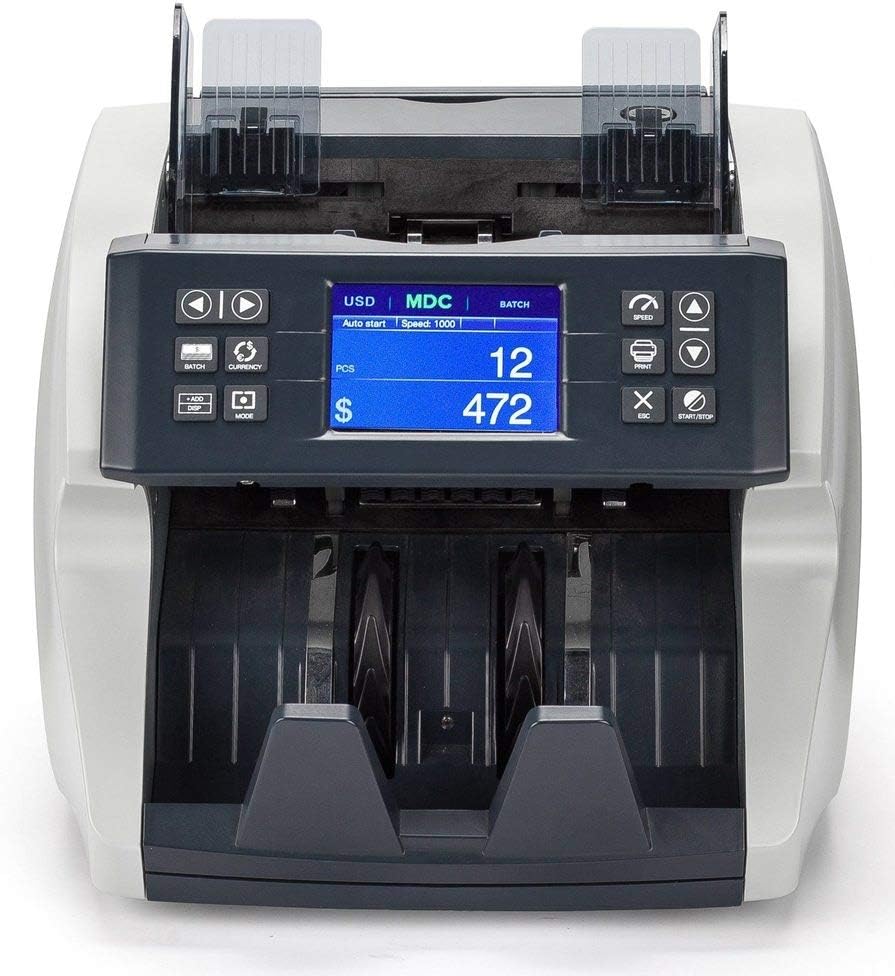
Image: Front view of the Carnation CR7 bill counter, showing the hopper where bills are loaded and the display panel.
2. Basic Counting Modes
- Count Mode: Counts the number of bills.
- Mixed Denomination Mode (MDC): Counts and calculates the total value of mixed denomination bills. Select this mode using the appropriate button on the control panel.
- Batch Mode: Allows the machine to stop counting once a preset number of bills is reached. Use the 'BATCH' button to set the desired batch quantity.
- Add Mode: Accumulates the total count from multiple counting operations. Activate 'ADD' mode to continuously sum counts.
3. Counterfeit Detection
The CR7 is equipped with multiple detection methods to identify counterfeit currency:
- UV (Ultraviolet) Detection: Checks for UV security features present in genuine banknotes.
- MG (Magnetic) Detection: Scans for magnetic ink patterns on bills.
- MT (Magnetic Thread) Detection: Detects the magnetic security thread embedded in currency.
- IR (Infrared) Detection: Verifies infrared security features and patterns.
If a suspicious bill is detected, the machine will typically stop, alert the user, and display an error code. Remove the suspect bill and press 'START/STOP' to resume counting.
Maintenance
Regular maintenance ensures the longevity and accuracy of your bill counter.
1. Cleaning
- Power Off: Always turn off and unplug the machine before cleaning.
- Dust Removal: Use a soft brush or compressed air to remove dust and lint from the bill path, sensors, and rollers. Pay special attention to the detection sensors (UV, MG, IR) to ensure they are clear.
- Exterior Cleaning: Wipe the exterior surfaces with a soft, damp cloth. Do not use abrasive cleaners or solvents.
Frequency: Clean the machine regularly, especially if used frequently or in dusty environments. Dust accumulation can lead to miscounts or detection errors.
2. Storage
When not in use, cover the bill counter with a dust cover (if provided or purchased separately) to protect it from dust and debris. Store in a cool, dry place.
Troubleshooting
This section addresses common issues you might encounter. For problems not listed here, please contact customer support.
| Problem | Possible Cause | Solution |
|---|---|---|
| Machine does not power on. | Power cord not connected; power switch off; no power from outlet. | Ensure power cord is securely connected. Turn power switch ON. Check outlet with another device. |
| Miscounts or inaccurate counts. | Bills not properly aligned; dirty sensors; worn rollers; bills are too old/creased. | Align bills properly. Clean sensors and bill path (refer to Maintenance). Try new or less worn bills. |
| Bills jam frequently. | Overloaded hopper; bills are folded/creased; foreign objects in bill path; worn rollers. | Do not overload hopper. Straighten bills. Inspect bill path for obstructions. Clean rollers. |
| Counterfeit detection errors. | Dirty detection sensors; bills are extremely worn or damaged; incorrect currency settings. | Clean UV, MG, MT, IR sensors. Ensure bills are in good condition. Verify currency settings are correct for the bills being counted. |
Specifications
| Model Number | CR7 |
| Brand | CARNATION |
| Item Weight | 15.9 pounds |
| Product Dimensions (L x W x H) | 11.2 x 9.9 x 11.4 inches (285mm x 252mm x 289mm) |
| Material Type | Metal, Plastic |
| Color | Black |
| Detection Methods | UV, MG, MT, IR |
| Manufacturer | Carnation |
Warranty Information
The Carnation CR7 Mixed Denomination Bill Counter is covered by a manufacturer's warranty. Specific warranty terms and duration may vary by region and purchase date. Please retain your proof of purchase for warranty claims.
For detailed warranty information, including coverage and how to make a claim, please refer to the warranty card included with your product or visit the official Carnation website.
Customer Support
If you require assistance with your Carnation CR7 Bill Counter, have questions about its operation, or need technical support, please contact Carnation customer service.
- Online Support: Visit the official Carnation website for FAQs, support resources, and contact forms.
- Email Support: Refer to your product packaging or the official website for the customer support email address.
- Phone Support: Check the official Carnation website for regional customer service phone numbers.
When contacting support, please have your model number (CR7) and purchase date available.


