
ResMed Mirage FX
Contents
ResMed Mirage FX Replacement Frame System - Small User Manual
Brand: ResMed | Model: Mirage FX
Introduction
This manual provides instructions for the ResMed Mirage FX Replacement Frame System, designed for use with the Mirage FX nasal mask. This system includes the mask frame and elbow. Please note that headgear and cushion components are sold separately and are required for a complete mask system.
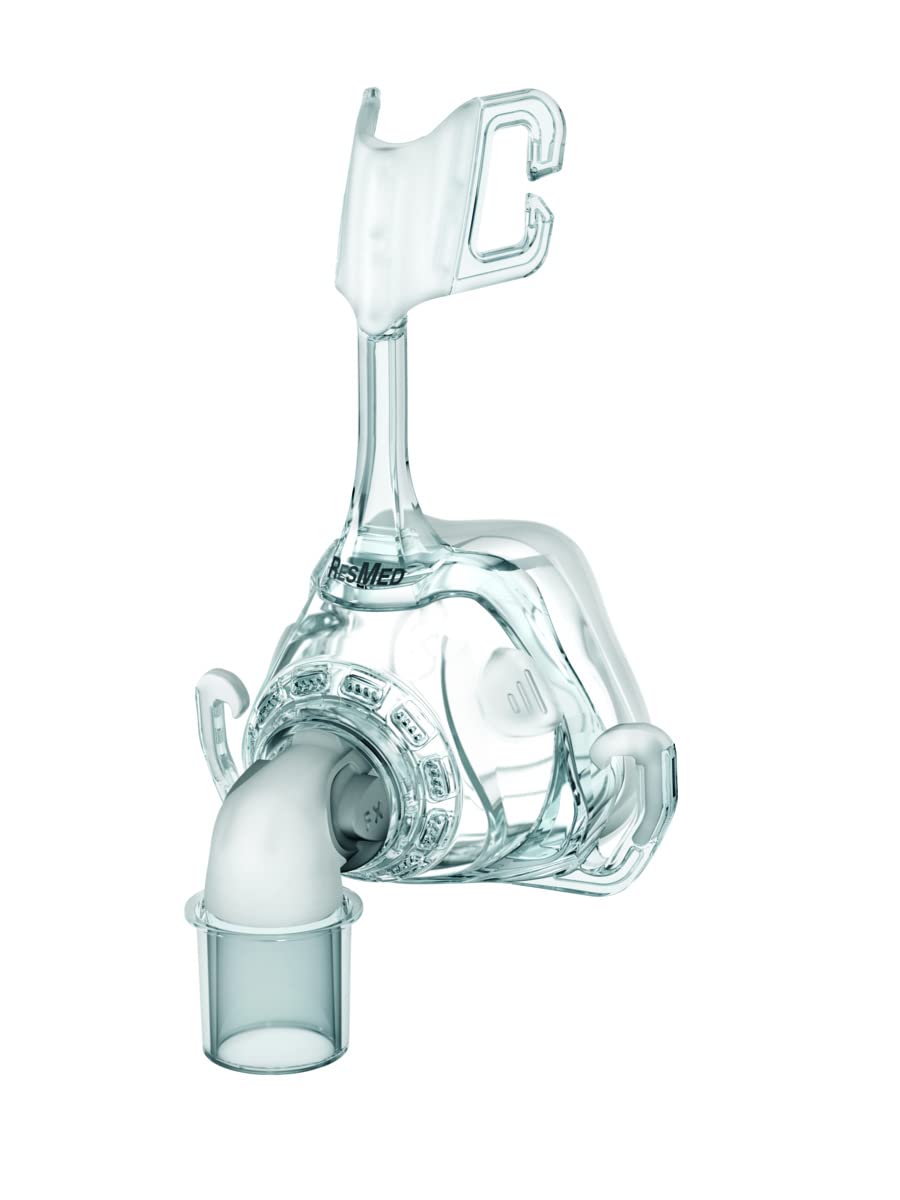
Image: Overview of the ResMed Mirage FX Replacement Frame System components, including the frame, elbow, and cushion (cushion not included in this specific product).
Setup and Assembly
To assemble your ResMed Mirage FX nasal mask, follow these steps:
- Attach the Cushion: Align the small cushion (sold separately) with the mask frame. Gently press the cushion onto the frame until it securely snaps into place. Ensure there are no gaps to prevent air leaks.
- Connect the Headgear: Thread the upper and lower headgear straps (sold separately) through the designated slots on the mask frame. Secure the straps using the Velcro fasteners or clips, ensuring a comfortable but firm fit.
- Attach the Elbow: Insert the elbow component into the front port of the mask frame. It should click securely into position. This elbow allows for connection to your CPAP tubing.
- Adjust for Fit: Place the assembled mask on your face. Adjust the headgear straps evenly to achieve a comfortable and effective seal. The mask should not feel too tight or cause pressure points.

Image: Detailed view of the elbow, frame, and cushion components of the ResMed Mirage FX mask, illustrating how they connect.
Operating Instructions
Once the mask is assembled and fitted, connect the CPAP tubing to the elbow. Turn on your CPAP device. Lie down and breathe normally. If you feel any air leaks, gently adjust the headgear straps or reposition the mask on your face. Avoid overtightening the straps, as this can cause discomfort and lead to leaks.
Maintenance and Cleaning
Regular cleaning of your mask components is essential for hygiene and optimal performance. Follow these general guidelines:
- Daily Cleaning: Disassemble the mask components (frame, cushion, elbow). Wash the cushion and elbow in warm water with a mild soap. Rinse thoroughly with clean water. Allow all parts to air dry completely out of direct sunlight before reassembly.
- Weekly Cleaning: In addition to daily cleaning, wash the mask frame and headgear (if washable) in warm water with a mild soap. Rinse well and allow to air dry. Inspect all components for wear and tear, and replace as needed.
- Do Not Use: Avoid using harsh cleaning agents, alcohol-based solutions, or bleach, as these can damage the materials and reduce the lifespan of your mask.
Troubleshooting
- Air Leaks:
- Check that the cushion is correctly seated on the frame and that the headgear is adjusted for a snug, but not overly tight, fit.
- Ensure the mask is positioned correctly on your face.
- Inspect the cushion for any damage or wear; replace if necessary.
- Discomfort or Red Marks:
- Loosen the headgear straps slightly. The mask should be secure but not cause excessive pressure.
- Ensure the cushion is clean and free of oils or debris that could irritate the skin.
- Consider adjusting your sleeping position.
- Difficulty Breathing:
- Ensure the mask is properly connected to the CPAP machine and that the machine is functioning correctly.
- Check for any blockages in the mask's exhalation ports or tubing.
Specifications
- Manufacturer: ResMed
- Model: Mirage FX Replacement Frame System
- Size: Small
- Product Dimensions: 5.5 x 4.5 x 2.5 inches; 1.76 ounces
- ASIN: B009GJRH8O
Warranty and Support
For detailed warranty information, product registration, and customer support, please refer to the official ResMed website or the documentation included with your original product purchase. You may also contact ResMed customer service directly for assistance with your Mirage FX Replacement Frame System.
Ask a question about this manual
Ask about setup, troubleshooting, compatibility, parts, safety, or missing instructions. Manuals+ will review the question and use this page’s manual context to help answer it.