1. Introduction
This manual provides essential instructions for the safe and effective installation, operation, and maintenance of the SELECTA SS109-BG 2-Wire, 3-Amp, ON-Off, Single Pole Single Throw (SPST) Rotary Switch. Please read this manual thoroughly before use and retain it for future reference.
The SS109-BG is designed for simple ON-Off control in various electrical applications, featuring a durable rotary mechanism and a 2-wire connection for straightforward integration.
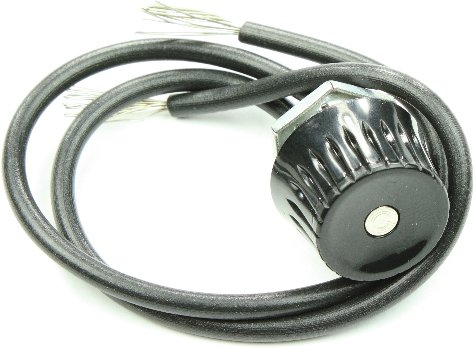
This image displays the SELECTA SS109-BG rotary switch, featuring a black knob and two insulated wires with exposed conductors, ready for electrical connection.
2. Safety Information
WARNING: Electrical shock hazard. Always disconnect power before installing, servicing, or removing this switch. Failure to do so may result in serious injury or death.
- Ensure all wiring is performed by a qualified electrician or competent person in accordance with local and national electrical codes.
- Verify that the voltage and current ratings of the switch are compatible with the circuit it will control.
- Do not operate the switch if it appears damaged or has been exposed to moisture.
- Keep children away from electrical components.
3. Setup and Installation
The SS109-BG is a 2-wire, SPST (Single Pole Single Throw) switch, designed for simple series connection within a circuit to control power flow.
- Disconnect Power: Before beginning installation, ensure that the power supply to the circuit is completely disconnected at the main breaker or fuse box. Verify with a voltage tester.
- Mounting: Securely mount the rotary switch in the desired location. Ensure the mounting surface is stable and provides adequate clearance for the switch body and wiring.
- Wiring Connection:
- Identify the two wires extending from the SS109-BG switch. These wires are interchangeable for connection purposes in an SPST configuration.
- Cut the live (hot) wire of the circuit where you intend to install the switch.
- Connect one wire from the SS109-BG switch to one end of the cut live wire.
- Connect the other wire from the SS109-BG switch to the remaining end of the cut live wire.
- Ensure all connections are secure using appropriate wire connectors (e.g., wire nuts, terminal blocks) and are properly insulated.
- Verify Installation: Double-check all connections for tightness and proper insulation. Ensure no bare wires are exposed.
- Restore Power: Once installation is complete and verified, restore power to the circuit.
4. Operating Instructions
The SELECTA SS109-BG is an ON-Off rotary switch. Its operation is straightforward:
- To Turn ON: Rotate the knob in one direction (typically clockwise) until it clicks into the 'ON' position. This completes the circuit, allowing power to flow to the connected device.
- To Turn OFF: Rotate the knob in the opposite direction (typically counter-clockwise) until it clicks into the 'OFF' position. This breaks the circuit, stopping power flow to the connected device.
The switch provides tactile feedback (a click) when transitioning between the ON and OFF states.
5. Maintenance
The SS109-BG rotary switch is designed for minimal maintenance. Follow these guidelines to ensure longevity:
- Cleaning: Periodically wipe the exterior of the switch with a clean, dry cloth. Do not use abrasive cleaners or solvents. Ensure power is disconnected before cleaning.
- Inspection: Regularly inspect the switch for any signs of physical damage, loose connections, or discoloration. If any issues are observed, disconnect power and address them immediately.
- Environmental Conditions: Ensure the switch is not exposed to conditions beyond its specified operating environment (e.g., excessive moisture, extreme temperatures, corrosive atmospheres) unless specifically rated for such conditions.
6. Troubleshooting
If the SELECTA SS109-BG switch is not functioning as expected, consider the following:
- Switch Does Not Turn ON/OFF:
- No Power: Check if the circuit breaker or fuse for the circuit has tripped or blown.
- Loose Connections: Disconnect power and inspect all wiring connections to ensure they are secure.
- Damaged Switch: If the switch feels loose, jammed, or shows visible damage, it may need replacement.
- Intermittent Operation:
- Loose Wiring: Power off and check for any loose wire connections at the switch or within the circuit.
- Internal Fault: If connections are secure and power is present, the switch itself may have an internal fault and require replacement.
If troubleshooting steps do not resolve the issue, consult a qualified electrician.
7. Specifications
| Feature | Detail |
|---|---|
| Model Number | SS109-BG |
| Brand | SELECTA |
| Current Rating | 3 Amp |
| Wiring Configuration | 2-Wire |
| Switch Type | Rotary Switch |
| Function | ON-Off |
| Pole/Throw | SPST (Single Pole Single Throw) |
| ASIN | B009ECAC44 |
| Date First Available | March 31, 2015 |
8. Warranty Information
Specific warranty details for the SELECTA SS109-BG switch are typically provided at the point of purchase or by the manufacturer. Please refer to your purchase documentation or contact SELECTA directly for comprehensive warranty terms and conditions.
9. Support
For technical assistance, replacement parts, or further inquiries regarding the SELECTA SS109-BG rotary switch, please contact the manufacturer, SELECTA, or your authorized distributor. Contact information can usually be found on the product packaging or the manufacturer's official website.