
1. Introduction
This manual provides detailed instructions for the installation, operation, and troubleshooting of the Broadcom DW1501 BCM94313HMG2L WLAN 802.11n Half Mini PCI-E Card. This wireless network card is designed to provide 802.11n Wi-Fi connectivity for compatible laptop systems.
2. Safety Information
- Always power off your computer and disconnect it from the power source before installing or removing any internal components.
- Discharge any static electricity from your body by touching a grounded metal object before handling the card.
- Handle the card by its edges to avoid touching sensitive components.
- Keep the card away from moisture and extreme temperatures.
- This card is not compatible with certain laptop models, specifically IBM/Lenovo/Thinkpad and HP versions. Verify compatibility before installation.
3. Package Contents
Ensure the following item is included in your package:
- Broadcom DW1501 BCM94313HMG2L WLAN 802.11n Half Mini PCI-E Card
If any items are missing or damaged, please contact your vendor.
4. Installation
4.1 Pre-installation Checklist
- Verify your laptop has a compatible Half Mini PCI-E slot.
- Ensure your laptop is not an IBM/Lenovo/Thinkpad or HP model, as this card is not compatible with these systems.
- Gather necessary tools, such as a small Phillips head screwdriver.
4.2 Physical Installation
- Power Off: Shut down your laptop completely and disconnect the power adapter and battery.
- Access Panel: Locate and open the access panel on the bottom of your laptop that covers the Mini PCI-E slot. Refer to your laptop's service manual for specific instructions.
- Remove Old Card (if applicable): If an existing wireless card is present, carefully disconnect any antenna cables and remove the screw securing the card. Gently slide the card out of its slot.
- Insert New Card: Align the Broadcom DW1501 card with the Half Mini PCI-E slot. Gently push the card into the slot at an angle until it is fully seated.
- Secure Card: Press the card down and secure it with the screw removed earlier.
- Connect Antennas: Carefully connect the antenna cables to the corresponding connectors on the new card. Typically, the main antenna connects to 'MAIN' or '1' and the auxiliary antenna to 'AUX' or '2'.
- Close Panel: Replace the access panel and secure it.
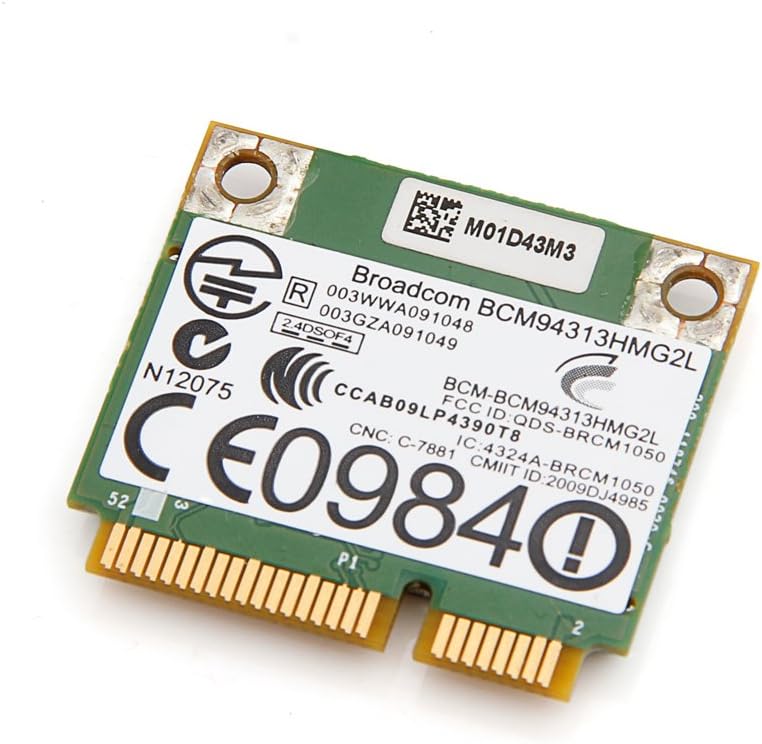
Image 1: Top view of the Broadcom DW1501 BCM94313HMG2L WLAN Half Mini PCI-E Card, showing the Broadcom branding and regulatory markings. This side typically faces upwards during installation.
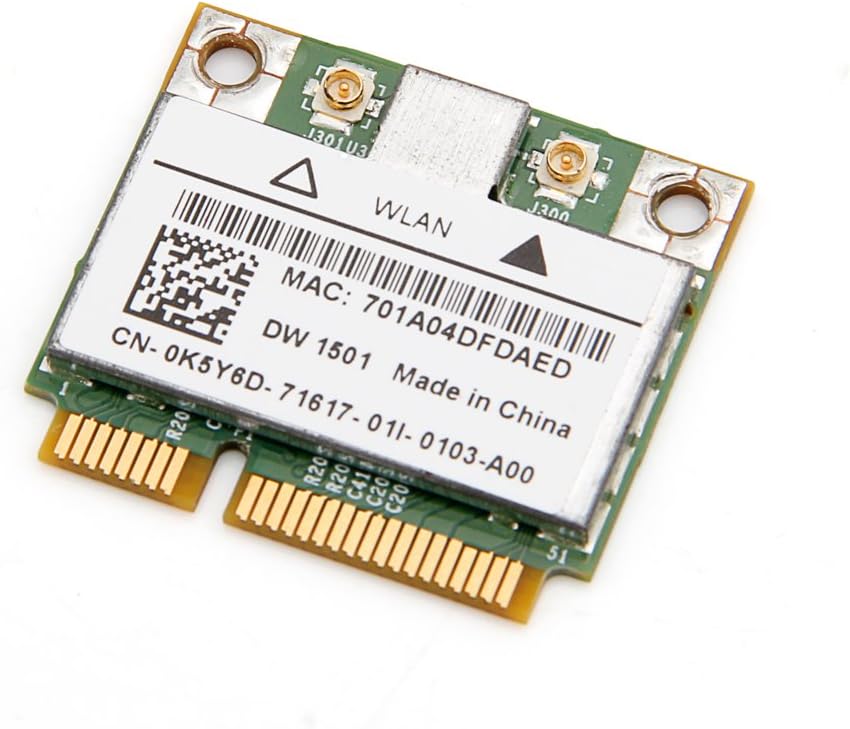
Image 2: Bottom view of the Broadcom DW1501 BCM94313HMG2L WLAN Half Mini PCI-E Card, displaying the MAC address and model number. This side typically faces downwards during installation.
4.3 Driver Installation
- Power On: Reconnect the battery and power adapter, then power on your laptop.
- Operating System Detection: Your operating system may automatically detect the new hardware and attempt to install generic drivers.
- Install Specific Drivers: For optimal performance, download the latest drivers for the Broadcom DW1501 BCM94313HMG2L from your laptop manufacturer's support website or Broadcom's official website.
- Follow On-Screen Instructions: Run the downloaded driver installer and follow the prompts to complete the installation.
- Restart: Restart your computer after driver installation is complete.
5. Operating Instructions
Once the card is installed and drivers are successfully loaded, your laptop should detect available wireless networks.
- Access Network Settings: Navigate to your operating system's network settings (e.g., Wi-Fi settings in Windows, Network Preferences in macOS).
- Enable Wi-Fi: Ensure that Wi-Fi is enabled.
- Select Network: A list of available wireless networks will appear. Select your desired network.
- Enter Password: If the network is secured, enter the Wi-Fi password (security key) when prompted.
- Connect: Click 'Connect' to establish a wireless connection.
6. Maintenance
The Broadcom DW1501 BCM94313HMG2L card requires minimal maintenance.
- Keep your laptop's internal components clean by periodically removing dust with compressed air.
- Ensure your wireless drivers are up to date for optimal performance and security.
- Avoid exposing your laptop to environments with excessive heat or moisture.
7. Troubleshooting
7.1 Card Not Detected
- Check Physical Installation: Power off the laptop and re-verify that the card is properly seated in the Mini PCI-E slot and secured with the screw.
- Antenna Connections: Ensure antenna cables are securely attached to the card.
- Driver Installation: Confirm that the correct drivers for the Broadcom DW1501 BCM94313HMG2L are installed. Check Device Manager (Windows) or System Information (macOS) for any error indicators.
- Compatibility: Reconfirm that your laptop model is not an IBM/Lenovo/Thinkpad or HP version, as these are incompatible.
7.2 Cannot Connect to Wi-Fi
- Wi-Fi Enabled: Ensure Wi-Fi is enabled in your operating system settings and any physical Wi-Fi switch on your laptop is in the 'on' position.
- Correct Password: Double-check that you are entering the correct Wi-Fi password.
- Router Issues: Restart your wireless router and modem.
- Driver Update: Update or reinstall the wireless card drivers.
- Network Diagnostics: Use your operating system's built-in network diagnostic tools.
7.3 Slow Connection Speed
- Signal Strength: Move closer to your wireless router to improve signal strength.
- Interference: Minimize interference from other electronic devices or crowded Wi-Fi channels.
- Driver Update: Ensure you have the latest drivers installed.
- Router Settings: Check your router's settings for optimal 802.11n performance.
8. Specifications
| Product Name | Broadcom DW1501 BCM94313HMG2L WLAN 802.11n Half WiFi Mini PCI-E Card |
| Model Number | 8541551410 |
| Wireless Standard | 802.11n |
| Interface | Half Mini PCI-E |
| Hardware Interface | PCI |
| Compatible Devices | Laptop (excluding IBM/Lenovo/Thinkpad and HP versions) |
| Data Link Protocol | Bluetooth (Note: While listed, primary function is WLAN) |
| Product Dimensions | 3.3 x 2 x 0.1 inches |
| Item Weight | 0.32 ounces (9.07 g) |
| Manufacturer | Broadcom |
| UPC | 612148456344 |
9. Warranty and Support
For warranty information and technical support, please refer to the documentation provided by your seller or contact Broadcom directly through their official website. Specific warranty terms may vary depending on your region and point of purchase.