
Introduction
Thank you for choosing the DEMA Digital Ultrasonic Cleaner with Heating. This manual provides essential information for the safe and efficient operation, maintenance, and troubleshooting of your new ultrasonic cleaner. Please read these instructions thoroughly before first use and keep them for future reference.
Important Safety Instructions
- Always disconnect the appliance from the power supply before filling or emptying the tank, or during maintenance.
- Do not operate the unit without liquid in the tank.
- Do not immerse the main unit in water or other liquids.
- Keep the unit out of reach of children.
- Do not use flammable, explosive, or corrosive cleaning solutions.
- Ensure the power cord is not damaged and is properly connected to a grounded outlet.
- Avoid touching the tank or solution during operation, especially when the heating function is active.
- Do not disassemble or attempt to repair the unit yourself. Contact qualified service personnel.
- This appliance is for household and light commercial use only.
Package Contents
Carefully unpack the box and ensure all items are present and in good condition. If any items are missing or damaged, please contact your retailer.
- DEMA Digital Ultrasonic Cleaner Unit
- Stainless Steel Cleaning Tank (integrated)
- PVC Cleaning Basket
- Jewelry Holder
- Power Cord
- Instruction Manual (this document)

Image: Included accessories - cleaning basket, jewelry holder, and power cord.
Product Overview
Familiarize yourself with the components of your DEMA Digital Ultrasonic Cleaner.

Image: Overall view of the DEMA Digital Ultrasonic Cleaner.
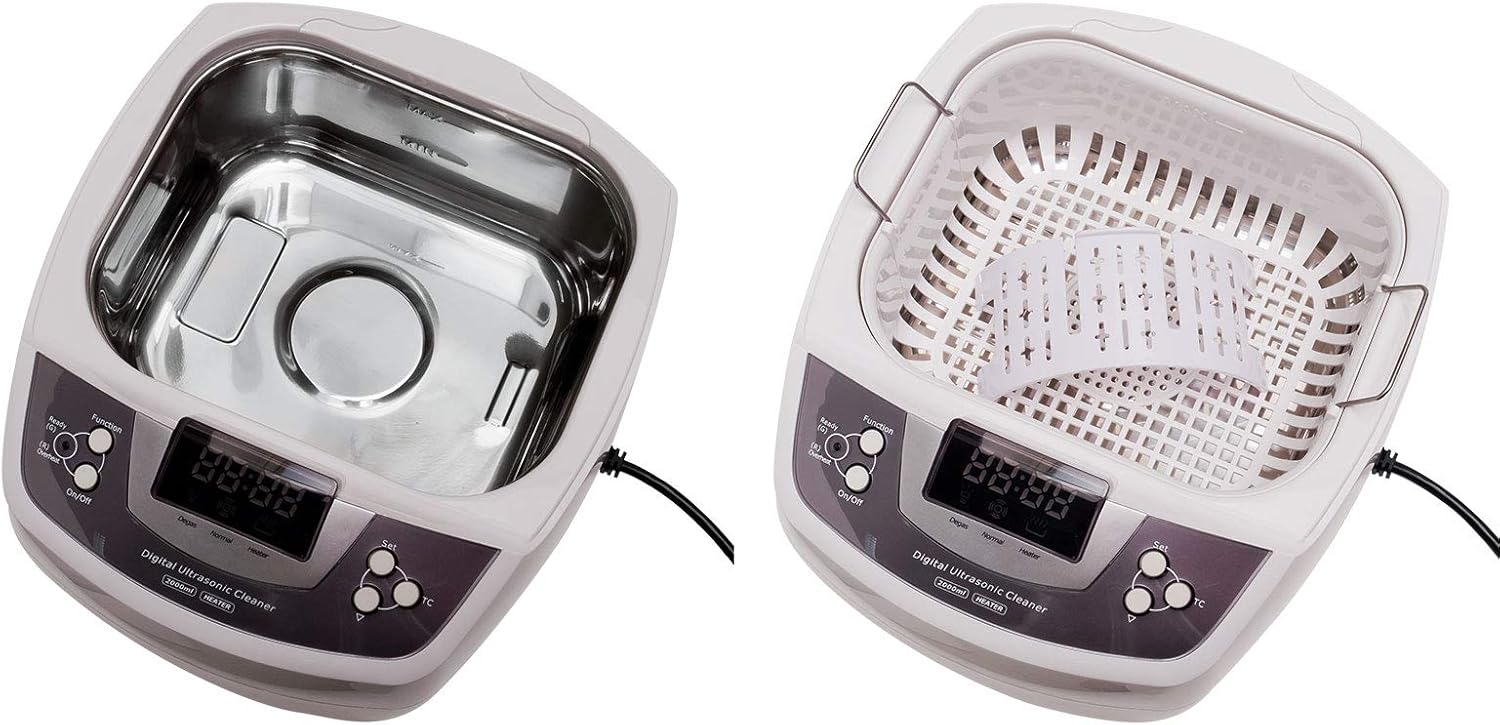
Image: Internal view of the cleaning tank.
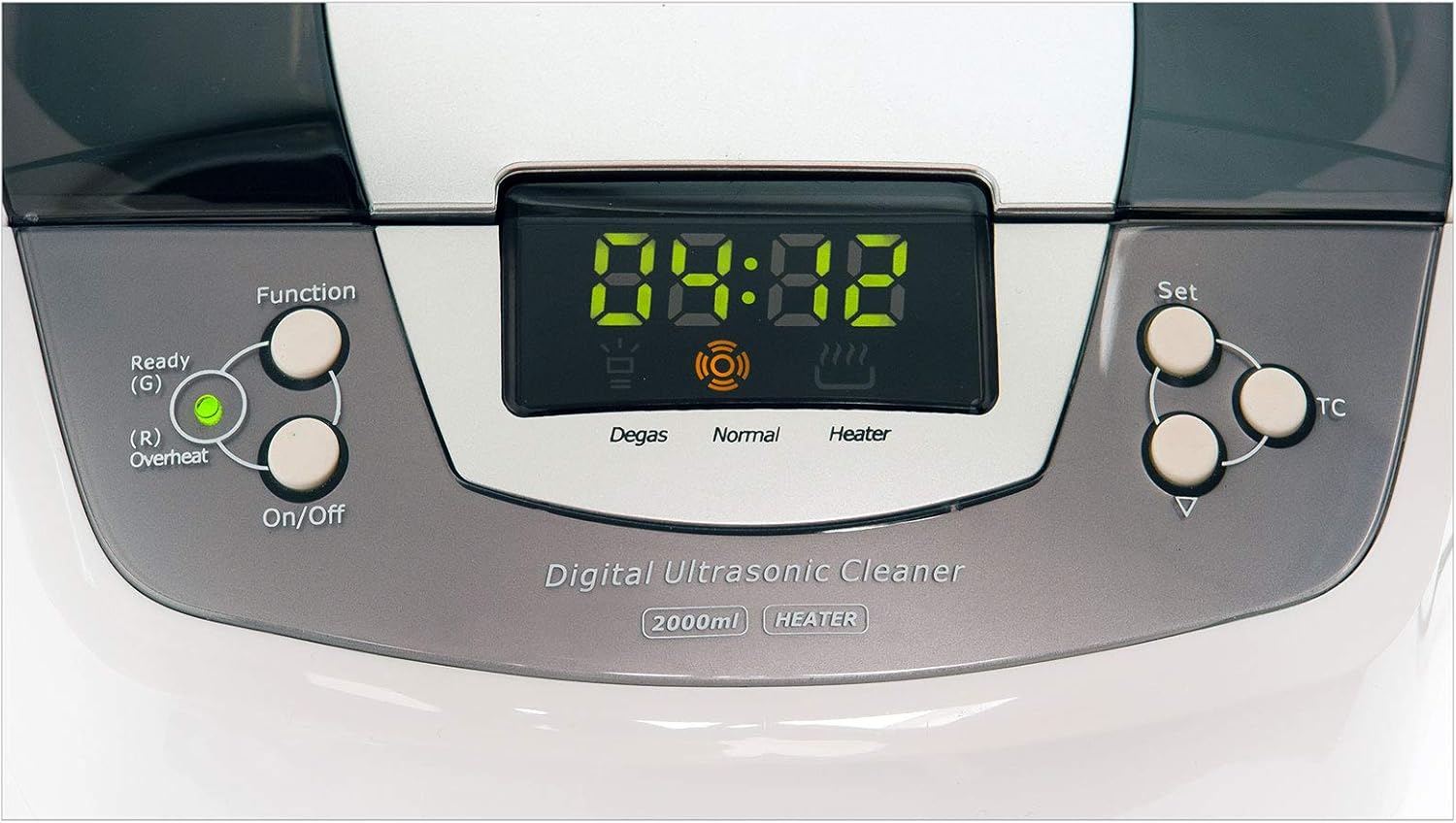
Image: Digital control panel with timer and function indicators.
Control Panel Functions:
- On/Off Button: Powers the unit on or off.
- Function Button: Selects between cleaning modes (Degas, Normal) and activates heating.
- Set Button: Adjusts the cleaning timer.
- TC (Temperature Control) Button: Activates or deactivates the heating function.
- Digital Display: Shows remaining cleaning time and selected functions.
Setup
- Place the ultrasonic cleaner on a firm, flat, and dry surface.
- Ensure there is adequate ventilation around the unit.
- Open the lid and fill the stainless steel tank with water or a suitable cleaning solution. Do not exceed the "MAX" fill line.
- Place the cleaning basket into the tank.
- Carefully place the items to be cleaned into the basket, ensuring they are fully submerged but not touching the bottom of the tank directly.
- Close the lid.
- Connect the power cord to the unit and then to a grounded electrical outlet.
Operating Instructions
1. Power On:
Press the On/Off button to turn on the unit. The digital display will illuminate.
2. Set Cleaning Time:
Press the Set button repeatedly to adjust the cleaning time from 1 to 30 minutes in 1-minute increments. The selected time will be shown on the display.
3. Activate Heating (Optional):
Press the TC button to activate the heating function. The "Heater" indicator on the display will light up. Heating can improve cleaning effectiveness for certain items. Note that there is no separate temperature pre-selection; the unit heats to a preset optimal temperature.
4. Select Cleaning Mode (Optional):
Press the Function button to cycle through cleaning modes:
- Normal: Standard ultrasonic cleaning.
- Degas: This mode removes air bubbles from the cleaning solution, which can improve cleaning efficiency, especially with fresh solutions. The "Degas" indicator will light up.
5. Start Cleaning:
Once the time and desired functions are set, the unit will automatically start the cleaning cycle after a few seconds, or you can press the On/Off button to initiate it immediately. The display will count down the remaining time.
6. End of Cycle:
The unit will automatically shut off when the timer reaches zero. You can manually stop the cleaning cycle at any time by pressing the On/Off button.
7. After Cleaning:
- Disconnect the power cord from the outlet.
- Open the lid and carefully remove the cleaning basket with the cleaned items.
- Rinse the cleaned items under clean water and dry them thoroughly.
- Empty the tank and clean the unit as described in the Maintenance section.
Maintenance
Cleaning the Unit:
- Always unplug the unit before cleaning.
- After each use, empty the tank by carefully pouring out the used solution. Avoid spilling liquid onto the control panel or exterior.
- Wipe the stainless steel tank with a soft cloth. For stubborn residue, use a mild, non-abrasive cleaner.
- Wipe the exterior of the unit with a damp cloth. Do not use abrasive cleaners or immerse the unit in water.
- Ensure the unit is completely dry before storing or next use.
Storage:
Store the ultrasonic cleaner in a cool, dry place, away from direct sunlight and moisture. Keep the lid closed to prevent dust accumulation.
Troubleshooting
| Problem | Possible Cause | Solution |
|---|---|---|
| Unit does not power on. | No power supply; power cord not connected; faulty outlet. | Check power cord connection; try a different outlet; ensure power switch is on. |
| Ultrasonic cleaning not effective. | Insufficient cleaning solution; incorrect solution for item; items too crowded; solution not degassed. | Ensure items are submerged; use appropriate cleaning solution; do not overload; use Degas function for fresh solutions. |
| Heating function not working. | Heating not activated; unit malfunction. | Press the TC button to activate heating; if problem persists, contact support. |
| Unit makes unusual noise. | Normal operating noise; unit not on a stable surface; internal issue. | Ensure unit is on a stable surface; if noise is excessive or unusual, discontinue use and contact support. |
Specifications
- Model: 917705-61025
- Total Volume: 2 Liters
- Internal Dimensions (L x W x H): 18.5 x 15.5 x 8 cm (approx. 7.3 x 6.1 x 3.1 inches)
- Cleaning Basket Dimensions (L x W x H): 18 x 15 x 7.5 cm (approx. 7.1 x 5.9 x 3 inches)
- Ultrasonic Frequency: 35 kHz
- Adjustable Timer: 1 - 30 minutes (in 1-minute steps)
- Heating Function: Separately switchable on/off (no separate temperature pre-selection)
- Power Supply: 230 Volt / 50 Hz
- Cleaning Power: Approx. 120 Watt
- Heating Power: Approx. 20 Watt
- Cooling Fan Power: Approx. 15 Watt
- Total Power Consumption: Approx. 160 Watt
- Protection Class: I/IPX0
- Cable Length: 1.4 m
- Overall Dimensions (L x W x H): 26.5 x 23 x 18 cm (approx. 10.4 x 9.1 x 7.1 inches)
- Weight: 2.5 kg (approx. 5.5 lbs)
- Material: ABS / High-quality stainless steel tank
Warranty and Support
For warranty information and technical support, please refer to the documentation provided with your purchase or contact your retailer. Keep your proof of purchase for any warranty claims.