
1. Introduction
This manual provides instructions for the safe and efficient operation of your Optimus U-31001 1.5-Gallon Cool Mist Ultrasonic Humidifier. This unit is designed to add moisture to the air, featuring a 1.11-gallon tank capacity and an output of 1.5 gallons over 18 hours. Key features include an automatic shut-off when the water tank is empty, a refill indicator light, and an adjustable mist volume control. The transparent tank includes a handle for easy removal and transport, and its whisper-quiet operation ensures minimal disturbance. Please read all instructions carefully before use and retain this manual for future reference.
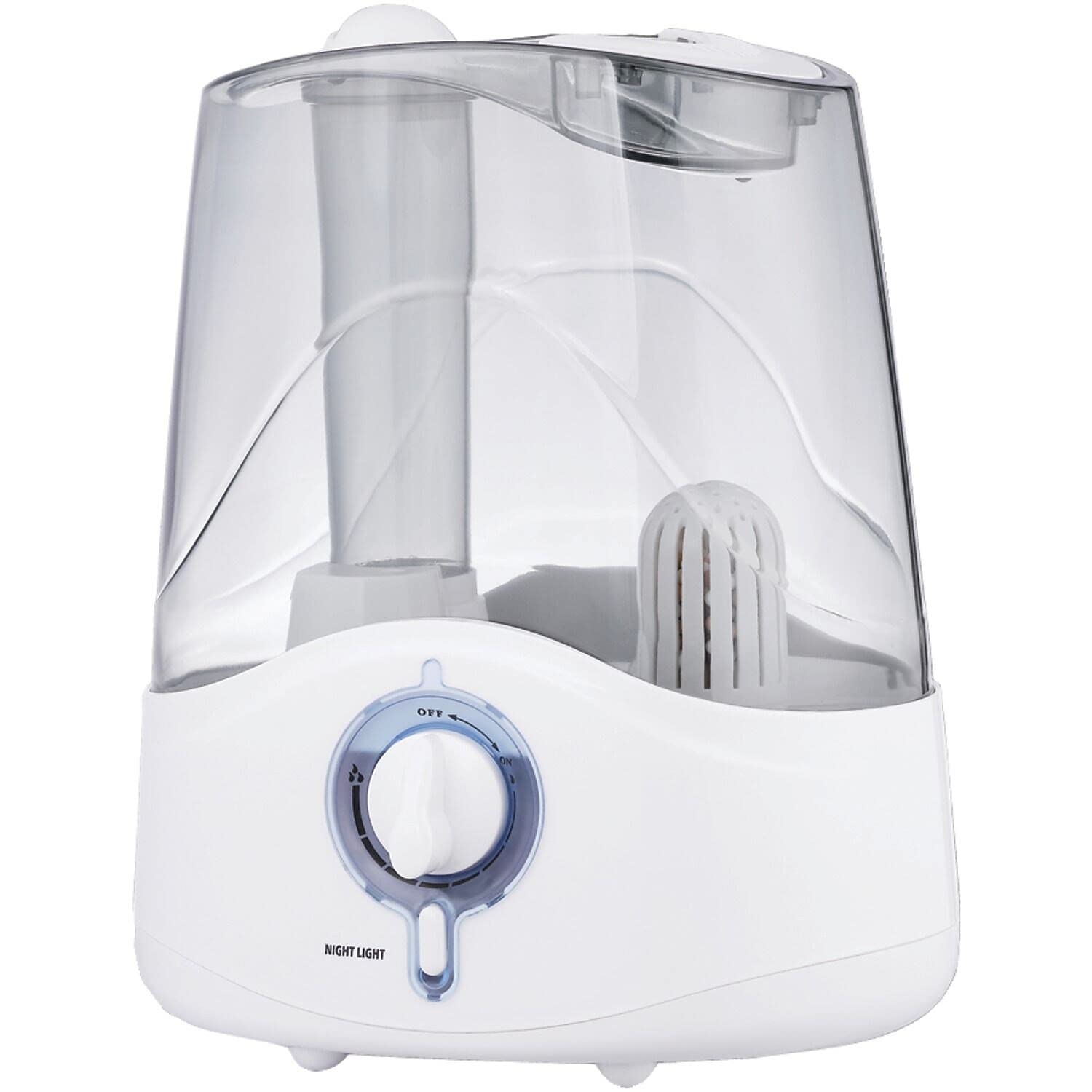
Image 1.1: Optimus U-31001 Humidifier placed in a bedroom environment, demonstrating its compact design.
2. Important Safety Instructions
When using electrical appliances, basic precautions should always be followed to reduce the risk of fire, electric shock, and injury to persons, including the following:
- Read all instructions before using the humidifier.
- Always place the humidifier on a firm, flat, water-resistant surface at least 12 inches (30 cm) away from walls and 3 feet (90 cm) from heat sources such as stoves, radiators, or heaters.
- Do not place the humidifier directly on carpet, towels, or other absorbent surfaces.
- Do not operate the humidifier if the cord or plug is damaged, or if the unit has been dropped or damaged in any manner.
- Always unplug the humidifier when not in use, before cleaning, or before moving it.
- Do not add essential oils, medications, or any other additives directly into the water tank or base. This can damage the unit and void the warranty.
- Keep the humidifier out of reach of children and pets.
- Do not block air vents or mist outlet.
- Use only clean, cool tap water. Distilled or demineralized water is recommended to prevent mineral buildup (white dust).
- Never immerse the base unit in water or other liquids.
3. Product Components
Familiarize yourself with the parts of your Optimus U-31001 humidifier for proper assembly and operation.

Image 3.1: Close-up view of the Optimus U-31001 Humidifier, highlighting the transparent water tank, mist nozzle, and control knob.
- Mist Nozzle: Directs the mist output.
- Water Tank: Transparent, removable tank with a handle for easy filling and transport. Capacity of 1.11 gallons (4.2 liters).
- Base Unit: Contains the ultrasonic transducer, fan, and electronic controls.
- Control Knob: Adjusts mist volume and turns the unit ON/OFF. Also features a night light function.
- Water Sensor: Detects low water levels, triggering automatic shut-off and refill light.
- Power Cord: For connecting to an electrical outlet.
4. Setup Instructions
- Unpack the Humidifier: Carefully remove all packaging materials and ensure all components are present and undamaged.
- Choose a Location: Place the humidifier on a firm, flat, water-resistant surface. Ensure it is at least 12 inches (30 cm) from walls and 3 feet (90 cm) from heat sources. Avoid placing it on carpet or near electronics.
- Fill the Water Tank:
- Remove the water tank from the base unit by lifting it using the handle.
- Turn the tank upside down and unscrew the tank cap.
- Fill the tank with clean, cool tap water. Distilled or demineralized water is recommended to minimize mineral residue. Do not add any additives to the water.
- Securely screw the tank cap back on.
- Place the filled water tank back onto the base unit, ensuring it is seated correctly.
- Connect to Power: Plug the power cord into a standard 120V AC electrical outlet.
5. Operating Instructions
- Turn On/Off: Rotate the control knob clockwise to turn the unit ON. Continue rotating to increase mist output. Rotate counter-clockwise until it clicks to turn the unit OFF.
- Adjust Mist Volume: The control knob allows you to adjust the mist output from low to high. Turn the knob clockwise for more mist and counter-clockwise for less mist.
- Direct Mist: The mist nozzle on top of the water tank can be rotated to direct the mist in your desired direction.
- Automatic Shut-Off and Refill Light: The humidifier is equipped with a safety feature that automatically turns the unit off when the water level in the tank is too low. A refill light will illuminate to indicate that the tank needs to be refilled. Once refilled, the unit will resume operation when turned on.
- Night Light: The control knob may feature a built-in night light. Refer to the markings on the knob for activation, typically by rotating it to a specific position or pressing it.
6. Maintenance and Cleaning
Regular cleaning is essential to maintain the efficiency of your humidifier and prevent mineral buildup and bacterial growth.
Daily Maintenance:
- Before refilling, empty any remaining water from the tank and base.
- Rinse the water tank and base with fresh water.
Weekly Cleaning:
- Disconnect Power: Always unplug the humidifier before cleaning.
- Clean the Water Tank:
- Remove the water tank and empty any remaining water.
- Fill the tank with a mixture of 2 tablespoons of white vinegar and 1 gallon of water.
- Let it stand for 20 minutes, then rinse thoroughly with clean water until the vinegar smell is gone.
- Clean the Base Unit and Transducer:
- Empty any water from the base unit.
- Pour a small amount of undiluted white vinegar onto the ultrasonic transducer (the small metal disc) and let it soak for 5-10 minutes to loosen mineral deposits.
- Gently clean the transducer and the inside of the base with a soft brush or cloth. Do not use abrasive cleaners or sharp objects.
- Rinse the base thoroughly with clean water. Ensure no water enters the air outlet.
- Dry Components: Allow all parts to air dry completely before reassembling or storing the unit.
Caution: Do not use harsh chemicals, detergents, or abrasive cleaning agents. Do not immerse the base unit in water. Avoid using products containing chlorine, as this can damage the ultrasonic ring.
7. Troubleshooting
Before contacting customer support, please refer to the following troubleshooting guide for common issues.
| Problem | Possible Cause | Solution |
|---|---|---|
| No mist or very little mist. |
|
|
| Water leaking from the base. |
|
|
| Unusual noise. |
|
|
| White dust around the humidifier. |
|
|
8. Specifications
| Model Name: | U-31001 |
| Brand: | Optimus |
| Operation Mode: | Ultrasonic |
| Capacity: | 1.5 Gallons (4.2 Liters) |
| Output: | 1.5 gallons in 18 hours |
| Voltage: | 120 Volts |
| Item Weight: | 4 Pounds (1.81 kg) |
| Product Dimensions: | 11.4 x 8.4 x 13.5 inches (28.96 x 21.34 x 34.29 cm) |
| Special Feature: | Quiet Operation, Automatic Shut-off, Refill Light, Adjustable Mist Volume |
| Color: | White |
9. Warranty Information
The Optimus U-31001 Cool Mist Ultrasonic Humidifier comes with a 1-year limited warranty from the date of purchase. This warranty covers defects in materials and workmanship under normal household use. It does not cover damage resulting from misuse, abuse, accident, alteration, lack of proper care, or normal wear and tear. For warranty service, please retain your original purchase receipt.
10. Customer Support
If you have any questions, require assistance, or need to report an issue with your Optimus U-31001 Humidifier, please contact Optimus customer support.
- Website: Visit the official Optimus website for FAQs and support resources.
- Phone: Refer to the product packaging or the Optimus website for the most current customer service contact number.
- Email: Contact support via email for non-urgent inquiries.
Please have your model number (U-31001) and proof of purchase ready when contacting support.


