1. Introduction
This manual provides essential instructions for the safe installation, operation, and maintenance of your ADVPRO j310 Beer Pong Neon LED Light Sign. Please read this manual thoroughly before use and retain it for future reference.
2. Safety Information
Observe the following safety precautions to prevent injury or damage to the product:
- Ensure the power supply voltage matches the product's requirements (110v for USA/CA, 240v for UK/AU/NZ/EU).
- Do not expose the sign to water or excessive moisture. This product is for indoor use only.
- Avoid placing the sign in direct sunlight or near heat sources.
- Do not attempt to open or modify the sign's housing. Refer all servicing to qualified personnel.
- Keep out of reach of children.
- Handle the sign with care to prevent damage to the acrylic panel.
3. Package Contents
Verify that all items are present in the package:
- ADVPRO j310 Beer Pong Neon LED Light Sign (W 12" x H 8.5" / 300mm x 210mm)
- Power Adapter with 5 Ft. (1.5m) white wire and ON/OFF switch (appropriate plug type for your region)
- Hanging Chain (pre-attached to the sign's aluminum light box)
4. Setup
Follow these steps to set up your neon LED light sign:
- Unpack the Sign: Carefully remove the sign and all components from the packaging. Inspect for any visible damage.
- Choose a Location: Select a suitable indoor location for your sign. Ensure it is away from direct heat, moisture, and out of reach of children.
- Mounting: The sign features an aluminum light box designed for easy wall mounting. Use appropriate hardware (not included) to securely hang the sign using the pre-attached hanging chain. Ensure the mounting surface can support the sign's weight (approximately 15.8 ounces).
- Connect Power: Plug the power adapter into the sign's power input port. Then, plug the power adapter into a compatible electrical outlet.
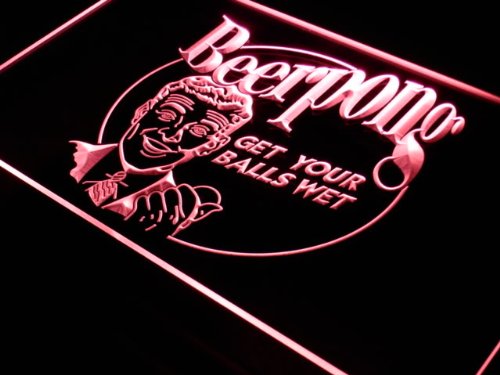
Image: The ADVPRO j310 Beer Pong Neon LED Light Sign, showing its design and the top-mounted aluminum light box with hanging chain.
Note on Color: The default color is as shown in the product image. If you ordered a custom color (blue, red, green, pink, yellow, purple, orange, or white), ensure you received the correct color. Color cannot be changed by the user after purchase.
5. Operating Instructions
To operate your ADVPRO neon LED light sign:
- Power On: Locate the ON/OFF switch on the power cord. Flip the switch to the 'ON' position to illuminate the sign.
- Power Off: To turn off the sign, flip the switch to the 'OFF' position. For extended periods of non-use, unplug the power adapter from the wall outlet.
6. Maintenance
Proper maintenance ensures the longevity of your sign:
- Cleaning: Disconnect the power before cleaning. Use a soft, dry, lint-free cloth to gently wipe the acrylic surface. Do not use abrasive cleaners, solvents, or excessive moisture, as these can damage the acrylic or electronic components.
- Storage: If storing the sign, keep it in its original packaging or a protective cover in a dry, cool place to prevent dust accumulation and accidental damage.
7. Troubleshooting
If your sign is not functioning correctly, refer to the following common issues and solutions:
| Problem | Possible Cause | Solution |
|---|---|---|
| Sign does not light up. | No power supply. | Check if the power adapter is securely plugged into both the sign and the wall outlet. Ensure the ON/OFF switch is in the 'ON' position. Test the outlet with another device. |
| Sign flickers or dims. | Loose connection or unstable power. | Ensure all connections are secure. Try plugging into a different outlet. If the issue persists, contact customer support. |
| Sign is damaged. | Physical impact or improper handling. | Discontinue use. Contact customer support for assistance regarding repair or replacement options under warranty. |
8. Specifications
- Model: j310
- Overall Size: W 12" x H 8.5" (300mm x 210mm)
- Product Dimensions: 12 x 1 x 8.5 inches
- Item Weight: 15.8 ounces
- Light Source: LED
- Light Type: LED, Neon
- Estimated LED Lifespan: > 100,000 hours
- Material: Plastic (Acrylic panel), Aluminum (Light box)
- Power Cord Length: 5 Ft. (1.5m) with ON/OFF switch
- Manufacturer: ADVPRO
9. Warranty Information
Your ADVPRO j310 Beer Pong Neon LED Light Sign comes with a 1-Year Limited Warranty for the light components. This warranty covers defects in materials and workmanship under normal use.
To validate your warranty, ensure your product has the official ADVPRO laser sticker, typically found on the sign itself. This sticker signifies that the product has passed quality control. Products without this sticker may not be genuine ADVPRO products and may not be covered under warranty.
The warranty does not cover damage caused by misuse, accident, unauthorized modification, or external causes such as power surges.
10. Customer Support
For technical assistance, warranty claims, or any questions regarding your ADVPRO j310 Beer Pong Neon LED Light Sign, please contact ADVPRO customer support through the retailer where you purchased the product or visit the official ADVPRO website for contact information.


