
Introduction
The Performance Tool W181 Brake Fluid Moisture Tester is designed to accurately determine the moisture content in automotive brake fluid. This device helps ensure optimal vehicle safety by providing clear indications of fluid degradation, which can lead to reduced braking performance. It features a 5-LED readout for easy interpretation of moisture levels and is specifically calibrated for DOT 4 brake fluid, with applicability for estimates with DOT 3 brake fluid. It is not suitable for use with DOT 5 brake fluid.
Safety Information
- Always wear appropriate personal protective equipment, including safety glasses and gloves, when handling brake fluid.
- Brake fluid is corrosive and can damage painted surfaces. Avoid contact with vehicle paintwork.
- Keep the tester and brake fluid out of reach of children and pets.
- Do not ingest brake fluid. In case of accidental ingestion, seek immediate medical attention.
- Dispose of used brake fluid and batteries according to local environmental regulations.
- Ensure the vehicle is on a level surface and the engine is off before performing any tests.
Package Contents
- 1 x Performance Tool W181 Brake Fluid Moisture Tester
- 1 x AAA Battery
Setup
The Performance Tool W181 Brake Fluid Moisture Tester comes with a 1-AAA battery included, allowing for immediate use. To install or replace the battery:
- Unscrew the cap at the top of the tester to reveal the battery compartment.
- Insert one AAA battery, ensuring the correct polarity (+/-) as indicated inside the compartment.
- Securely screw the cap back onto the tester.

Operating Instructions
Follow these steps to accurately test the moisture content of your brake fluid:
- Ensure the tester is clean and dry before use.
- Remove the cap from the tester to expose the probe.
- Locate the vehicle's brake fluid reservoir. Carefully remove the reservoir cap.
- Dip the probe of the tester into the brake fluid, ensuring the two metal pins are fully submerged. Avoid touching the sides or bottom of the reservoir.
- Press the button on the tester to activate the LED indicators.
- Observe the illuminated LEDs to determine the moisture content. Refer to the interpretation guide below.
- After testing, wipe the probe clean with a dry, lint-free cloth. Do not use water or solvents.
- Replace the brake fluid reservoir cap and the tester cap.

LED Indicator Interpretation:
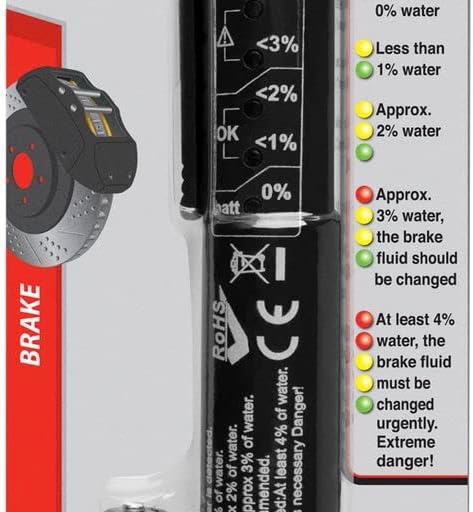
- Green LED: Battery OK / No water detected.
- Green / Yellow LED: Less than 1% water.
- Green / Yellow / Yellow LED: Approximately 2% water.
- Green / Yellow / Yellow / Red LED: Approximately 3% water. A change of liquid is recommended.
- Green / Yellow / Yellow / Red / Red LED: At least 4% water. An urgent change of liquid is necessary. Danger!
Note: This tester is calibrated for DOT 4 brake fluid. While it can provide estimates for DOT 3 fluid, it is not compatible with DOT 5 brake fluid.
Maintenance
- Cleaning: After each use, thoroughly wipe the probe with a clean, dry, lint-free cloth. Do not use water, solvents, or abrasive cleaners, as these can damage the sensor.
- Battery Replacement: Replace the AAA battery when the "batt" indicator light (if present and separate from moisture indicators) or the green "OK" light does not illuminate, or if readings become inconsistent.
- Storage: Store the tester in a cool, dry place, away from direct sunlight and extreme temperatures. Always replace the protective cap on the probe when not in use to prevent damage and contamination.
Troubleshooting
| Problem | Possible Cause | Solution |
|---|---|---|
| Tester does not turn on. | Dead or incorrectly installed battery. | Check battery polarity or replace with a new AAA battery. |
| Inconsistent or erratic readings. | Probe not fully submerged, dirty probe, or low battery. | Ensure probe is fully submerged. Clean probe thoroughly. Replace battery. |
| All LEDs illuminate immediately upon dipping. | Probe may be touching the bottom or side of the reservoir, or fluid is extremely contaminated. | Reposition the probe to ensure it is suspended in the fluid. If problem persists, fluid is likely highly contaminated and requires immediate change. |
| No LEDs illuminate when probe is dipped. | Tester not activated, or fluid has extremely low conductivity (unlikely for brake fluid). | Ensure the activation button is pressed. Verify battery is functional. |
Specifications
- Model: W181
- Brand: Performance Tool
- Dimensions (L x W x H): 8.6 x 2.75 x 1 inches (21.8 x 7 x 2.5 cm)
- Weight: Approximately 2.4 ounces (68 grams)
- Power Source: 1 x AAA Battery (included)
- Brake Fluid Compatibility: Calibrated for DOT 4, suitable for estimates with DOT 3. Not for use with DOT 5.
- Readout: 5 LED indicators for moisture percentage
- Material: Steel, plastic, or a combination of materials
- Country of Origin: Taiwan
- UPC: 039564045981, 632963511912
Warranty and Support
For warranty information or technical support regarding your Performance Tool W181 Brake Fluid Moisture Tester, please refer to the manufacturer's official website or contact their customer service department. Keep your purchase receipt as proof of purchase for any warranty claims.
Manufacturer: Wilmar Corporation