
Introduction
This manual provides comprehensive instructions for the safe and efficient use of your Marmitek BoomBoom 560 Bluetooth Over-Ear Headphones. These headphones offer excellent digital sound quality with clear mid-tones and deep bass, along with passive noise reduction for an immersive audio experience. Please read this manual thoroughly before operating the device.

Image: Marmitek BoomBoom 560 Bluetooth Over-Ear Headphones, black, shown from a slight angle.
Package Contents
Please check that all items listed below are present in your package:
- 1x Marmitek BoomBoom 560 Bluetooth Over-Ear Headphones
- 1x Micro USB to USB charging cable
- 1x 3.5mm Mini-jack audio cable (160 cm)
- 1x User manual (this document)

Image: Visual representation of the Marmitek BoomBoom 560 package contents, including the headphones, charging cable, audio cable, and user manual.
Product Overview: Controls and Ports
Familiarize yourself with the controls and ports on your BoomBoom 560 headphones:
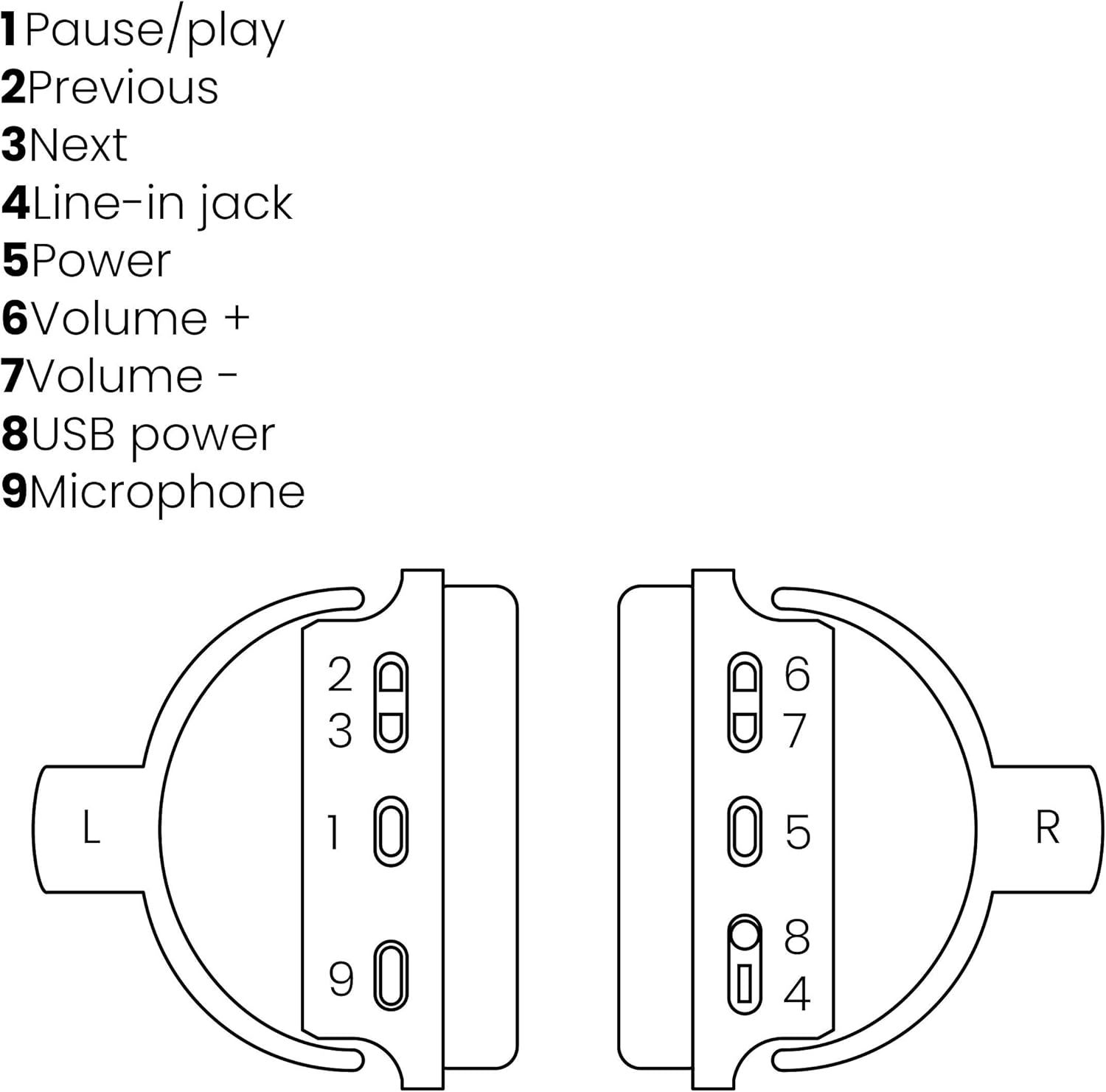
Image: A line drawing illustrating the left and right ear cup controls and ports, numbered for identification.
- Pause/Play Button: Controls music playback.
- Previous Track Button: Skips to the previous song.
- Next Track Button: Skips to the next song.
- Line-in Jack: For wired audio connection using the 3.5mm cable.
- Power Button: Turns the headphones on/off and initiates Bluetooth pairing.
- Volume + Button: Increases the volume.
- Volume - Button: Decreases the volume.
- USB Power Port: For charging the headphones using the Micro USB cable.
- Microphone: Built-in microphone for hands-free calls.
Setup
1. Charging the Headphones
Before first use, fully charge your headphones. Connect the Micro USB end of the charging cable to the USB Power Port (8) on the headphones and the standard USB end to a USB power adapter (not included) or a computer's USB port. The LED indicator will show charging status. A full charge provides over 8 hours of playback time.
2. Bluetooth Pairing
To connect your headphones wirelessly to a Bluetooth-enabled device:
- Ensure the headphones are turned off.
- Press and hold the Power Button (5) until the LED indicator flashes blue and red, indicating pairing mode.
- On your smartphone, tablet, or other Bluetooth device, enable Bluetooth and search for available devices.
- Select "BoomBoom 560" from the list of found devices.
- Once connected, the LED indicator will flash blue slowly.

Image: Illustration depicting various Bluetooth-enabled devices (laptop, smartphone, tablet) wirelessly transmitting audio to the headphones.
3. Wired Connection
If Bluetooth is not available or the battery is depleted, you can use the included 3.5mm audio cable. Connect one end of the cable to the Line-in Jack (4) on the headphones and the other end to the audio output of your device.
Operating Instructions
Power On/Off
- To Power On: Press and hold the Power Button (5) for approximately 3 seconds until the LED indicator flashes blue.
- To Power Off: Press and hold the Power Button (5) for approximately 3 seconds until the LED indicator turns off.
Music Playback
- Play/Pause: Press the Pause/Play Button (1) once.
- Next Track: Press the Next Track Button (3) once.
- Previous Track: Press the Previous Track Button (2) once.
Call Management
When connected via Bluetooth, you can manage phone calls using the built-in microphone (9):
- Answer/End Call: Press the Pause/Play Button (1) once.
- Reject Call: Press and hold the Pause/Play Button (1) for approximately 2 seconds.
Volume Control
- Increase Volume: Press the Volume + Button (6).
- Decrease Volume: Press the Volume - Button (7).

Image: A user enjoying music or media with the Marmitek BoomBoom 560 headphones while relaxing at home.
Maintenance
To ensure the longevity and optimal performance of your headphones:
- Clean the headphones with a soft, dry cloth. Do not use abrasive cleaners or solvents.
- Avoid exposing the headphones to extreme temperatures, humidity, or direct sunlight.
- Store the headphones in a cool, dry place when not in use.
- Do not attempt to disassemble or repair the headphones yourself, as this will void the warranty.
Troubleshooting
If you encounter issues with your BoomBoom 560 headphones, refer to the following common solutions:
- No Power: Ensure the headphones are fully charged. Connect them to a power source using the USB charging cable.
- Cannot Pair via Bluetooth:
- Make sure the headphones are in pairing mode (LED flashing blue and red).
- Ensure your Bluetooth device's Bluetooth function is enabled and within range (typically 10 meters).
- Try turning off and on both the headphones and your Bluetooth device.
- Delete "BoomBoom 560" from your device's Bluetooth list and attempt to pair again.
- No Sound:
- Check the volume levels on both the headphones and your connected device.
- Ensure the headphones are properly paired or the 3.5mm audio cable is securely connected.
- If using Bluetooth, try disconnecting and reconnecting.
- Poor Sound Quality:
- Move closer to your Bluetooth device to reduce interference.
- Ensure there are no obstacles between the headphones and the device.
- Check the audio source for quality issues.
- Loose Earcup Bracket: If the earcup bracket feels loose, handle the headphones with care. Avoid excessive force when adjusting or folding. If the issue persists and affects functionality, contact customer support.
Specifications
| Model Name | BoomBoom 560 |
| Model Number | 8122 |
| Brand | Marmitek |
| Connectivity Technology | Wireless (Bluetooth), Wired (3.5mm jack) |
| Bluetooth Compatibility | Yes |
| Form Factor | Over-ear |
| Material | Leather (earcups) |
| Special Features | Noise Reduction |
| Microphone Technology | Omni (Built-in) |
| Battery Description | Lithium-Ion (Li-Ion) |
| Battery Life | Over 8 hours (approx.) |
| Signal-to-Noise Ratio (SNR) | 82 dB |
| Product Dimensions | 23 x 5 x 18 cm; 100 g |
Warranty and Support
Marmitek products are designed and manufactured to high quality standards. For information regarding warranty terms and conditions, please refer to the documentation provided with your purchase or visit the official Marmitek website.
For further assistance or technical support, please visit the Marmitek Store on Amazon or the official Marmitek support channels.

Image: Logo indicating "Dutch Quality" and compliance with "EU European Standards".


