
Introduction
This manual provides detailed instructions for the installation, operation, and maintenance of the SPT 15-BA07 High Sensitive Audio Pickup Device. This device is designed to add audio functionality to CCTV security camera systems, capturing clear sound within its operational range.
Product Overview
The SPT 15-BA07 is a compact and highly sensitive audio pickup device, also known as an audio box or microphone, specifically designed for integration with existing CCTV camera setups. It features a high-gain microphone capable of capturing subtle sounds, providing an audio output suitable for recording or live monitoring.

Figure 1: The SPT 15-BA07 High Sensitive Audio Pickup Device, showing the main audio box and its connecting cables with RCA connectors.
Setup and Installation
Proper installation is crucial for optimal performance. Follow these steps carefully:
- Power Supply: Connect the device to a stable 12V DC power source. The power requirement is 12V DC at 10mA. Ensure the power supply is compatible and provides clean power to avoid audio interference.
- Audio Connection: Connect the audio output of the 15-BA07 device to the audio input of your CCTV DVR, NVR, or monitor. The device provides an audio output of 2Vp-p (max). Use appropriate RCA cables for connection.
- Placement: Position the audio pickup device in an area where sound capture is desired. Avoid placing it near noisy equipment, air vents, or directly in front of speakers, as this can cause distortion or feedback. The compact size (41 x 25 x 19mm) allows for discreet placement.
- Cable Management: Secure all cables to prevent accidental disconnections and to maintain a tidy installation.
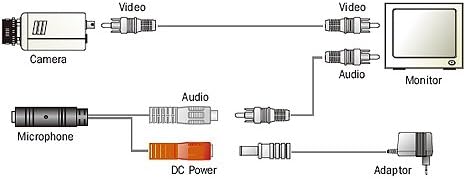
Figure 2: Typical connection diagram for the audio pickup device within a CCTV system. This diagram illustrates how the microphone connects to the audio input of a monitor or DVR, alongside the camera's video feed and power adapter.
Operating Instructions
Once installed, the SPT 15-BA07 operates continuously when powered. No user configuration is typically required for basic audio capture.
- Audio Monitoring: Access the audio feed through your connected DVR, NVR, or monitor. Refer to your recording device's manual for specific instructions on enabling and monitoring audio channels.
- Sensitivity: The device features a high sensitivity microphone, designed to pick up a wide range of sounds. Adjust audio levels on your recording or monitoring equipment if the sound is too low or too high.
Maintenance
The SPT 15-BA07 is designed for low maintenance. Follow these guidelines to ensure longevity:
- Cleaning: Gently wipe the exterior of the device with a soft, dry cloth. Do not use liquid cleaners or abrasive materials.
- Environmental Conditions: Ensure the device operates within its specified temperature range: Operating temp. -10°C to +45°C; Storage temp. -30°C to +60°C. Avoid exposure to extreme humidity, direct water, or corrosive environments.
- Cable Integrity: Periodically inspect cables for any signs of wear, damage, or loose connections.
Troubleshooting
If you encounter issues with your audio pickup device, refer to the following common problems and solutions:
| Problem | Possible Cause | Solution |
|---|---|---|
| No audio output |
|
|
| Distorted or noisy audio |
|
|
| Low audio volume |
|
|
Specifications
| Feature | Detail |
|---|---|
| Model Number | 15BA07.1 |
| Microphone Type | High sensitivity |
| Audio Output | 2Vp-p (max) |
| Power Requirement | 12V DC @ 10mA |
| Dimensions (Audio Box) | 41 x 25 x 19mm |
| Weight | 25g |
| Operating Temperature | -10°C to +45°C (14°F to 113°F) |
| Storage Temperature | -30°C to +60°C (-22°F to 140°F) |
Warranty and Support
Specific warranty details for the SPT 15-BA07 device are not provided in this manual. For warranty information, technical support, or service inquiries, please contact your original point of purchase or refer to the official SPT website for customer service contact details.
You may also visit the SPT Store on Amazon for additional product information and support resources.