1. Product Overview
The Panasonic KX-TG3821 is a cordless phone designed for home or office use, featuring a large LCD display, caller ID, and a digital answering system. This manual provides instructions for setting up, operating, and maintaining your device.
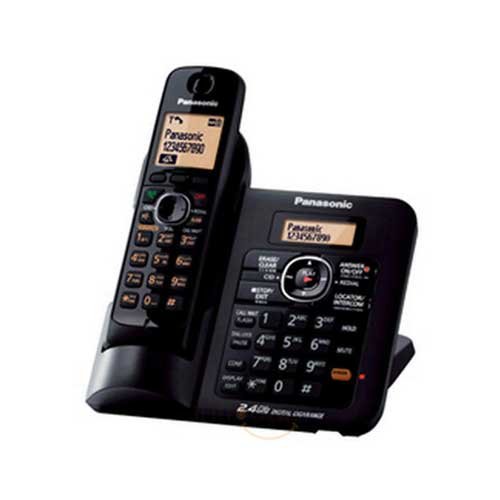
Image: The Panasonic KX-TG3821 cordless phone, showing the handset placed on its base unit.
2. Setup
2.1. What's in the Box
- Handset
- Base Unit
- Rechargeable Ni-MH Battery
- AC Adaptor (Charger)
- Telephone Line Cord
- User Guide
2.2. Battery Installation
- Open the battery compartment cover on the back of the handset.
- Insert the provided rechargeable Ni-MH battery, ensuring correct polarity (+/-).
- Close the battery compartment cover securely.
2.3. Base Unit Connection
- Connect the AC adaptor to the base unit's power jack and then plug it into a standard electrical outlet.
- Connect the telephone line cord to the base unit's line jack and then plug it into a telephone wall jack.
- Place the base unit on a flat, stable surface, or mount it on a wall using the smart wall mountable design.
2.4. Initial Charging
Place the handset on the base unit. The handset will begin charging. Allow the handset to charge for at least 7 hours before initial use to ensure optimal battery performance.
3. Operating Instructions
3.1. Making and Receiving Calls
- To Make a Call: Lift the handset from the base or press the TALK button, then dial the phone number.
- To Receive a Call: When the phone rings, lift the handset or press the TALK button.
- To End a Call: Place the handset back on the base unit or press the OFF button.
3.2. Caller ID
The phone supports Caller ID with a memory for up to 50 names and numbers. When a call is received, the caller's information will be displayed on the large 1.8-inch LCD screen (service subscription required from your telephone provider).
3.3. Phonebook
Store up to 100 names and numbers in the phonebook for quick dialing. Refer to the detailed user guide for instructions on adding, editing, and deleting phonebook entries.
3.4. Digital Answering System
The integrated digital answering system records incoming messages. The message counter on the LCD display indicates the number of new messages. Follow the on-screen prompts or refer to the full manual for setup and message retrieval.
3.5. Power Failure Talk System
In the event of a power outage, the handset can temporarily draw power from the base unit to allow for limited call functionality. This feature ensures basic communication during power interruptions.
4. Maintenance
4.1. Cleaning
Wipe the handset and base unit with a soft, dry cloth. Do not use liquid cleaners or aerosol sprays, as these may damage the device. Ensure the phone is unplugged from the power outlet before cleaning.
4.2. Battery Care
- Use only the specified rechargeable Ni-MH battery.
- Avoid exposing the battery to extreme temperatures.
- If the phone will not be used for an extended period, remove the battery to prevent leakage.
5. Troubleshooting
If you encounter issues with your Panasonic KX-TG3821, please refer to the following common solutions:
- No Dial Tone: Ensure the telephone line cord is securely connected to both the base unit and the wall jack. Check if the AC adaptor is properly plugged in.
- Cannot Make/Receive Calls: Verify that the handset is charged. Check if the phone line is active.
- Poor Sound Quality: Move the handset closer to the base unit. Ensure there are no large metal objects or other electronic devices interfering with the signal.
- Handset Not Charging: Ensure the handset is correctly placed on the base unit and the charging contacts are clean. Check the AC adaptor connection.
- Display Not Working: Ensure the battery is properly installed and charged.
For more complex issues, consult the comprehensive user guide or contact Panasonic customer support.
6. Specifications
| Feature | Specification |
|---|---|
| Model Number | KX-TG3821 |
| Telephone Type | Cordless |
| Display | Large 1.8-inch LCD |
| Caller ID Memory | 50 names and numbers |
| Phonebook Entries | 100 names and numbers |
| Answering System | Digital |
| Special Features | Reversible handset, Power failure talk system, Smart wall mountable |
| Battery Type | Rechargeable Ni-MH |
| Power Source | Battery Powered |
| Item Weight | 1 kg 740 g |
| Package Dimensions | 27 x 25.04 x 13 cm |
7. Warranty and Support
7.1. Manufacturer's Warranty
This product comes with a 1-year manufacturer warranty from the date of purchase. Please retain your proof of purchase for warranty claims. The warranty covers manufacturing defects under normal use.
7.2. Customer Support
For technical assistance, warranty service, or further inquiries, please contact Panasonic customer support. Refer to the official Panasonic website or the contact information provided in your product packaging for the most up-to-date support details.


