
1. Introduction
The Nikon MB-D14 Multi Battery Power Pack is designed to enhance the handling capabilities and extend the battery life of your Nikon D600 or D610 Digital SLR camera. This grip provides a more comfortable and secure hold, especially during vertical shooting, and offers additional controls for improved operability.
2. Product Overview
Key Features:
- Extended Battery Life: Accommodates one or two EN-EL15 (or EN-EL3e) lithium-ion batteries, or six AA batteries when used with the optional MS-D14 AA Battery Holder.
- Enhanced Vertical Shooting: Features an additional shutter release button, AE/AF lock button, multi-selector, and main- and sub-command dials for intuitive control in portrait orientation.
- Improved Handling: Provides a larger grip surface for a more stable and comfortable hold on the camera.
What's in the Box:
- Nikon MB-D14 Multi Battery Power Pack (Grip)
- MS-D14EN Battery Holder (for EN-EL15/EN-EL3e batteries)
- MS-D14 AA Battery Holder (for AA batteries)

Image 2.1: The Nikon MB-D14 Multi Battery Power Pack shown with its included battery holder.
3. Setup
3.1. Installing Batteries
The MB-D14 can be powered by one or two EN-EL15 (or EN-EL3e) lithium-ion batteries, or six AA batteries. Ensure batteries are fully charged before installation.
Using EN-EL15/EN-EL3e Batteries:
- Open the battery chamber cover on the MB-D14.
- Insert one or two EN-EL15 (or EN-EL3e) batteries into the MS-D14EN battery holder, ensuring correct orientation.
- Slide the loaded MS-D14EN battery holder into the MB-D14 grip until it clicks securely into place.
Using AA Batteries:
- Open the battery chamber cover on the MB-D14.
- Insert six AA batteries into the MS-D14 AA Battery Holder, observing the polarity markings.
- Slide the loaded MS-D14 AA Battery Holder into the MB-D14 grip until it clicks securely into place.

Image 3.1: Battery tray being inserted into the MB-D14 grip.

Image 3.2: Battery tray removed from the MB-D14 grip.
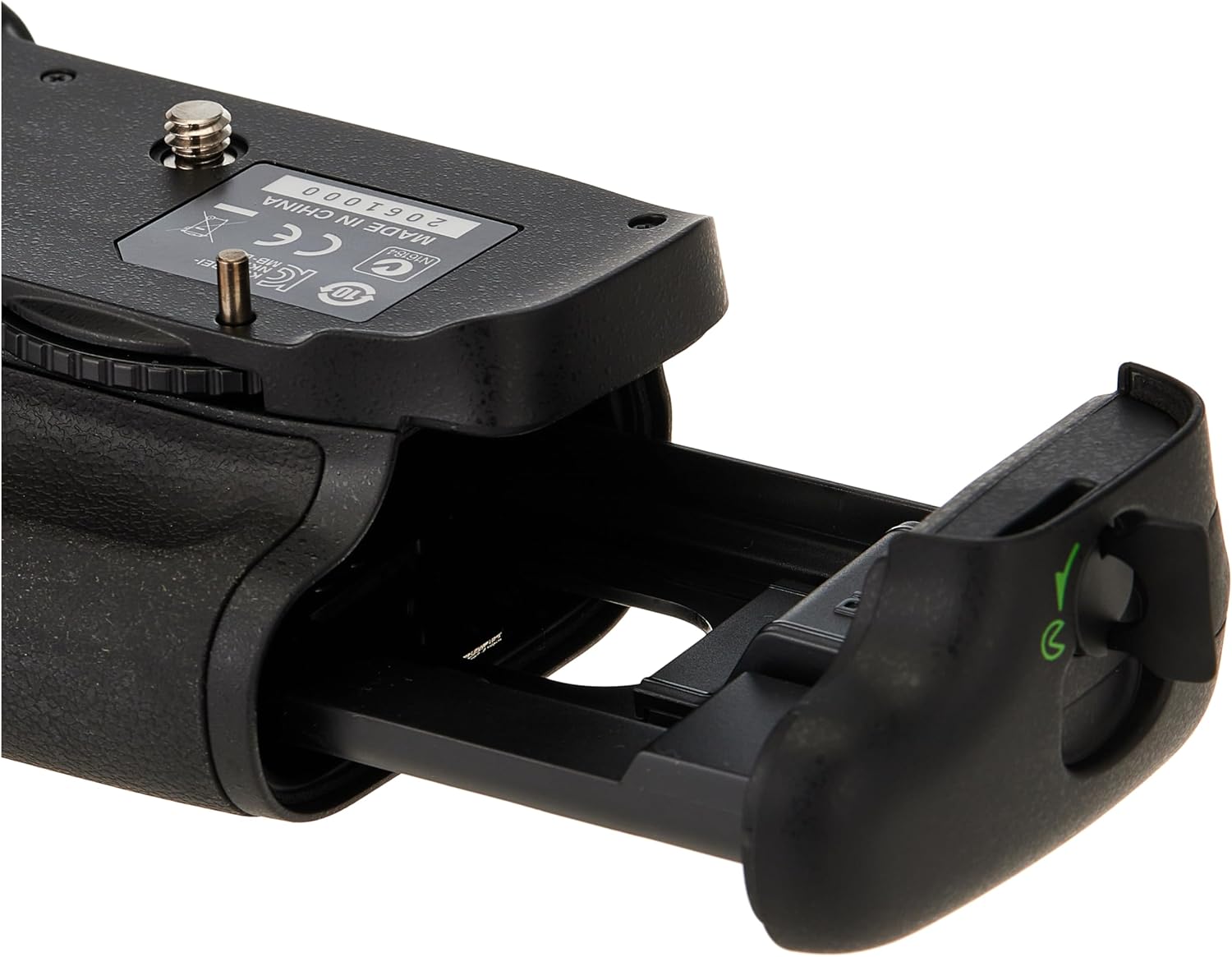
Image 3.3: Detailed view of the battery tray for the MB-D14.
3.2. Attaching to Camera
- Ensure your Nikon D600 or D610 camera is turned off.
- Remove the camera's battery and detach the battery chamber cover. Store the camera's battery chamber cover in the designated slot on the MB-D14 to prevent loss.
- Align the MB-D14 with the camera's tripod socket and battery chamber.
- Tighten the attachment screw on the MB-D14 by rotating the locking wheel until the grip is firmly secured to the camera. Do not overtighten.

Image 3.4: The attachment point and locking mechanism on the MB-D14 grip.
3.3. Charging Batteries
While the MB-D14 itself does not charge batteries, compatible EN-EL15 batteries can be charged using external dual chargers. These chargers often feature intuitive indicators and multiple input options for convenience.
Video 3.1: Demonstration of an EN-EL15 dual battery charger, highlighting its features and compatibility with various Nikon camera models. This video is provided by a seller of compatible batteries.
Video 3.2: Unboxing and demonstration of a FirstPower EN-EL15 battery and dual USB charger set, showing the charging process and various power input options. This video is provided by a seller of compatible batteries.
4. Operating the MB-D14
Once attached, the MB-D14 integrates seamlessly with your camera, providing duplicate controls for comfortable vertical shooting.
4.1. Vertical Shooting Controls
- Shutter Release Button: Located on the grip for easy access during vertical orientation.
- AE/AF Lock Button: Allows locking of exposure and focus.
- Multi-Selector: For navigating menus and selecting focus points.
- Main- and Sub-Command Dials: For adjusting camera settings like aperture and shutter speed.
4.2. Battery Management
The camera will automatically switch between the internal battery (if present) and the batteries in the MB-D14. You can configure the battery usage priority in your camera's menu settings.
5. Maintenance
- Keep the grip clean by wiping it with a soft, dry cloth.
- Avoid exposing the grip to extreme temperatures, humidity, or direct sunlight.
- Ensure battery contacts are clean and free of debris for optimal performance.
- When not in use for extended periods, remove batteries from the grip and store them separately.
6. Troubleshooting
Grip not functioning:
- Ensure the grip is securely attached to the camera and the attachment screw is tightened.
- Verify that batteries are correctly inserted and fully charged.
- Check the battery contacts on both the grip and the battery holders for cleanliness.
- Confirm that the camera's battery chamber cover has been removed and stored in the grip.
Camera not recognizing batteries in grip:
- Remove and reinsert the battery holder.
- Clean the electrical contacts on the battery holder and inside the grip with a clean, dry cloth.
- Ensure you are using genuine Nikon EN-EL15/EN-EL3e batteries or high-quality compatible alternatives.
7. Specifications
- Model Number: 27065
- Compatible Cameras: Nikon D610, Nikon D600
- Power Sources: One or two EN-EL15 (or EN-EL3e) lithium-ion batteries, or six AA batteries (with MS-D14 AA Battery Holder)
- Operating Controls: Shutter release button, AE/AF lock button, multi-selector, main-command dial, sub-command dial
- Dimensions (Approx.): 3 x 1.5 x 2.2 inches (7.6 x 3.8 x 5.6 cm)
- Weight (Approx.): 14.4 ounces (408 grams) (without batteries)
- Manufacturer: Nikon

Image 7.1: Approximate dimensions of the Nikon MB-D14 Multi Battery Power Pack.
8. Warranty and Support
This product is covered by a 90-day parts and labor warranty. For support or warranty claims, please refer to the contact information provided with your purchase or visit the official Nikon support website.


