
Introduction
This manual provides essential instructions for the safe and effective use of your Pentax K-5 II DSLR camera. Please read this manual thoroughly before using the camera and keep it for future reference. The Pentax K-5 II is a robust, weather-resistant, and cold-resistant DSLR camera featuring a 16.3 MP APS-C CMOS sensor and a highly sensitive SAFOX X AF sensor for precise autofocusing in various lighting conditions.
Safety Precautions
- Do not expose the camera to extreme temperatures, humidity, or direct sunlight for extended periods.
- Avoid dropping the camera or subjecting it to strong impacts.
- Keep the camera away from strong magnetic fields.
- Do not attempt to disassemble or modify the camera. Refer all servicing to qualified personnel.
- Use only Pentax-approved accessories and power sources.
- Clean the camera body with a soft, dry cloth. For the lens and sensor, use specialized cleaning tools and solutions.
Setup
Unpacking and Checking Contents
Before proceeding, ensure all items are present in the package:
- Pentax K-5 II Camera Body
- Rechargeable Lithium-Ion Battery
- Battery Charger
- USB Cable
- Strap
- Eyecup
- Body Mount Cap
- Software CD-ROM (if included)
- Instruction Manual (this document)
Note: A tripod is typically an optional accessory and may not be included with the camera body kit.
Charging the Battery
- Insert the provided Lithium-Ion battery into the battery charger.
- Connect the charger to a power outlet. The charging indicator light will illuminate.
- Once charging is complete, the indicator light will change or turn off (refer to charger specific instructions).
- Remove the battery from the charger.
Inserting the Battery and SD Card
The battery compartment and SD card slot are located on the side of the camera body.

Figure 1: Rear view of the Pentax K-5 II camera with the SD card slot open. A blue 4GB SD card is partially inserted, and the battery compartment is visible below it. This illustrates the location for inserting both the battery and memory card.
- Open the battery/SD card compartment cover.
- Insert the charged battery into the battery compartment, ensuring correct orientation.
- Insert an SD card into the SD card slot with the label facing the correct direction until it clicks into place.
- Close the compartment cover securely.
Attaching a Lens
- Remove the body cap from the camera and the rear cap from the lens.
- Align the red or white index mark on the lens with the corresponding mark on the camera body.
- Mount the lens by rotating it clockwise until it clicks into place.
Operating Instructions
Camera Controls Overview
Familiarize yourself with the main controls on the camera body.
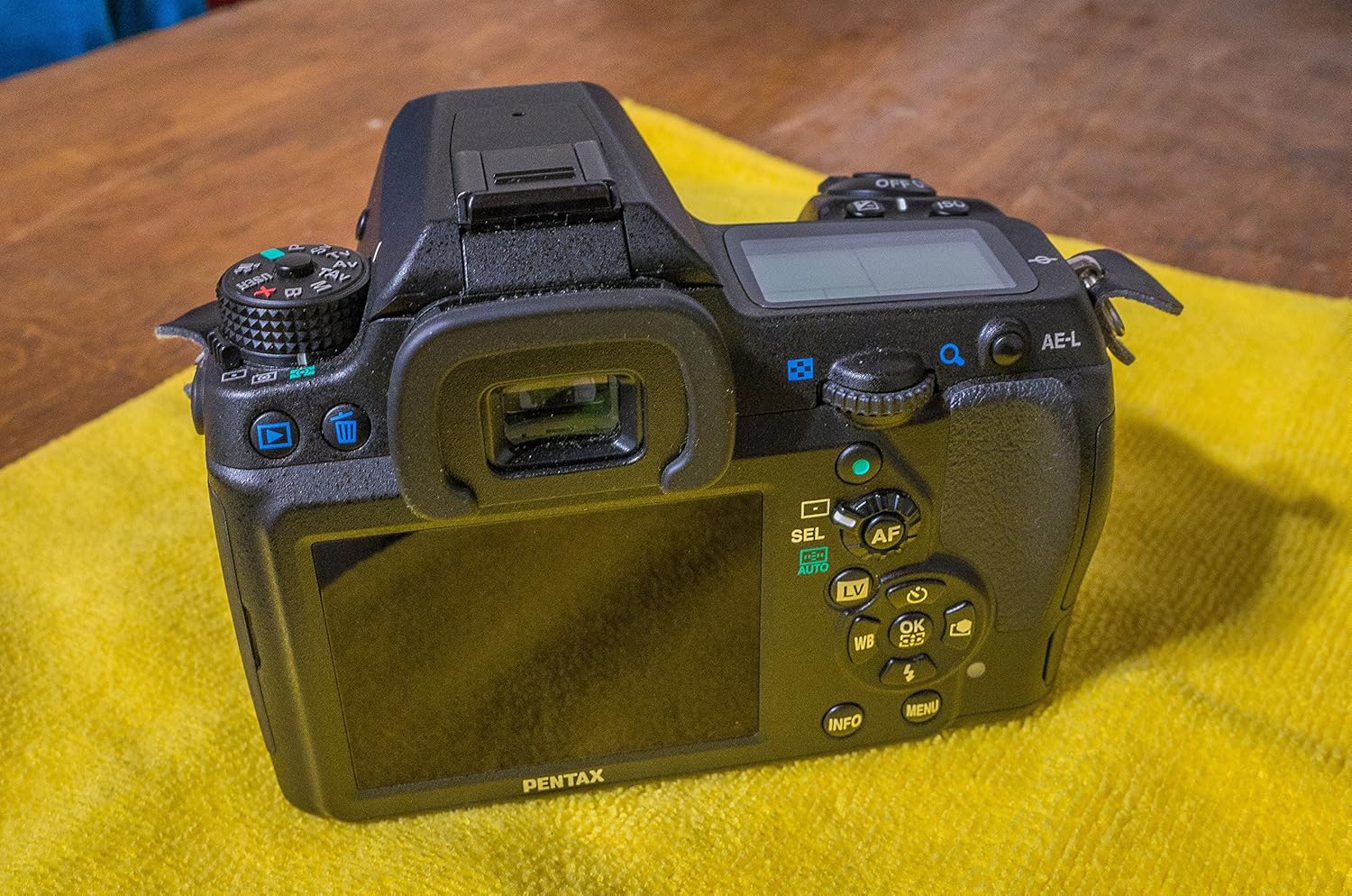
Figure 2: Rear view of the Pentax K-5 II camera, highlighting the LCD screen, viewfinder, and various control buttons. Key controls visible include the four-way controller, AF button, Live View (LV) button, INFO button, MENU button, and AE-L button.
- Power Switch: Located near the shutter button, turns the camera on/off.
- Shutter Button: Press halfway to focus, fully to take a picture.
- Mode Dial: Selects shooting modes (e.g., P, Av, Tv, M, B, X, USER).
- Control Dials: Front and rear dials adjust settings like aperture and shutter speed.
- LCD Monitor: Displays menus, settings, and live view.
- INFO Button: Displays or hides shooting information on the LCD.
- MENU Button: Accesses the camera's main menu system.
- Four-Way Controller: Navigates menus and selects options.
- AF Button: Activates autofocus.
- LV (Live View) Button: Toggles Live View mode.
- AE-L Button: Locks exposure.
Basic Shooting
- Turn On: Rotate the power switch to ON.
- Select Mode: Rotate the mode dial to your desired shooting mode (e.g., P for Program Auto).
- Focus: Look through the viewfinder or use Live View. Press the shutter button halfway to focus. The camera's SAFOX X AF sensor provides broad autofocusing capabilities.
- Shoot: Press the shutter button fully to capture the image.
Key Features for Enhanced Photography
- 16.3 MP APS-C CMOS Sensor: Delivers high-resolution images with excellent detail.
- High Sensitivity ISO Range (80-51200): Allows for shooting in various lighting conditions with reduced noise.
- Pentax Body-Based Shake Reduction: Provides in-camera image stabilization for sharper handheld shots.
- Weather-Sealed and Cold-Proof Design: Ensures durability and reliable operation in challenging environments.
- 7 FPS Continuous Shooting: Captures fast-moving subjects with ease.
- Air Gap Free 3-Inch LCD: Offers clear viewing with 921,000 dots of resolution.
Maintenance
Cleaning the Camera
- Camera Body: Use a soft, lint-free cloth to wipe the camera body. For stubborn dirt, slightly dampen the cloth with water.
- LCD Monitor: Gently wipe with a microfiber cloth designed for optics. Avoid pressing too hard.
- Lens: Use a lens brush to remove dust, then a lens cleaning solution and a microfiber cloth.
- Image Sensor: Cleaning the image sensor should be done with extreme care. If dust spots appear on your images, use the camera's built-in sensor cleaning function first. For persistent dust, consult a professional service center.
Battery Care
- Store batteries in a cool, dry place when not in use.
- Avoid fully discharging the battery frequently to prolong its lifespan.
- Do not expose batteries to high temperatures or direct sunlight.
Storage
- When storing the camera for extended periods, remove the battery.
- Store the camera in a dry, well-ventilated area, preferably with a desiccant to prevent mold and mildew.
- Attach the body cap and lens caps to protect the sensor and lens elements.
Troubleshooting
| Problem | Possible Cause | Solution |
|---|---|---|
| Camera does not turn on. | Battery is not charged or incorrectly inserted. | Charge the battery fully and reinsert it correctly. |
| Images are blurry. | Incorrect focus, camera shake, or dirty lens. | Ensure proper focus, use a faster shutter speed, or clean the lens. Check image stabilization settings. |
| No images are recorded. | SD card is full, not inserted, or corrupted. | Insert a formatted SD card, delete unnecessary files, or try a different card. |
| Flash does not fire. | Flash mode is off, or battery is low. | Check flash settings. Ensure battery is sufficiently charged. |
| LCD screen is blank or unresponsive. | Camera may be in viewfinder-only mode, or a temporary software glitch. | Press the INFO or LV button. Remove and reinsert the battery to reset the camera. |
Specifications
| Feature | Detail |
|---|---|
| Model | Pentax K-5 II |
| Sensor Type | 16.3 MP APS-C CMOS sensor |
| ISO Range | 80-51200 (Expanded) |
| Autofocus System | SAFOX X AF sensor (-3 EV to +18 EV) |
| Image Stabilization | Sensor-shift (Body-based Shake Reduction) |
| LCD Monitor | 3-inch, 921,000 dots, Air Gap Free |
| Continuous Shooting | Up to 7 frames per second (FPS) |
| Weather Sealing | Dustproof, weather-resistant, cold-resistant |
| Supported File Format | RAW 14 bits (PEF, DNG), JPEG (Exif 2.3), DCF 2.0 |
| Compatible Mountings | Pentax KAF2 |
| Product Dimensions | 5.16 x 2.87 x 3.82 inches |
| Item Weight | 1.68 pounds |
| Batteries | 1 Lithium Ion battery (included) |
Warranty & Support
Warranty Information
This product may come with a manufacturer's warranty. Please refer to the warranty card included in your original packaging for specific terms and conditions. For products purchased from certain sellers, a limited warranty may be provided, such as a 90-day parts and labor warranty, or a 14-day satisfaction guarantee. Always retain your proof of purchase.
Note: A specific seller's legal disclaimer mentioned a "FULL 14 DAY NO HASSLE SATISFACTION GUARANTEE AND A 90 DAY PARTS AND LABOR WARRANTY." This applies to specific seller offers and may not be a general manufacturer warranty.
Customer Support
For technical assistance, service, or inquiries regarding your Pentax K-5 II camera, please contact Pentax customer support. Visit the official Pentax website for the most up-to-date contact information and support resources.
Pentax Official Website: Ricoh Imaging (Pentax)


