
1. Introduction
The Sekonic L-478D LiteMaster Pro Lightmeter is a professional-grade light measuring device designed for photographers and videographers. It provides accurate incident and reflected light readings, enabling precise exposure control for both still photography and cinema applications. This manual outlines the proper procedures for setting up, operating, maintaining, and troubleshooting your L-478D light meter to ensure optimal performance and longevity.
2. Setup
2.1 Battery Installation
The L-478D requires two AAA batteries for operation. To install the batteries:
- Locate the battery compartment cover on the rear of the light meter.
- Slide the cover latch to open the compartment.
- Insert two AAA batteries, ensuring correct polarity as indicated inside the compartment.
- Close the battery compartment cover securely.

Figure 2.1: Rear view of the L-478D, illustrating the battery compartment location.
2.2 Initial Power-On and Basic Settings
After installing batteries, press the power button to turn on the device. The L-478D features a touchscreen interface for navigation. Upon first use, you may be prompted to set the date, time, and basic measurement units. Follow the on-screen instructions to configure these settings.
While the device is designed for multi-language support, some units may have a fixed language setting. If you encounter a unit with an unchangeable language, please contact Sekonic support for assistance.
2.3 Camera Calibration
For optimal accuracy, the L-478D allows for calibration to match your specific camera's dynamic range and characteristics. This can be done using a color checker passport or similar calibration tools. Refer to the on-screen menu for calibration options and follow the detailed instructions provided by Sekonic's official tutorials for this advanced feature.

Figure 2.2: Front view of the L-478D, highlighting the touchscreen display and main controls.
3. Operating Instructions
3.1 General Operation and Menu Navigation
The L-478D features a responsive touchscreen for accessing various functions and settings. Use your finger to tap icons and swipe through menus. The 'MENU' button below the screen provides quick access to the main menu options.
3.2 Incident Light Measurement
To measure incident light, ensure the lumisphere (white dome) is extended. Point the lumisphere towards the camera position from the subject's location. Press the 'MEASURE' button on the side of the unit. The meter will display the recommended exposure settings (aperture, shutter speed, ISO).
- Dome In: Provides incident light measurement from a single source/angle, useful for multiple light setups.
- Dome Out: Provides incident light measurement in 3D, capturing light from a wider area.
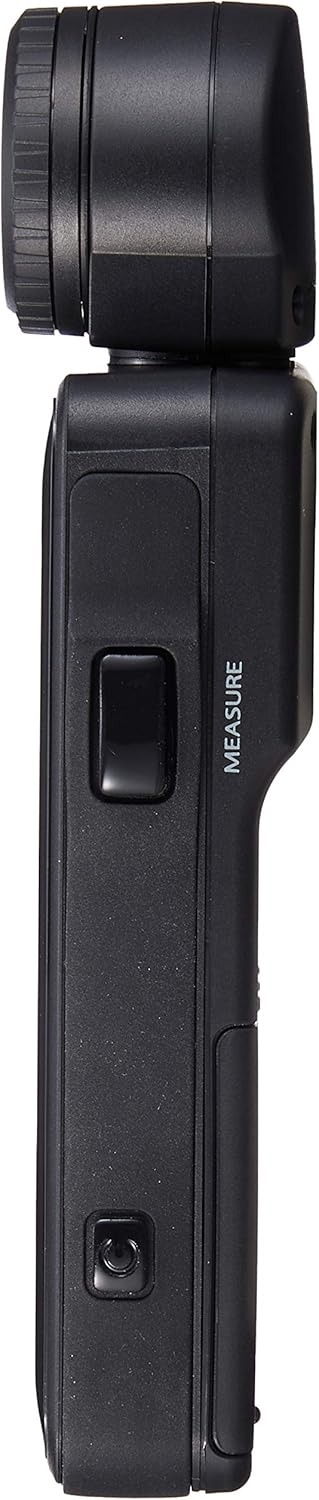
Figure 3.1: Side view of the L-478D, indicating the 'MEASURE' button.
3.3 Flash Light Measurement
The L-478D can measure flash output. Connect a sync cord to the flash sync terminal on the meter and to your flash unit, or use the cord-less flash measurement mode. Trigger the flash, and the meter will provide accurate flash exposure readings.

Figure 3.2: Bottom view of the L-478D, showing the flash sync terminal.
3.4 Reflective Light Measurement
For reflective light measurement, an optional 5-degree spot attachment is required. This attachment allows for precise measurement of light reflected from specific areas of your subject. Attach the accessory and follow the on-screen instructions for spot metering.
3.5 Memory Functions
The L-478D includes memory functions to store multiple readings. This allows you to compare different light sources or areas within a scene. Use the 'MEMORY' button on the side of the unit to save readings and recall them for analysis.

Figure 3.3: Side view of the L-478D, showing the 'MEMORY' button and USB port.
3.6 DTS Software Connectivity
The L-478D can connect to Sekonic's Data Transfer Software (DTS) via its USB port for firmware updates and advanced calibration. Ensure you have the correct drivers installed. For known driver conflicts (e.g., with Wacom drivers), a specific installation sequence may be required: install DTS version 3.05 from the original CD, connect the meter, open DTS, then update to version 3.06 from within the software. This process may need to be repeated if DTS is closed and reopened.
4. Maintenance
4.1 Cleaning
To clean the light meter, use a soft, dry cloth. For stubborn smudges on the screen, a slightly damp microfiber cloth can be used. Avoid using harsh chemicals or abrasive materials, as these can damage the screen and casing.
4.2 Battery Replacement
Replace batteries when the low battery indicator appears on the display. Always use fresh AAA batteries. Remove batteries if the unit will not be used for an extended period to prevent leakage.
4.3 Storage
Store the L-478D in its protective case in a cool, dry place away from direct sunlight, extreme temperatures, and high humidity. This will help protect the device from physical damage and environmental factors.

Figure 4.1: The protective carrying case for the L-478D light meter.
5. Troubleshooting
- Display difficult to read in bright sunlight: The L-478D's display may be challenging to view under direct, bright sunlight. Shield the screen with your hand or body to improve visibility.
- Clunky menu navigation: Some users find the menu system less intuitive initially. Familiarization through regular use and reviewing Sekonic's official video tutorials can improve user experience.
- DTS software not detecting meter: Refer to section 3.6 regarding specific installation steps for the DTS software and drivers, especially if encountering conflicts with other device drivers.
- Inaccurate readings: Ensure the lumisphere is correctly positioned for incident light, or the spot attachment is properly used for reflective light. Verify camera calibration settings. Check battery levels.
- Meter not powering on: Check battery installation and ensure batteries are fresh.
For further assistance, Sekonic provides a wealth of video tutorials on their official website, covering various aspects of meter usage and calibration.
6. Specifications
| Feature | Detail |
|---|---|
| Model Number | 401-478 |
| Product Dimensions | 2 x 1 x 5 inches (5.08 x 2.54 x 12.7 cm) |
| Item Weight | 8 ounces (226.8 grams) |
| Batteries Required | 2 AAA batteries |
| Measurement Type | Incident, Reflected (with optional attachment), Flash |
| Display | Touchscreen |
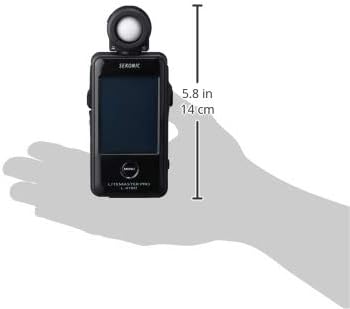
Figure 6.1: Dimensions of the L-478D light meter.
7. Warranty and Support
For warranty information, technical support, or service inquiries, please refer to the official Sekonic website or contact your local authorized Sekonic dealer. Keep your purchase receipt as proof of purchase for warranty claims.


