
1. Product Overview
The Fellowes Galaxy Comb Manual Binding Machine is designed for frequent use in office environments, providing efficient and reliable document binding. Its robust construction and user-friendly features make it suitable for handling large binding tasks.
Key features include a unique removable binding mechanism for enhanced productivity, three releasable dies to accommodate various document sizes, a rotary edge guide for precise document centering, and vertical loading for accurate punch alignment. The machine also integrates a comb storage tray and a document measuring device for convenience.

Figure 1: Front view of the Fellowes Galaxy Comb Manual Binding Machine, showcasing its main components including the punching handle, binding mechanism, and paper guides.
2. Safety Information
- Always place the machine on a stable, flat surface during operation.
- Keep hands and loose clothing clear of moving parts, especially the punching and binding mechanisms.
- Do not exceed the maximum punching or binding capacity to prevent damage to the machine and ensure proper operation.
- Empty the waste tray regularly to avoid paper jams and maintain optimal performance.
- Keep out of reach of children. This machine is intended for adult use in an office environment.
3. Setup
3.1 Unpacking and Initial Inspection
- Carefully remove the binding machine from its packaging.
- Inspect the machine for any signs of damage that may have occurred during transit. If damage is found, do not operate the machine and contact customer support.
- Remove all packing materials and protective films from the machine.
3.2 Component Identification
Familiarize yourself with the main components of the binding machine:
- Punching Handle: Used to operate the punching mechanism.
- Binding Handle: Used to open and close the binding comb.
- Paper Entry Slot: Where documents are inserted for punching.
- Rotary Edge Guide: Adjustable guide for centering documents.
- Releasable Dies: Allows selection of punching holes for different document sizes.
- Comb Storage Tray: Integrated tray for storing binding combs.
- Document Measuring Device: Helps determine the correct comb size.
- Waste Tray: Collects paper chads from punching.

Figure 2: Top-down view of the binding machine, showing the closed punching and binding mechanisms, and the overall compact design.
4. Operating Instructions
4.1 Preparing Your Document
- Ensure all pages of your document are aligned and free from staples or paper clips.
- Use the integrated document measuring device to determine the appropriate comb size for your document's thickness.
- Select the correct releasable dies based on your document size (e.g., A4, Letter).
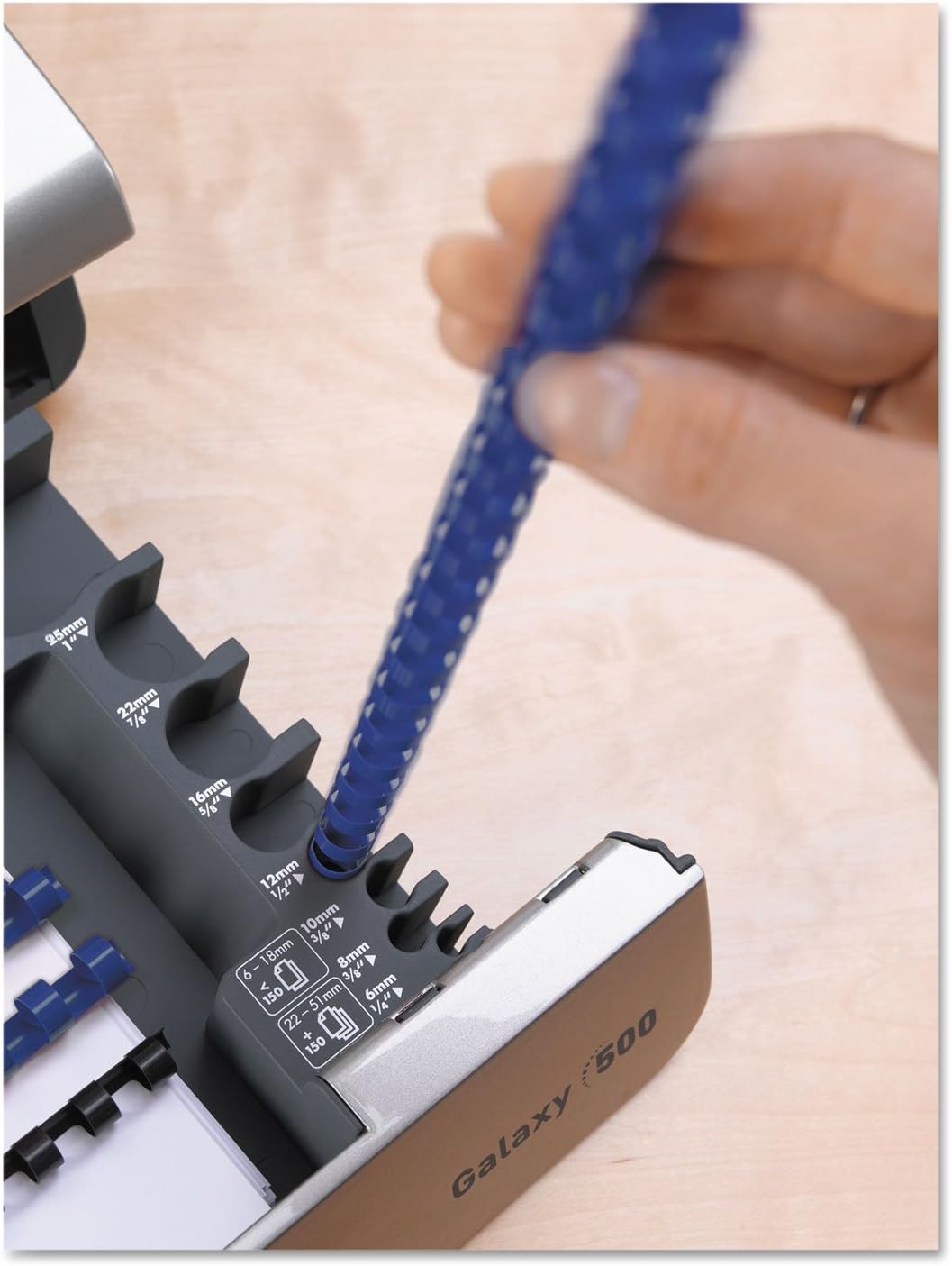
Figure 3: Close-up view of the integrated comb size guide, indicating various comb diameters and corresponding sheet capacities.
4.2 Punching Pages
- Adjust the rotary edge guide to center your document in the paper entry slot.
- Insert a stack of pages into the vertical loading slot. Ensure the stack does not exceed the maximum punching capacity of 25 sheets (20lb paper).
- Firmly press down the punching handle until the pages are fully punched.
- Release the handle and remove the punched pages. Repeat this process for all pages of your document.

Figure 4: A user demonstrating the punching process, inserting paper into the vertical loading slot and operating the punching handle.
4.3 Binding Your Document
- Place the selected binding comb onto the binding mechanism, ensuring the teeth are facing upwards.
- Pull the binding handle towards you to open the comb teeth.
- Carefully slide the punched pages onto the open comb teeth. Start with the back cover, then the main document pages, and finally the front cover.
- Once all pages are on the comb, push the binding handle away from you to close the comb teeth, securing the document.
- Remove the bound document from the machine.
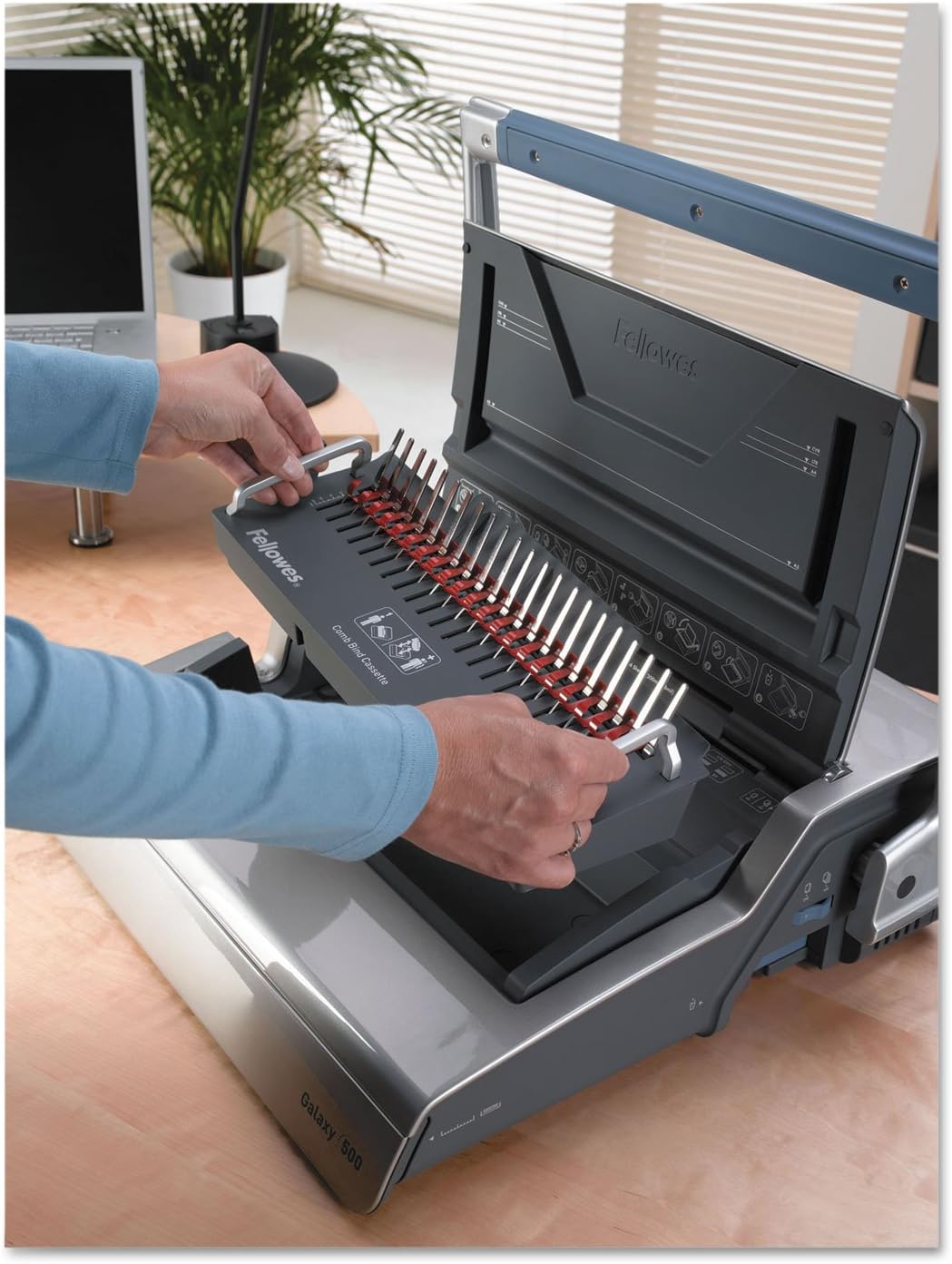
Figure 5: A user placing a binding comb onto the binding mechanism, preparing for the binding process.
4.4 Using the Removable Binding Mechanism
The Galaxy binding machine features a unique removable binding mechanism that can be used independently for increased productivity or flexibility in workspace setup.
- To remove, locate the release latches on either side of the binding mechanism and gently lift it out of the main unit.
- Place the detached binding mechanism on a stable surface.
- Follow the binding steps (Section 4.3) using the detached mechanism.
- To reattach, align the mechanism with the slots on the main unit and press down until it clicks securely into place.

Figure 6: The removable binding mechanism, shown detached from the main unit, highlighting its portability and independent functionality.
4.5 Comb Storage Tray
The integrated comb storage tray provides convenient access to your binding combs. It is located at the front of the machine.

Figure 7: The open comb storage tray, showing various sizes of binding combs stored within, along with the integrated document measuring device.
5. Maintenance
5.1 Emptying the Waste Tray
The waste tray collects paper chads generated during the punching process. It is crucial to empty it regularly to prevent blockages and ensure smooth operation.
- Locate the front-access waste tray at the bottom front of the machine.
- Gently pull out the tray.
- Dispose of the paper chads in a waste receptacle.
- Slide the waste tray back into the machine until it is securely closed.
5.2 Cleaning the Machine
To maintain the machine's appearance and functionality:
- Wipe the exterior surfaces with a soft, damp cloth. Do not use abrasive cleaners or solvents.
- Periodically check the punching dies for any paper residue and carefully remove it if present.
6. Troubleshooting
| Problem | Possible Cause | Solution |
|---|---|---|
| Pages not punching cleanly. | Exceeding punching capacity; dull dies; paper residue in dies. | Reduce the number of sheets per punch. Clean the punching dies. |
| Paper jams in punching slot. | Overloading the machine; misaligned paper. | Remove jammed paper carefully. Ensure paper is properly aligned and within capacity. |
| Comb not opening/closing properly. | Incorrect comb size for document; mechanism obstruction. | Verify comb size matches document thickness. Check for any obstructions in the binding mechanism. |
| Waste tray full. | Accumulated paper chads. | Empty the waste tray. |
7. Specifications
- Binding Spine Type: Comb
- Binding Sheet Capacity: 500 sheets
- Punching Sheet Capacity: 25 sheets (20lb paper)
- Maximum Binding Edge: 12 inches
- Product Dimensions: 21.5 x 25 x 9.13 inches
- Item Weight: 27.1 pounds
- Model Number: FEL5218201
- Manufacturer: Fellowes
8. Warranty and Support
For warranty information and customer support, please refer to the documentation included with your product or visit the official Fellowes website. Keep your purchase receipt as proof of purchase for any warranty claims.
For technical assistance or inquiries, please contact Fellowes customer service through their official channels.


