
1. Introduction
The Sony HVL-F60M is a versatile lighting solution designed for photographers and videographers using Sony Alpha cameras. It features a subtle design and faster operation, incorporating the Quick Navi interface for easy adjustment of flash and lighting settings. The patented Quick Shift Bounce design allows for seamless transitions between horizontal and vertical shooting without compromising light output. Additionally, a built-in LED video light enhances its utility in various movie shooting scenarios. Its dust and moisture-resistant construction, along with a range of included attachments, makes it a reliable accessory for diverse photographic needs.
2. What's in the Box
- Mini-stand (1)
- Carrying Case (1)
- Mini Carrying Case (1)
- Carrying Pouch (1)
- Bounce Adapter for Flash (1)
- Color Conversion Filter for LED Light (1)
- Connector Protect Cap (1)
- Shoe Adapter (ADP-AMA) (1)
3. Key Features
- Flash with built-in LED light for creative applications
- Guide number of 60 (105mm lens at ISO 100)
- 1200 lux /19 in. (0.5m) for the LED light
- Flash effective range of 90 feet (28m 105mm lens @ ISO100)
- LED light effective range 6 feet (2m)
4. Setup
4.1. Battery Installation
The HVL-F60M flash is powered by four AA batteries. To install, open the battery compartment cover, insert the batteries according to the polarity indicators, and close the cover securely.

Image: Side view of the HVL-F60M flash, highlighting the battery compartment. Ensure correct battery orientation during installation.
4.2. Mounting the Flash
Attach the HVL-F60M flash to your compatible Sony Alpha camera's multi-interface shoe. Slide the flash into the shoe until it clicks into place, then secure it using the locking mechanism.

Image: The HVL-F60M flash securely mounted on a Sony Alpha camera, ready for use.
4.3. Attaching Accessories
The HVL-F60M comes with various accessories, including a bounce adapter and color conversion filter. These can be attached to the flash head to modify light output and color temperature. For older Alpha cameras, use the provided Shoe Adapter (ADP-AMA).
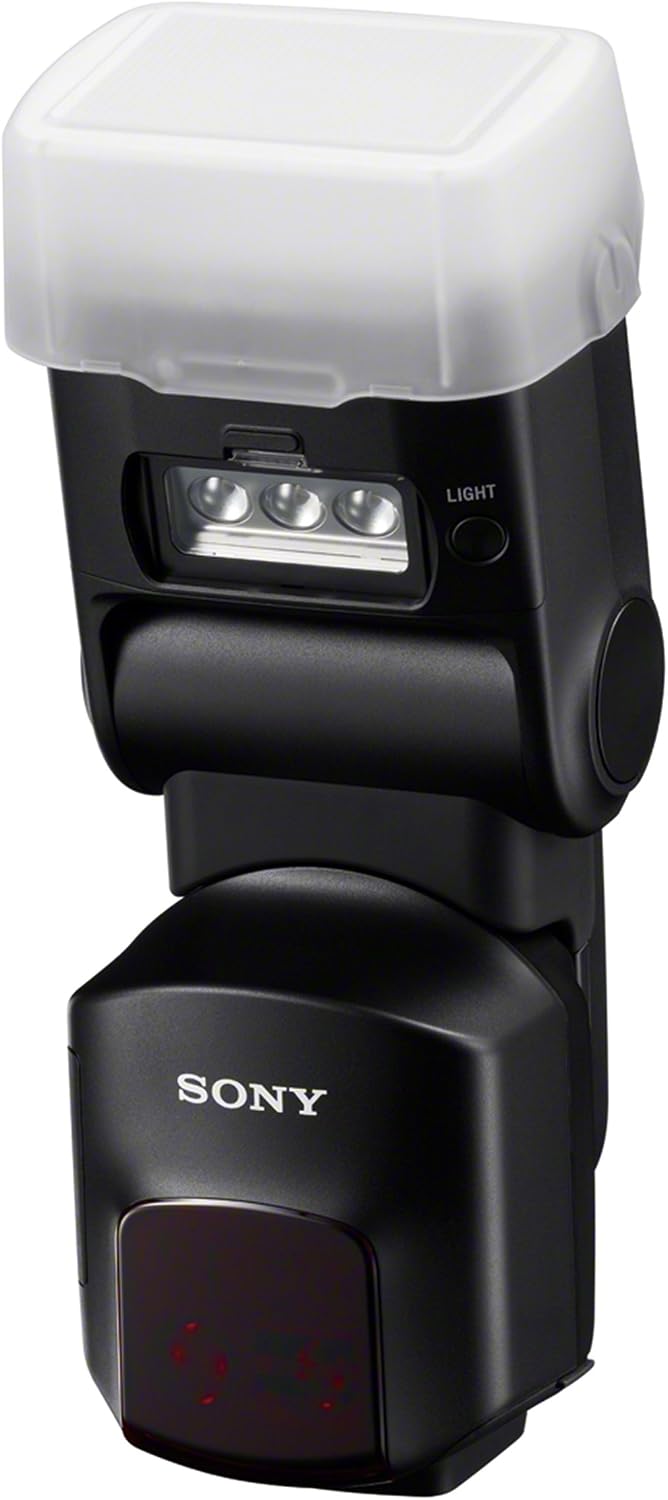
Image: The HVL-F60M flash with a diffuser attached, demonstrating how accessories can modify light output.
5. Operating Instructions
5.1. Quick Navi Interface
The Quick Navi interface allows for quick and easy adjustment of flash and lighting settings. Use the control dial and buttons to navigate through options such as flash mode, compensation, and zoom angle.

Image: The HVL-F60M flash's front panel with the Quick Navi display showing various settings.
5.2. Flash Modes
The HVL-F60M supports various flash modes including Through-The-Lens (TTL) for automatic exposure, Manual for precise control, and Multi for stroboscopic effects. It can also function as a wireless controller or slave flash.
Video: Demonstrates various flash modes and settings of the HVL-F60M flash, including TTL, manual, and wireless control options.
5.3. LED Video Light
The integrated LED video light provides continuous illumination, ideal for video recording or as a modeling light for still photography. Adjust its brightness using the Quick Navi interface.

Image: The HVL-F60M flash with its powerful LED video light turned on.
Video: Illustrates the use of continuous LED light for macro photography, showing how it helps in controlling light and achieving desired results.
5.4. Quick Shift Bounce
The Quick Shift Bounce mechanism allows the flash head to rotate 90 degrees left or right, and tilt up to 150 degrees back or 10 degrees down. This enables flexible light bouncing for softer, more natural illumination, regardless of camera orientation.

Image: The HVL-F60M flash head angled for bounce lighting, showcasing its flexibility.
Video: Demonstrates the Quick Shift Bounce feature, showing how the flash head can be rotated and tilted for optimal light bouncing.
5.5. Wireless Flash Control
The HVL-F60M can be used as a wireless commander to control other compatible Sony flashes, allowing for advanced multi-light setups. Adjust settings for multiple flashes directly from the HVL-F60M's Quick Navi interface.
Video: Explains how to use multiple light sources with the HVL-F60M, demonstrating its capabilities as a wireless flash controller.
6. Maintenance
To ensure optimal performance and longevity of your HVL-F60M flash, keep it clean and dry. Use a soft, dry cloth to wipe the exterior. Avoid exposing the flash to extreme temperatures or humidity. When not in use for extended periods, remove the batteries.
7. Troubleshooting
If you encounter issues with your HVL-F60M flash, consider the following:
- Flash not firing: Check battery levels and ensure they are correctly inserted. Verify the flash is securely mounted to the camera and turned on.
- Incorrect exposure: Review your camera and flash settings (e.g., flash mode, compensation, ISO). Ensure the flash head is pointed correctly for bounce or direct lighting.
- Overheating: If the flash stops firing due to overheating, allow it to cool down for several minutes before resuming use. Reduce flash power or frequency of firing if this occurs often.
- Wireless communication issues: Ensure all flashes are set to the correct channels and groups. Check for obstructions between the commander and slave flashes.
For further assistance, refer to the full user manual or contact Sony customer support.
8. Specifications
| Specification | Value |
|---|---|
| Product Dimensions | 4.57 x 4.3 x 8.6 inches |
| Item Weight | 1 pounds |
| Item Model Number | HVLF60M |
| Manufacturer | Sony |
| Compatible Mountings | Sony |
| Camera Flash Type | Built-In |
| Flash Sync Speed | 1/200 or 1/250 |
9. Warranty and Support
This product includes a FULL 14 DAY SATISFACTION GUARANTEE AND 90 DAY PARTS AND LABOR WARRANTY. For detailed warranty information or technical support, please refer to the documentation included with your product or visit the official Sony support website.