
Mastech MS8229
User Manual
Mastech MS8229 5-in-1 Digital Multimeter
Model: MS8229
Introduction
The Mastech MS8229 is a versatile 5-in-1 digital multimeter designed for professional and hobbyist use. It integrates the functions of a multimeter, sound level meter, thermometer, luxmeter, and humidity meter into a single, portable device. This manual provides detailed instructions for the safe and effective operation of the MS8229.
Safety Information
WARNING:
- Always adhere to all local and national safety codes.
- Do not use the device if it appears damaged or if the insulation on the test leads is compromised.
- Ensure the correct function and range are selected before making any measurements.
- Be cautious when working with voltages above 30V AC RMS, 42V peak, or 60V DC, as these pose a shock hazard.
- Replace batteries promptly when the low battery indicator appears to ensure accurate readings.
- The device features sound and light warnings for incorrect test lead connections; always heed these warnings.
Product Overview
The Mastech MS8229 features a large LCD digital display with a backlight for clear readings in various lighting conditions. Its design allows for single-hand operation of the range switch.
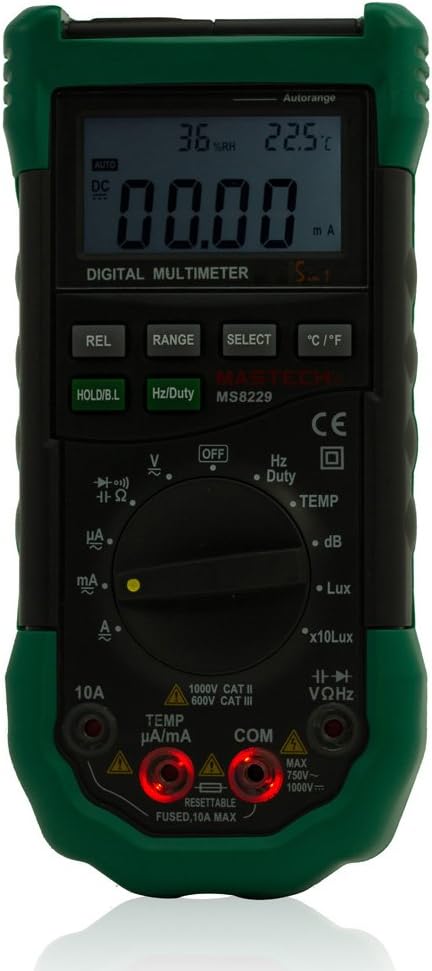
Figure 1: Front view of the Mastech MS8229 Digital Multimeter, showing the display, function dial, and buttons.
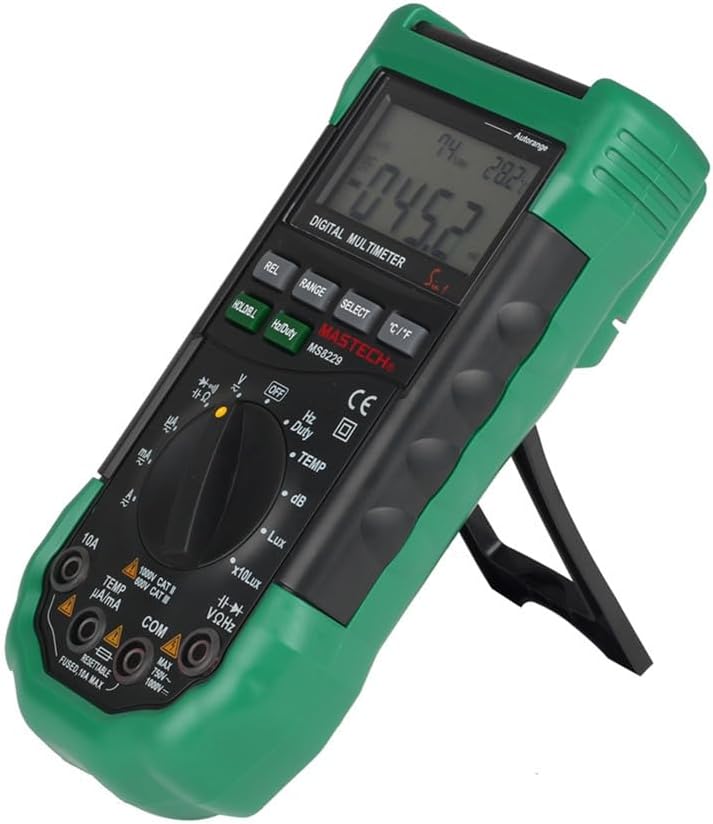
Figure 2: Side view of the Mastech MS8229 Digital Multimeter, illustrating the integrated kickstand for convenient viewing.

Figure 3: Rear view of the Mastech MS8229 Digital Multimeter, highlighting the battery compartment and sensor locations.
Controls and Indicators:
- LCD Display: Shows measurement readings, units, and function indicators. Features a backlight.
- Function Dial: Rotary switch to select measurement modes (Voltage, Current, Resistance, Frequency, Temperature, Humidity, Lux, Sound Level, Diode, Continuity).
- REL Button: Activates relative measurement mode.
- RANGE Button: Toggles between auto-ranging and manual ranging.
- SELECT Button: Cycles through sub-functions within a mode (e.g., AC/DC voltage, diode/continuity).
- °C/°F Button: Toggles temperature unit between Celsius and Fahrenheit.
- HOLD/B.L Button: Freezes the current display reading. Press and hold to activate/deactivate backlight.
- Hz/Duty Button: Selects frequency or duty cycle measurement.
- Input Jacks: Terminals for connecting test leads. Features light and sound warnings for incorrect connections.
Setup
Battery Installation:
- Ensure the multimeter is turned OFF.
- Locate the battery compartment on the back of the unit.
- Unscrew the battery cover.
- Insert three 1.5V AAA batteries, observing correct polarity.
- Replace the battery cover and secure it with the screw.
Connecting Test Leads:
- For most measurements (Voltage, Resistance, Continuity, Diode, Capacitance, Frequency, Temperature, Humidity, Lux, Sound Level), connect the black test lead to the "COM" jack and the red test lead to the "VΩHz" jack.
- For current measurements (mA/µA), connect the black test lead to the "COM" jack and the red test lead to the "TEMP µA/mA" jack.
- For high current measurements (10A), connect the black test lead to the "COM" jack and the red test lead to the "10A" jack.
- The device will provide a light and sound warning if test leads are connected incorrectly for the selected function.
Operating Instructions
General Operation:
- Turn the function dial to the desired measurement mode.
- The device defaults to auto-ranging. Press the RANGE button to switch to manual ranging if needed.
- Press the SELECT button to cycle through sub-functions (e.g., AC/DC, Diode/Continuity).
- Press the HOLD/B.L button briefly to freeze the display reading. Press again to release.
- Press and hold the HOLD/B.L button to turn the backlight ON/OFF.
- The device features auto power-off to conserve battery life.
Specific Measurement Modes:
Voltage (AC/DC):
- Set the function dial to V~ (AC Voltage) or V- (DC Voltage).
- Connect test leads to the "COM" and "VΩHz" jacks.
- Apply probes to the circuit or component to be measured.
Current (AC/DC):
- Set the function dial to A~ (AC Current) or A- (DC Current).
- Connect test leads to the "COM" and "TEMP µA/mA" or "10A" jacks, depending on the expected current.
- Connect the multimeter in series with the circuit.
Resistance (Ω):
- Set the function dial to Ω.
- Connect test leads to the "COM" and "VΩHz" jacks.
- Apply probes across the component to be measured. Ensure the circuit is de-energized.
Continuity Test:
- Set the function dial to the continuity/diode symbol. Press SELECT if necessary to choose continuity.
- Connect test leads to the "COM" and "VΩHz" jacks.
- A buzzer will sound if resistance is less than 40 ohms, indicating continuity.
Diode Test:
- Set the function dial to the continuity/diode symbol. Press SELECT if necessary to choose diode.
- Connect test leads to the "COM" and "VΩHz" jacks.
- Apply probes across the diode. The display will show the forward voltage drop.
Capacitance (F):
- Set the function dial to F.
- Connect test leads to the "COM" and "VΩHz" jacks.
- Apply probes across the capacitor. Ensure the capacitor is discharged before testing.
Frequency (Hz) / Duty Cycle (%):
- Set the function dial to Hz/Duty.
- Connect test leads to the "COM" and "VΩHz" jacks.
- Press the Hz/Duty button to toggle between frequency and duty cycle.
Temperature (°C/°F):
- Set the function dial to TEMP.
- Connect the K-Type thermocouple to the "COM" and "TEMP µA/mA" jacks.
- Place the thermocouple probe at the desired measurement point.
- Press the °C/°F button to switch between Celsius and Fahrenheit.
Relative Humidity (RH):
- Set the function dial to RH.
- The built-in sensor will measure the ambient relative humidity.
Lux (Light Level):
- Set the function dial to Lux or x10Lux.
- The built-in sensor will measure the ambient light level. Use x10Lux for higher intensity light.
Sound Level (dB):
- Set the function dial to dB.
- The built-in microphone will measure the ambient sound level.
Maintenance
Cleaning:
Wipe the case with a damp cloth and mild detergent. Do not use abrasives or solvents. Keep the sensors (humidity, lux, sound) clean and free from obstructions.
Battery Replacement:
When the low battery indicator appears on the display, replace the batteries as described in the "Setup" section. Always use three new 1.5V AAA batteries.
Fuse Replacement:
The device is equipped with a resettable fuse for the 10A current range. If the 10A function stops working, disconnect the device from all power sources and allow a few minutes for the fuse to reset. If the issue persists, consult a qualified technician.
Troubleshooting
| Problem | Possible Cause | Solution |
|---|---|---|
| No display or dim display | Low batteries; device off. | Replace batteries; turn on the device. |
| Incorrect readings | Incorrect function/range selected; poor test lead connection; low batteries. | Verify function/range; ensure secure connections; replace batteries. |
| No continuity beep | Resistance too high; continuity function not selected. | Check resistance; press SELECT to ensure continuity mode is active. |
| 10A current measurement not working | Overload tripped resettable fuse. | Disconnect from power, wait for fuse to reset (a few minutes). |
| Backlight not working | Backlight off; low batteries. | Press and hold HOLD/B.L button; replace batteries. |
Specifications
| Parameter | Range / Value | Accuracy |
|---|---|---|
| DC Voltage (DCV) | 400mV / 4V / 40V / 400V / 1000V | ±0.7% |
| AC Voltage (ACV) | 400mV / 4V / 40V / 400V / 750V | ±0.8% (400mV-400V), ±1.0% (750V) |
| DC Current (DCA) | 400µA / 4mA / 40mA / 400mA / 4A / 10A | ±1.2% (400µA-400mA), ±2.0% (4A-10A) |
| AC Current (ACA) | 400µA / 4mA / 40mA / 400mA / 4A / 10A | ±1.5% (400µA-400mA), ±3.0% (4A-10A) |
| Resistance | 400Ω / 4kΩ / 40kΩ / 400kΩ / 4MΩ / 40MΩ | ±1.2% (400Ω-4MΩ), ±2.0% (40MΩ) |
| Capacitance | 40nF / 400nF / 4µF / 40µF / 100µF | ±3.0% |
| Frequency | 10Hz / 100Hz / 1KHz / 10KHz / 100KHz / 200KHz | ±2.0% (up to 200KHz) |
| Temperature | -20°C to 1000°C | ±3.0% (C/F selectable) |
| Relative Humidity (RH) | 20% to 95% | ±5.0% |
| Lux | 4,000 Lux / 40,000 Lux | ±5.0% |
| Sound Level (dB) | 40dB to 100dB | ±3.5% at 94dB |
| Continuity Test | Buzzer if resistance < 40Ω | N/A |
| Duty Cycle | 0.1% to 99.9% | ±3.0% |
| Dimensions | 195 x 92 x 55mm | N/A |
| Weight | 400g | N/A |
| Battery Type | 3 x 1.5V AAA | N/A |
Warranty and Support
For warranty information and technical support, please refer to the documentation provided with your purchase or contact Mastech customer service directly. Keep your purchase receipt as proof of purchase.
Included Accessories: Test leads, K-Type thermo probe, User Manual.
Related documentsMS8229


Ask a question about this manual
Ask about setup, troubleshooting, compatibility, parts, safety, or missing instructions. Manuals+ will review the question and use this page’s manual context to help answer it.