Introduction
The Rip Curl Pipeline World Tide Surf Watch (Model A1083) is a sophisticated timepiece designed for surfers and water enthusiasts. It features preprogrammed tide data for 500 beaches and can be configured for thousands of additional locations worldwide. This manual provides detailed instructions for setting up, operating, and maintaining your watch to ensure optimal performance and longevity.
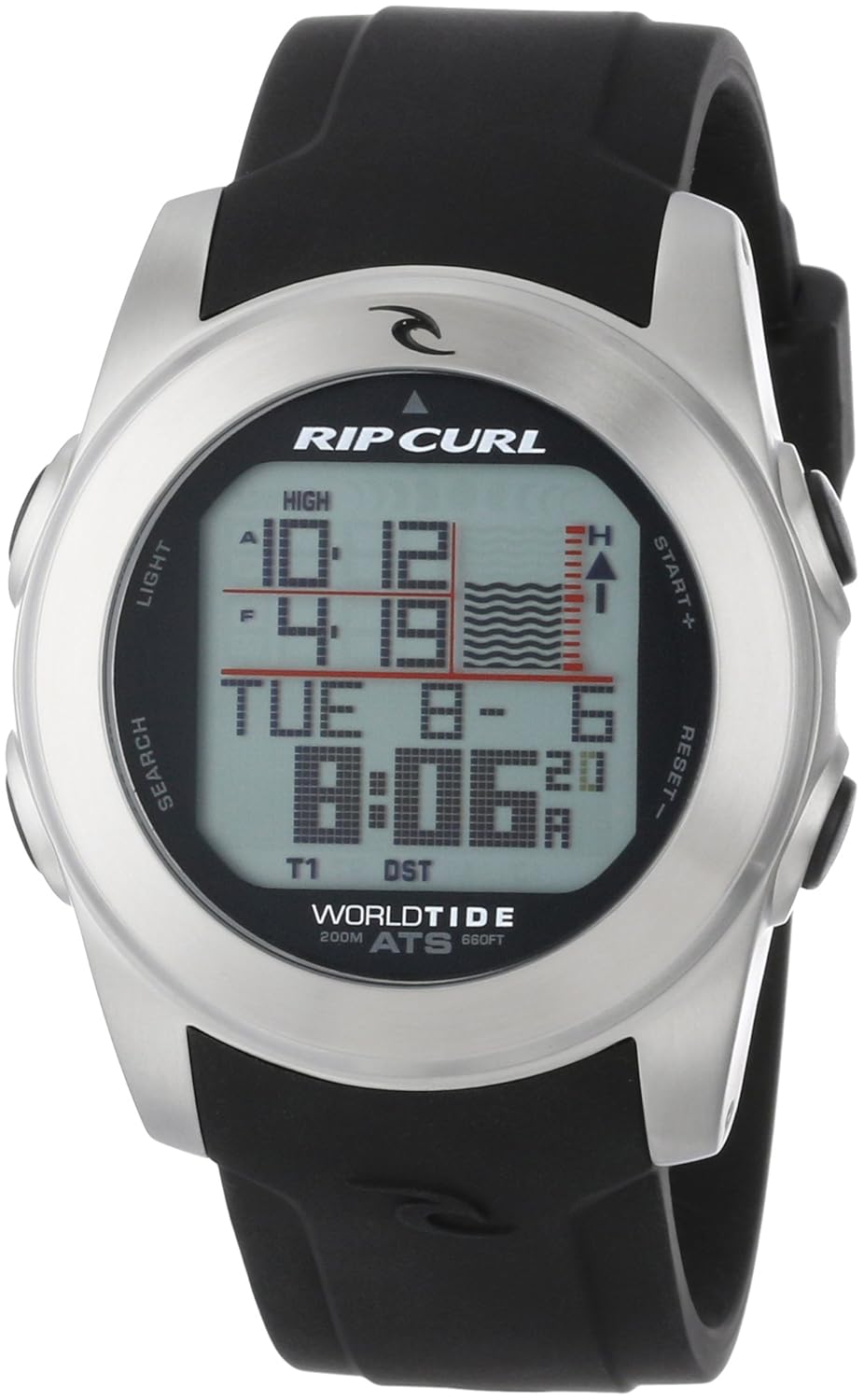
Image: Front view of the Rip Curl Pipeline World Tide Surf Watch A1083, displaying its digital interface with time and tide information. The watch features a silver-tone case and a black silicone band.
Setup
Initial Time and Date Setting
- Access Setup Mode: Press and hold the 'SEARCH' button (typically on the left side) until the watch enters setup mode.
- Navigate Settings: Use the 'START+' and 'RESET-' buttons (typically on the right side) to cycle through settings such as time zone, 12/24-hour format, date, and year.
- Adjust Values: Press the 'LIGHT' button (typically top left) to select a setting, then use 'START+' and 'RESET-' to adjust the values.
- Confirm and Exit: Press the 'SEARCH' button again to confirm your selections and exit setup mode.
Tide Location Selection
- Enter Tide Mode: From the main time display, press the 'SEARCH' button briefly to cycle through modes until 'TIDE' is displayed.
- Select Location: In Tide mode, press and hold 'SEARCH' to enter location selection. Use 'START+' and 'RESET-' to browse through the preprogrammed 500 beach locations or to manually input coordinates for other locations.
- Confirm Selection: Press 'SEARCH' to confirm your desired tide location. The watch will then display the current tide information for that location.
Operating Instructions
Understanding Display Modes
Your watch features multiple display modes accessible by pressing the 'SEARCH' button:
- Time Mode: Displays current time, date, and day of the week.
- Tide Mode: Shows current and future tide graphs and data for the selected location.
- Compass Mode: Provides a digital compass reading.
- Stopwatch Mode: For timing events.
- Moonphase Mode: Displays the current moon phase.
- Heat Timer Mode: A countdown timer useful for surf heats.
- Sunrise/Sunset Mode: Displays sunrise and sunset times for the selected location.
Using the Digital Compass
- Enter Compass Mode: Press 'SEARCH' until 'COMPASS' is displayed.
- Calibration: For accurate readings, calibrate the compass periodically. Refer to the full Rip Curl A1083 manual for detailed calibration steps, typically involving rotating the watch in a figure-eight pattern.
- Reading: Hold the watch level. The display will show the cardinal direction and a numerical bearing.
Stopwatch Function
- Enter Stopwatch Mode: Press 'SEARCH' until 'STOPWATCH' is displayed.
- Start/Stop: Press 'START+' to begin timing. Press 'START+' again to pause.
- Lap/Split: While timing, press 'RESET-' to record a lap or split time.
- Reset: While paused, press 'RESET-' to clear the stopwatch to zero.
Water Resistance
The Rip Curl A1083 watch is water resistant to 200 meters (660 feet). This makes it suitable for recreational scuba diving, swimming, and surfing. Ensure all buttons are not pressed while the watch is submerged to prevent water ingress.

Image: The Rip Curl Pipeline World Tide Surf Watch A1083 worn on a wrist, demonstrating its size and fit. The black silicone band is visible.
Maintenance
Cleaning Your Watch
To maintain the appearance and function of your watch:
- Rinse the watch with fresh water after exposure to saltwater or chlorine.
- Wipe the watch and band with a soft, damp cloth.
- Avoid using harsh chemicals or abrasive materials, which can damage the finish or seals.
Battery Replacement
The watch is powered by one Lithium Metal battery. When the battery life is low, the display may dim or functions may become erratic. Battery replacement should be performed by a qualified watch technician to ensure the water resistance seal is properly maintained. Attempting to replace the battery yourself may void the warranty and compromise the watch's water resistance.
Troubleshooting
Common Issues and Solutions
- Display is blank or dim: The battery may be low or depleted. Refer to the 'Battery Replacement' section.
- Incorrect time/date: Re-enter setup mode and adjust the time and date settings as described in the 'Initial Time and Date Setting' section. Ensure the correct time zone is selected.
- Tide data is inaccurate: Verify that the correct tide location is selected. If manually entered, double-check the coordinates. Ensure the watch's internal calendar is set correctly for accurate future tide predictions.
- Compass reading is off: The compass may require calibration. Refer to the full product manual for detailed calibration instructions. Avoid strong magnetic fields.
- Water inside the watch: Immediately cease use and take the watch to a qualified service center. This indicates a breach in the water resistance seal.
Specifications
| Model Number | A1083 |
| Movement | Quartz Digital |
| Case Material | Stainless Steel |
| Band Material | Silicone |
| Case Diameter | 44 mm |
| Water Resistance | 200 meters (660 feet) |
| Crystal Type | Mineral Crystal |
| Battery Type | 1 Lithium Metal battery (included) |
| Item Weight | 127 g |

Image: A size comparison chart illustrating various watch case diameters, including the 44-48mm range relevant to this watch, alongside a ruler for scale.
Warranty and Support
Warranty Information
The warranty type for this product is 'Contact seller of record'. Please retain your proof of purchase. For specific warranty terms and conditions, refer to the documentation provided at the time of purchase or contact the retailer from whom the watch was acquired.
Customer Support
For further assistance, technical support, or service inquiries, please contact the retailer where you purchased your Rip Curl Pipeline World Tide Surf Watch A1083. You may also visit the official Rip Curl website for general product information and support resources.
Image: A black square packaging box with the Rip Curl logo subtly embossed on its surface, representing the product's retail packaging.