
1. Introduction
Thank you for choosing the Camelion LBC-312 Universal Battery Charger. This device is designed to provide a versatile and reliable charging solution for a wide range of rechargeable batteries, including Lithium-Ion (Li-ion), Nickel-Metal Hydride (Ni-MH), and Nickel-Cadmium (Ni-Cd) types. It also features a convenient USB output for charging mobile devices. Please read this manual carefully before use to ensure safe and optimal operation.
2. Safety Instructions
- Use the charger only for its intended purpose as described in this manual.
- Do not attempt to charge non-rechargeable batteries. This can lead to explosion, leakage, or personal injury.
- Ensure correct battery polarity when inserting batteries into the charger.
- Do not expose the charger to rain, moisture, or extreme temperatures.
- Keep the charger away from children and pets.
- Do not disassemble or modify the charger. Refer all servicing to qualified personnel.
- The charger features automatic safety shutdown: after 5 hours for Ni-MH/Ni-Cd batteries and after 10 hours for Li-ion batteries.
- The charger detects defective batteries. Do not attempt to charge damaged or leaking batteries.
3. Package Contents
Verify that all items are present in the package:
- Camelion LBC-312 Universal Battery Charger (Model 20000312)
- AC Power Cord
4. Product Features
- All-in-One Compatibility: Charges 3.6-3.7V and 7.2-7.4V Li-ion batteries, and 1.2V AA/AAA Ni-MH and Ni-Cd batteries.
- Automatic Voltage/Polarity Selection: Microprocessor automatically identifies battery type and polarity.
- Fast and Accurate Charging: Microprocessor-controlled rapid charging with automatic voltage control and overcharge protection.
- USB Power Output: Integrated USB port allows direct charging of mobile phones and other USB-powered devices while batteries are charging.
5. Setup
- Unpack the Camelion LBC-312 charger and its accessories.
- Connect the provided AC power cord to the charger's power input port.
- Plug the other end of the AC power cord into a standard wall outlet (100-240V AC, 50/60Hz).
- The charger is now ready for use.

Figure 1: Camelion LBC-312 Universal Battery Charger in its retail packaging. The packaging illustrates the charger's versatile design and compatibility with various battery types, including Li-ion and Ni-MH/Ni-Cd AA/AAA batteries, as well as its USB output function.
6. Operating Instructions
6.1. Charging Li-ion Batteries
- Adjust the movable contact pins on the charger to match the size and polarity of your Li-ion battery (3.6-3.7V or 7.2-7.4V).
- Carefully insert the Li-ion battery into the designated slot, ensuring proper contact with the pins. The charger will automatically detect the battery type and begin charging.
- The charging indicator light will illuminate.
- Charging will automatically stop after approximately 10 hours or when the battery is fully charged.
6.2. Charging Ni-MH / Ni-Cd Batteries (AA/AAA)
- Insert one or two AA or AAA Ni-MH/Ni-Cd batteries into the dedicated slots, observing the correct polarity (+/-).
- The charger will automatically detect the battery type and begin charging.
- The charging indicator light will illuminate.
- Charging will automatically stop after approximately 5 hours or when the batteries are fully charged.
6.3. Using the USB Output
- Connect your USB-powered device (e.g., smartphone, MP3 player) to the USB output port on the charger using its appropriate USB cable.
- The charger can supply power to the USB device even while simultaneously charging batteries.
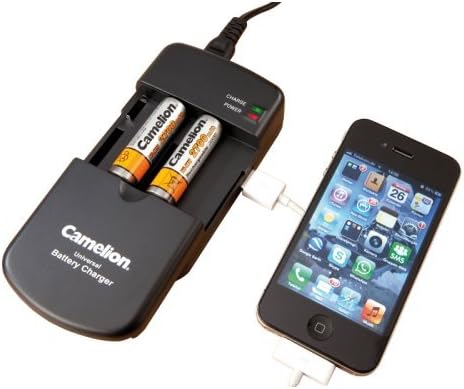
Figure 2: The Camelion LBC-312 Universal Battery Charger in operation. Two AA-sized Ni-MH batteries are inserted into the charging slots, and a smartphone is connected to the charger's USB output port, demonstrating simultaneous charging capabilities.
7. Maintenance
- Disconnect the charger from the power outlet before cleaning.
- Wipe the charger with a soft, dry cloth. Do not use liquid cleaners or abrasive materials.
- Store the charger in a cool, dry place when not in use.
- Ensure the charging contacts are clean and free of debris for optimal performance.
8. Troubleshooting
| Problem | Possible Cause | Solution |
|---|---|---|
| Charger not powering on | No power from outlet; loose power cord connection. | Check power outlet; ensure power cord is securely connected to both charger and outlet. |
| Battery not charging | Incorrect battery insertion; defective battery; incorrect battery type. | Ensure correct polarity and secure contact; remove and reinsert battery; replace defective battery; confirm battery is rechargeable and compatible. |
| USB device not charging | Loose USB cable connection; defective USB cable/device. | Ensure USB cable is securely connected; try a different USB cable or device to isolate the issue. |
| Charger gets warm during operation | Normal operation. | A slight increase in temperature is normal during charging. If it becomes excessively hot, disconnect immediately and contact support. |
9. Specifications
| Feature | Specification |
|---|---|
| Brand | CAMELION |
| Model Number | 20000312 (LBC-312) |
| Product Dimensions | 7 x 18.5 x 12.8 cm |
| Weight | 179.99 g |
| Color | Black |
| Compliance | CE |
| GTIN | 04260216452994 |
| Input Voltage | 100-240V AC, 50/60Hz (via AC adapter) |
| Battery Compatibility | 3.6-3.7V / 7.2-7.4V Li-ion, 1.2V Ni-MH / Ni-Cd (AA, AAA) |
| USB Output | Yes (for mobile devices) |
10. Warranty and Support
For warranty information and customer support, please refer to the documentation provided with your purchase or visit the official Camelion website. Keep your proof of purchase for any warranty claims.

