
beyerdynamic 721360
Beyerdynamic Stegos TB Wireless Boundary Microphone User Manual
Model: 721360
Introduction
This manual provides comprehensive instructions for the setup, operation, and maintenance of your Beyerdynamic Stegos TB Wireless Boundary Microphone. Please read this manual thoroughly before using the device to ensure optimal performance and longevity.
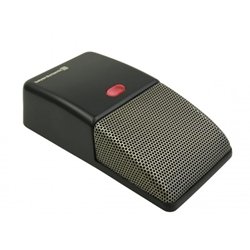
Image: Beyerdynamic Stegos TB Wireless Boundary Microphone. This image displays the compact, black wireless boundary microphone, designed for discreet placement on surfaces like conference tables.
Important Safety Instructions
- Do not expose the device to water or excessive moisture.
- Avoid extreme temperatures.
- Do not attempt to open or modify the device. Refer all servicing to qualified personnel.
- Use only specified power sources and accessories.
- Keep out of reach of children.
Package Contents
Verify that all items are present in the package:
- Beyerdynamic Stegos TB Wireless Boundary Microphone
- USB Charging Cable (Micro USB)
- User Manual (this document)
Setup
1. Charging the Microphone
- Connect the Micro USB end of the charging cable to the microphone's charging port.
- Connect the standard USB end of the cable to a powered USB port (e.g., computer, USB wall adapter).
- The LED indicator on the microphone will show charging status.
- Once fully charged, disconnect the charging cable.
2. Connecting to a Device
The Stegos TB microphone connects wirelessly to compatible devices, typically personal computers, for video conferencing applications.
- Ensure the microphone is charged and powered on.
- Activate Bluetooth on your personal computer or compatible device.
- Put the microphone into pairing mode (refer to the device's specific button combination, usually holding a power/pairing button). The LED indicator will typically flash to indicate pairing mode.
- On your computer, search for available Bluetooth devices. Select "Beyerdynamic Stegos TB" from the list.
- Once paired, the LED indicator on the microphone will show a solid light, indicating a successful connection.
- In your computer's sound settings or video conferencing software, select the "Beyerdynamic Stegos TB" as the input audio device.
Operating Instructions
Power On/Off
- To power on: Press and hold the power button for approximately 3 seconds. The LED indicator will illuminate.
- To power off: Press and hold the power button for approximately 3 seconds. The LED indicator will turn off.
Mute Function
The microphone features a mute function for privacy during calls.
- To mute: Press the mute button once. The LED indicator may change color or flash to indicate mute status.
- To unmute: Press the mute button again. The LED indicator will return to its normal operating state.
Placement for Optimal Performance
For best audio pickup, place the Stegos TB microphone on a flat surface in the center of the participants. Its omnidirectional polar pattern ensures 360-degree sound capture.
Maintenance
Cleaning
- Wipe the microphone's exterior with a soft, dry, or slightly damp cloth.
- Do not use harsh chemicals, solvents, or abrasive cleaners.
- Ensure no liquid enters the microphone grille or ports.
Storage
When not in use for extended periods, store the microphone in a cool, dry place, away from direct sunlight and extreme temperatures. It is recommended to fully charge the battery before long-term storage and recharge it every few months to maintain battery health.
Troubleshooting
| Problem | Possible Cause | Solution |
|---|---|---|
| Microphone does not power on. | Low or depleted battery. | Charge the microphone using the provided USB cable. |
| Cannot connect wirelessly. | Bluetooth is off on the device; microphone not in pairing mode; out of range. | Ensure Bluetooth is enabled. Put microphone into pairing mode. Move microphone closer to the device. |
| No audio input from microphone. | Microphone is muted; incorrect audio input selected on computer/software. | Unmute the microphone. Select "Beyerdynamic Stegos TB" as the input device in your system settings or application. |
| Poor audio quality. | Microphone too far from speaker; environmental noise; interference. | Place microphone closer to speakers. Reduce background noise. Ensure no obstructions between microphone and receiving device. |
Specifications
- Brand: Beyerdynamic
- Model: Stegos TB (721360)
- Connectivity Technology: Wireless (USB for charging)
- Connector Type: Micro USB (for charging)
- Special Feature: Wireless
- Compatible Devices: Personal Computer
- Color: Black
- Polar Pattern: Omnidirectional
- Power Source: Battery Powered
- Recommended Uses: Video Conference
Warranty Information
Beyerdynamic products are covered by a limited warranty. For specific warranty terms and conditions, please refer to the warranty card included with your product or visit the official Beyerdynamic website. Keep your proof of purchase for warranty claims.
Note: Warranty details are subject to change and may vary by region.
Support and Contact
For further assistance, technical support, or service inquiries, please contact Beyerdynamic customer support through their official website or the contact information provided in your product packaging.
Official Website: www.beyerdynamic.com
Please have your model number (721360) and serial number ready when contacting support.
Related documents721360

Ask a question about this manual
Ask about setup, troubleshooting, compatibility, parts, safety, or missing instructions. Manuals+ will review the question and use this page’s manual context to help answer it.