
1. Product Overview

The PORTER-CABLE NS150C 18GA Narrow Crown Stapler is a pneumatic tool designed for various fastening applications, including trim, molding, and cabinetry. Its magnesium body ensures a strong yet lightweight design, enhancing user comfort and reducing fatigue during extended use. Key features include a removable non-marring nose tip to protect work surfaces and an integrated rubber grip for improved handling. A low staple reload indicator provides a visual cue when staples are running low, helping to prevent dry firing.
Key Features:
- Long life maintenance-free motor to prevent staining of work surfaces.
- Tool-free depth-of-drive adjustment with detents for precise staple setting.
- Rear exhaust directs air away from the user and work area.
- Drives 18 GA. staples with a 1/4-inch crown, ranging from 1/2-inch to 1-1/2-inch in length.
- Split nose design facilitates easy removal of jammed staples.
- Adjustable belt hook allows convenient tool access.
- Removable non-marring nose tip with on-tool storage.
- Integrated rubber grip for enhanced comfort and control.
- Sequential style trigger for controlled fastening.
2. Safety Information
Always read and understand all safety warnings and instructions before operating this tool. Failure to follow these warnings and instructions may result in serious injury.
General Safety Precautions:
- Wear Eye Protection: Always wear ANSI Z87.1 compliant safety glasses with side shields when operating or performing maintenance on the tool.
- Wear Hearing Protection: Prolonged exposure to noise from power tools can cause hearing damage.
- Disconnect Air Supply: Always disconnect the air supply before loading staples, clearing jams, performing maintenance, or leaving the tool unattended.
- Keep Work Area Clear: Ensure the work area is well-lit and free of clutter. Keep children and bystanders away while operating a power tool.
- Use Correct Air Pressure: Do not exceed the maximum recommended air pressure for the tool (120 PSI).
- Inspect Tool Before Use: Check for misalignment or binding of moving parts, breakage of parts, and any other condition that may affect the tool’s operation.
- Never Point Tool at Yourself or Others: Accidental discharge can cause severe injury.
- Secure Workpiece: Always secure the workpiece to prevent movement during fastening.
Proposition 65 Warning: This product contains chemicals known to the State of California to cause cancer and birth defects or other reproductive harm.
3. Package Contents
Upon opening the package, verify that all items listed below are present and undamaged:
- PORTER-CABLE NS150C 18GA Narrow Crown Stapler
- Carrying case
- Owner's manual
- 1/4" air fitting
4. Setup
4.1. Connecting to Air Compressor
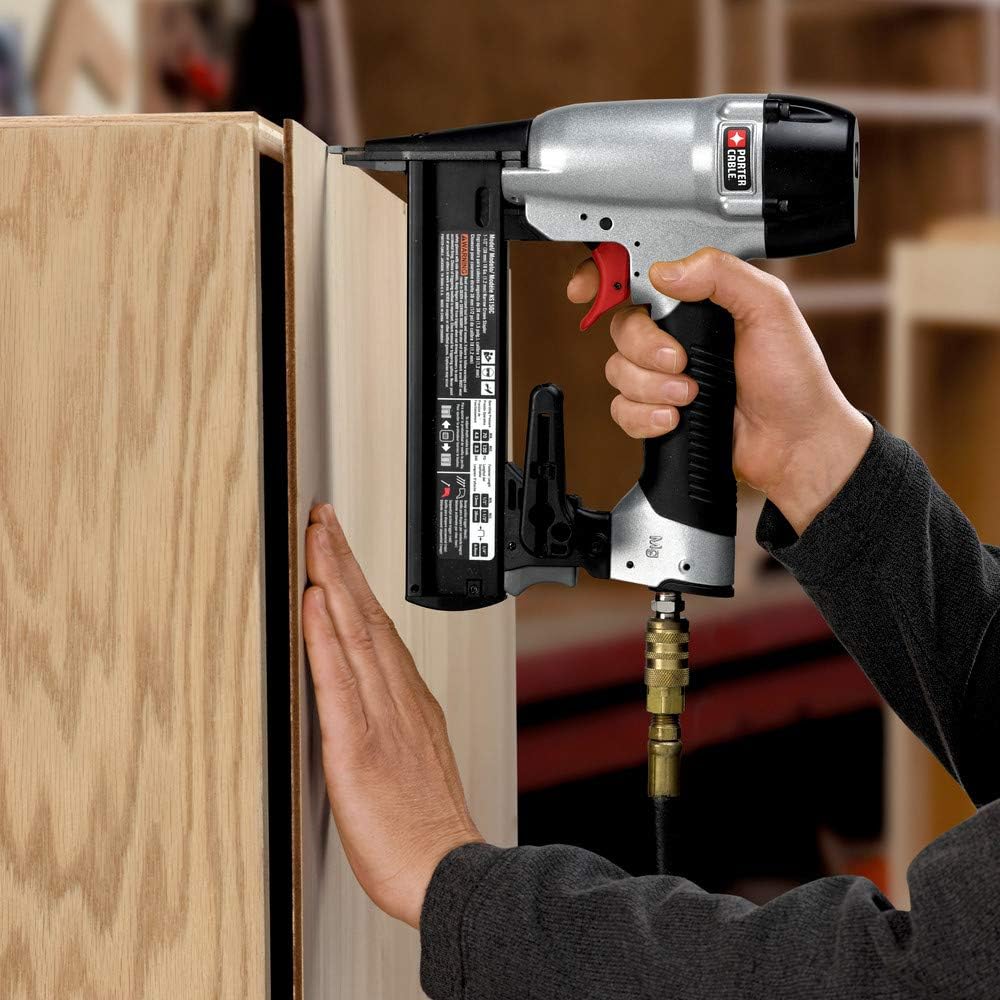
Before connecting the stapler, ensure your air compressor is turned off and disconnected from its power source. Attach the supplied 1/4" air fitting to the stapler's air inlet. Connect the air hose from your compressor to this fitting. Once connected, you can turn on your air compressor and set the operating pressure. The recommended operating pressure for the NS150C stapler is between 70-120 PSI. Always refer to your air compressor's manual for proper operation and safety guidelines.
4.2. Loading Staples

To load staples, first ensure the air supply is disconnected from the tool. Pull back the magazine latch located at the rear of the magazine to open it. Insert a strip of 18 GA narrow crown staples (1/2-inch to 1-1/2-inch length) into the magazine channel with the staple points facing down. Push the magazine latch forward until it securely locks into place, holding the staples firmly. Do not force staples into the magazine.
5. Operating Instructions
5.1. Adjusting Depth of Drive
The NS150C features a tool-free depth-of-drive adjustment mechanism. To adjust the staple depth, rotate the adjustment wheel located near the nose of the stapler. Turning the wheel in one direction will increase the depth (driving staples deeper), while turning it in the opposite direction will decrease the depth (leaving staples flush or slightly proud). Always test the depth setting on a scrap piece of material before fastening to your final workpiece to ensure the desired result.
5.2. Firing the Stapler

Once the stapler is connected to an air supply and loaded with staples, ensure the depth of drive is set correctly. Place the nose of the stapler firmly and squarely against the workpiece. The tool features a sequential style trigger, meaning the contact trip (nose) must be depressed against the material before the trigger can be pulled to drive a staple. Apply firm pressure to the tool against the workpiece and then pull the trigger to drive a staple. Release the trigger and lift the tool from the workpiece.
5.3. Clearing Jams
In the event of a staple jam, immediately disconnect the air supply from the stapler. The NS150C is designed with a split nose for easy access to clear jams. Open the nose latch to expose the staple channel. Carefully remove any bent or jammed staples using pliers or a similar tool. Close the nose latch securely before reconnecting the air supply and resuming operation.
6. Maintenance
6.1. General Cleaning
Keep your stapler clean to ensure optimal performance and longevity. Wipe down the exterior of the tool with a clean, dry cloth after each use. Do not use harsh solvents or abrasive cleaners, as these can damage the tool's housing and internal components. Periodically check the air inlet filter for debris and clean if necessary.
6.2. Air Compressor Maintenance
Regularly drain moisture from your air compressor tank. Condensation can build up in the tank, leading to rust and potential damage to both the compressor and pneumatic tools. Refer to your air compressor's owner's manual for specific instructions on draining the tank and other routine maintenance procedures.
7. Troubleshooting
| Issue | Possible Cause | Solution |
|---|---|---|
| Stapler not firing | No air supply or low air pressure | Check air compressor connection and ensure adequate pressure (70-120 PSI). |
| Empty magazine | Reload staples. | |
| Jammed staples | Disconnect air, clear jam using split nose design. | |
| Staples not fully driven | Low air pressure | Increase air pressure within the recommended range. |
| Incorrect depth setting | Adjust the depth-of-drive wheel. | |
| Worn driver blade | Contact PORTER-CABLE service for replacement. | |
| Air leaking from tool | Loose air fittings | Tighten all air hose connections and fittings. |
| Damaged O-rings or seals | Inspect and replace any damaged O-rings or seals. |
8. Specifications
| Feature | Detail |
|---|---|
| Model Number | NS150C |
| Item Weight | 4.9 pounds |
| Product Dimensions | 9.9 x 2.6 x 10.3 inches |
| Power Source | Pneumatic (Air-powered) |
| Staple Gauge | 18 GA |
| Crown Size | 1/4-inch |
| Staple Length | 1/2-inch to 1-1/2-inch |
| Operating Pressure | 70-120 PSI (recommended) |
| Motor | Long life, maintenance-free |
| Exhaust | Rear |
| Depth Adjustment | Tool-free with detents |
| Nose Tip | Removable non-marring |
| Grip | Integrated rubber |
| Trigger | Sequential style |
9. Warranty and Customer Support
The PORTER-CABLE NS150C Crown Stapler is backed by a 3-year limited warranty, a 90-day money-back guarantee, and 1 year of free service. This warranty covers defects in material or workmanship. For detailed warranty terms, technical assistance, replacement parts, or to make a warranty claim, please refer to the contact information provided in the owner's manual included with your product or visit the official PORTER-CABLE website. Keep your proof of purchase for warranty validation.


