
Subaru 88036XA010
Subaru Genuine 88036XA010 Keyless Transmitter User Manual
1. Introduction
This manual provides instructions for the proper use and maintenance of your Subaru Genuine 88036XA010 Keyless Transmitter. This device allows for remote locking and unlocking of your vehicle, enhancing convenience and security. Please read this manual thoroughly before attempting to program or operate the transmitter.
2. Product Overview
The Subaru Genuine 88036XA010 Keyless Transmitter is a compact, handheld device designed to remotely control your vehicle's locking system. It typically features buttons for locking, unlocking, and a panic function.

Figure 1: Front view of the Subaru Genuine 88036XA010 Keyless Transmitter, showing the lock, unlock, and trunk release buttons.
The reverse side of the transmitter contains important identification information and battery specifications.
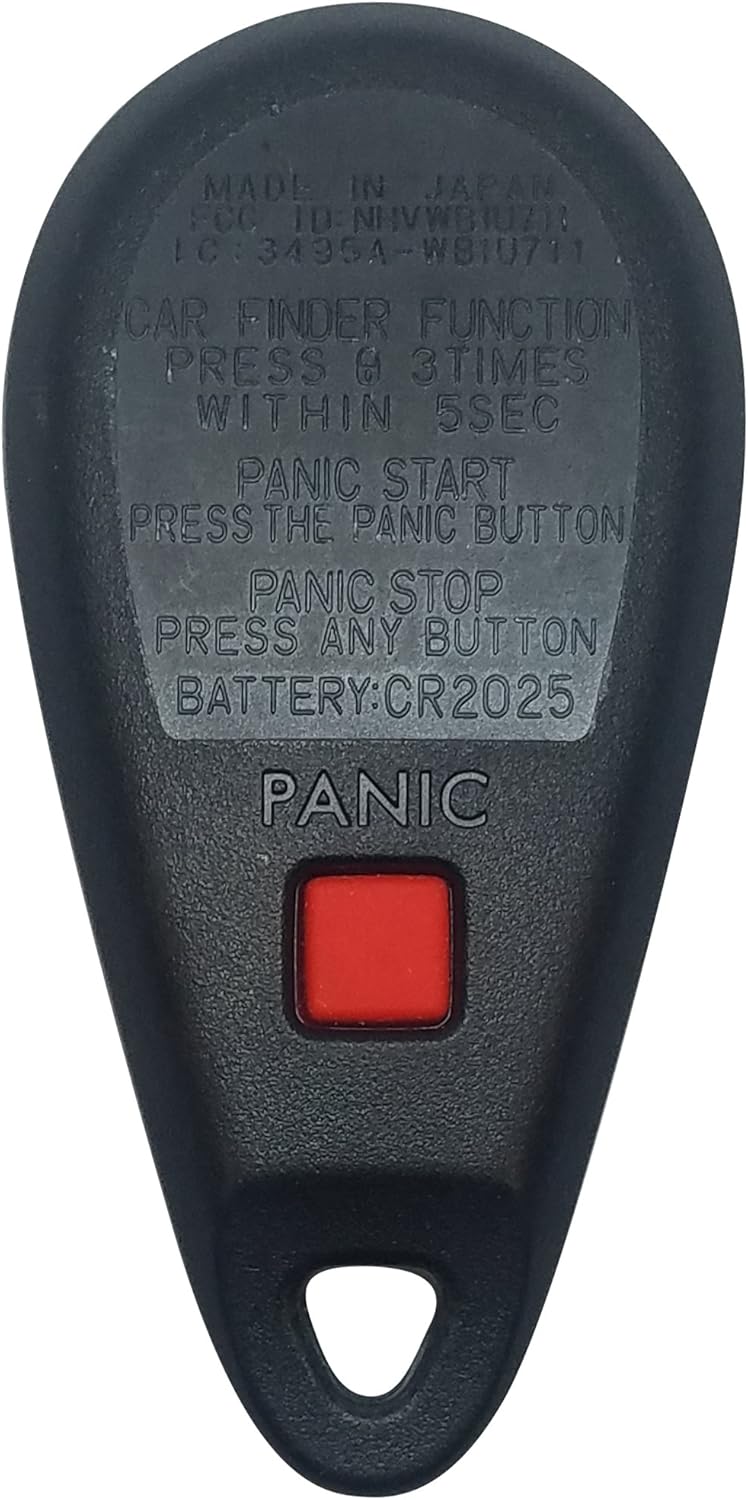
Figure 2: Back view of the Subaru Genuine 88036XA010 Keyless Transmitter, displaying instructions for the car finder function, panic button, and battery type (CR2025).

Figure 3: Detail of the back of the transmitter, indicating 'MADE IN JAPAN' along with FCC ID and other identifiers.
3. Setup (Programming Instructions)
The Subaru Genuine 88036XA010 Keyless Transmitter requires programming to function with your specific vehicle. Programming procedures can vary significantly between Subaru models and years. It is highly recommended to consult your vehicle's owner's manual or a certified Subaru technician for specific instructions relevant to your car's make and model.
Important Considerations:
- All existing keyless transmitters for your vehicle must be reprogrammed at the same time. If you do not reprogram all transmitters during the same session, any unprogrammed transmitters will cease to function.
- Ensure the battery in the new transmitter is functional before beginning the programming process.
- Verify that the FCC ID and part numbers on your new transmitter match the requirements for your vehicle.

Figure 4: Ensure your transmitter's FCC and part numbers match your vehicle's requirements for proper functionality.
General Programming Steps (Consult vehicle-specific resources for exact procedure):
- Enter the vehicle and close all doors.
- Insert the key into the ignition.
- Turn the ignition key from the OFF position to the ON position and back to OFF multiple times within a short period (e.g., 10 seconds). The exact number of cycles varies by model.
- Listen for a chime or observe a light flash, indicating the vehicle has entered programming mode.
- Press a button on the new transmitter (e.g., the lock button). The vehicle should respond with a chime or light flash to confirm successful programming.
- Repeat the button press for any other transmitters you wish to program, including existing ones.
- Turn the ignition key to the ON position or open a door to exit programming mode.
- Test all programmed transmitters to ensure they function correctly.
4. Operating Instructions
Once programmed, your keyless transmitter provides convenient remote access to your vehicle's functions:
- Lock Button: Press once to lock all vehicle doors. The vehicle's lights may flash, and a horn chirp may sound to confirm locking.
- Unlock Button: Press once to unlock the driver's door. Press twice within a few seconds to unlock all vehicle doors. The vehicle's lights may flash to confirm unlocking.
- Trunk/Hatch Release Button (if applicable): Press and hold this button to remotely open the vehicle's trunk or rear hatch.
- Panic Button: Press and hold the recessed panic button (often located on the back or side) for a few seconds to activate the vehicle's alarm system. This can be used to deter potential threats or locate your vehicle in a crowded parking lot. Press any other button on the transmitter to deactivate the alarm.
5. Maintenance (Battery Replacement)
The keyless transmitter is powered by a CR2025 coin cell battery. If the transmitter's range decreases or it stops responding, the battery may need replacement.
Battery Replacement Steps:
- Locate the small notch or seam on the side of the transmitter casing.
- Carefully pry open the casing using a small flat-head screwdriver or a coin. Exercise caution to avoid damaging the casing or internal components.
- Remove the old CR2025 battery. Note its orientation (positive (+) side up or down).
- Insert a new CR2025 battery, ensuring it is placed in the correct orientation.
- Align the two halves of the transmitter casing and press them firmly together until they snap securely into place.
- Test the transmitter to ensure it functions correctly.
Battery Disposal: Dispose of old batteries according to local regulations. Do not dispose of batteries in household waste.
6. Troubleshooting
- Transmitter Not Responding:
- Check the battery. Replace it if necessary (refer to Section 5).
- Ensure the transmitter is properly programmed to your vehicle (refer to Section 3). If it was recently replaced or if other transmitters were programmed, it might need to be reprogrammed.
- Verify there are no strong radio frequency interferences in the area.
- Intermittent Operation:
- A weak battery can cause inconsistent performance. Replace the battery.
- Physical damage to the transmitter may affect its functionality.
- Case Opening Unexpectedly:
- Ensure the casing is securely snapped together after battery replacement.
- Inspect the casing for any damage that might prevent it from closing properly.
- Panic Button Difficult to Press:
- The panic button is often recessed to prevent accidental activation. Use a fingertip or a small, blunt object to press it firmly.
7. Specifications
| Model Number | 88036XA010 |
| Item Weight | 0.319 ounces |
| Package Dimensions | 5 x 2 x 0.1 inches |
| Manufacturer Part Number | 88036XA010 |
| OEM Part Number | 88036 XA010 |
| Battery Type | CR2025 (Coin Cell) |
8. Warranty and Support
This product is a genuine Subaru OEM part. For specific warranty information, please refer to the documentation provided with your purchase or contact an authorized Subaru dealership. For technical support or assistance with programming, it is recommended to consult your vehicle's owner's manual or contact a certified Subaru service center.
Related documents88036XA010


Ask a question about this manual
Ask about setup, troubleshooting, compatibility, parts, safety, or missing instructions. Manuals+ will review the question and use this page’s manual context to help answer it.