Introduction
This manual provides detailed instructions for the installation, operation, and maintenance of your Seasonic SSR-360GP 360W 80PLUS Gold ATX12V Power Supply. Please read this manual thoroughly before installation and keep it for future reference. Proper installation and usage ensure optimal performance and longevity of your power supply unit (PSU).
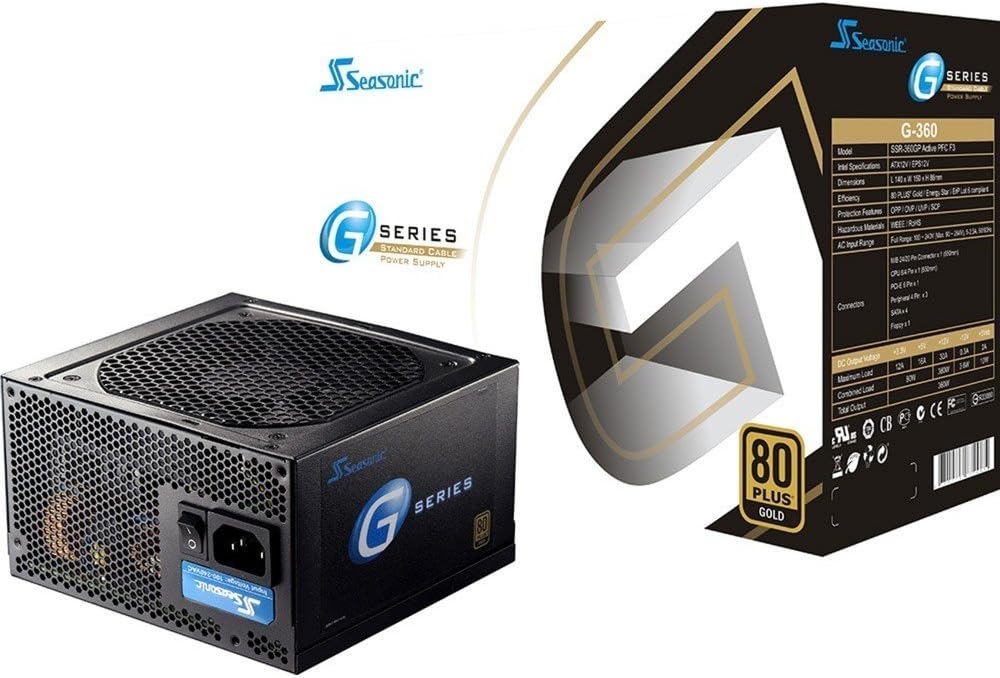
Image: The Seasonic SSR-360GP 360W 80PLUS Gold ATX12V Power Supply shown alongside its retail packaging. This image provides a visual overview of the product and its branding.
Safety Information
Always observe the following safety precautions to prevent injury or damage to your equipment:
- Ensure the power supply is disconnected from the AC power outlet before installation or maintenance.
- Do not open the power supply casing. High voltages are present inside, and there are no user-serviceable parts. Opening the casing will void the warranty.
- Install the power supply in a well-ventilated area, away from heat sources, direct sunlight, and moisture.
- Use only the cables provided with the power supply.
- Ensure all connectors are securely attached to prevent electrical shorts or damage.
- This product is designed for use in personal computers. Do not use it for other applications.
Package Contents
Verify that all items are present in your package:
- Seasonic SSR-360GP 360W Power Supply Unit
- AC Power Cord
- Mounting Screws
- Cable Ties (for cable management)
- User Manual (this document)
Setup and Installation
Follow these steps to install your power supply:
- Prepare Your System: Ensure your computer is completely powered off and unplugged from the wall outlet. Open your computer case.
- Remove Old PSU (if applicable): Disconnect all cables from your old power supply and remove it from the case.
- Install New PSU: Carefully place the Seasonic SSR-360GP into the power supply bay of your computer case. Ensure the fan is facing the correct direction for optimal airflow (typically facing down if your case has a bottom vent, or facing into the case if mounted at the top). Secure the PSU with the provided mounting screws.
- Connect Main Motherboard Power: Connect the 20+4 pin ATX connector to your motherboard's main power socket. Ensure it clicks into place.
- Connect CPU Power: Connect the 4+4 pin (or 8-pin) EPS/ATX12V connector to your motherboard's CPU power socket.
- Connect PCI-Express Power (if needed): If your graphics card requires additional power, connect the 6-pin PCI-Express connector to the graphics card.
- Connect SATA Devices: Connect the SATA power connectors to your hard drives, SSDs, and optical drives.
- Connect Peripheral Devices: Use the 4-pin peripheral (Molex) connectors for any other components that require them, such as case fans or older drives. A floppy connector is also available if needed.
- Cable Management: Organize cables using the provided cable ties to improve airflow and aesthetics within your case.
- Close Case and Connect AC Power: Close your computer case. Connect the AC power cord to the power supply and then to a wall outlet or surge protector.

Image: Rear view of the Seasonic SSR-360GP Power Supply, showing the AC power input, power switch, and exhaust grille. This illustrates the external connections and controls.
Operating Instructions
After successful installation, turn on the power switch located on the rear of the power supply (usually marked 'I' for ON and 'O' for OFF). Then, power on your computer using the case's power button. The 12cm ball bearing cooling fan will operate automatically to maintain optimal temperatures. This power supply is 80 PLUS Gold certified, indicating high energy efficiency during operation.

Image: The 80 PLUS Gold certification logo, signifying the power supply's high energy efficiency.
Maintenance
The Seasonic SSR-360GP is designed for reliable, long-term operation with minimal maintenance. However, periodic checks can help ensure its performance:
- Dust Removal: Every 6-12 months, or more frequently in dusty environments, power off and unplug your computer. Use compressed air to gently clear dust from the power supply's fan intake and exhaust grilles. Do not open the PSU casing.
- Cable Inspection: Periodically check all power cable connections to ensure they are secure and free from damage.
- Ventilation: Ensure that the computer case has adequate airflow and that the power supply's fan is not obstructed.
Troubleshooting
If you encounter issues with your power supply, consider the following common solutions:
- No Power:
- Ensure the AC power cord is securely connected to both the power supply and the wall outlet.
- Check that the power switch on the back of the PSU is in the 'I' (ON) position.
- Verify that all internal power connectors (20+4 pin ATX, 4+4 pin CPU, etc.) are firmly seated.
- Test the wall outlet with another device to confirm it has power.
- System Instability/Random Shutdowns:
- Ensure your system's power requirements do not exceed the 360W capacity of the PSU.
- Check for proper ventilation within your computer case to prevent overheating.
- Inspect all cable connections for looseness or damage.
- Unusual Noises:
- A slight fan noise is normal. If you hear grinding or excessive noise, ensure no cables are obstructing the fan.
- If the noise persists and is unusual, contact customer support.
If troubleshooting steps do not resolve the issue, contact Seasonic customer support for further assistance.
Specifications
| Feature | Detail |
|---|---|
| Brand | Seasonic |
| Model Name | SSR-360GP |
| Total Power | 360 W |
| Efficiency Certification | 80 PLUS Gold |
| Form Factor | ATX12V |
| Cooling Fan | 12cm Ball Bearing |
| Input Frequency | 50/60 Hz |
| Dimensions (LxWxH) | 5.51 x 3.38 x 5.9 inches (140 x 86 x 150 mm) |
| Weight | 5 pounds (2.27 kg) |
| Main Connector | 1x 20/24 pin M/B Connector |
| CPU Connector | 1x 8/4 pin CPU Connector |
| PCI-Express Connector | 1x 6pin PCI-Express Connector |
| SATA Connectors | 4x SATA connectors |
| Peripheral Connectors | 3x 4pin Peripheral Connectors |
| Floppy Connector | 1x Floppy Connector |
Warranty and Support
Seasonic provides a 5-year warranty for the SSR-360GP power supply, covering defects in materials and workmanship under normal use. For warranty claims or technical support, please visit the official Seasonic website or contact their customer service department. Keep your proof of purchase for warranty validation.
Seasonic Official Website: https://seasonic.com
For the most up-to-date support information, including FAQs and contact details, please refer to the official Seasonic support page.


