1. Safety Instructions
Operating this industrial paper cutter requires strict adherence to safety protocols to prevent injury. This machine is equipped with multiple safety features designed for user protection.
- Light Curtain Safety Guard: Ensure the light curtain is unobstructed and functioning correctly before operation. This system is designed to stop the blade if an object or hand breaks the beam.
- Two-Hand Operation: The cutting mechanism requires simultaneous activation by both hands. This prevents hands from being near the blade during operation.
- Blade Latch Device: Verify the blade latch is engaged when the machine is not in use or during maintenance to prevent accidental blade descent.
- CE Standard Compliance: This machine meets CE safety standards, indicating compliance with European health, safety, and environmental protection standards.
- Infrared Wall Protection: An infrared wall system provides an additional layer of safety, detecting presence in the cutting area.
- Air Breaker Protection: The integrated air breaker protects the electrical system from overloads.
- Always ensure the work area is clear of obstructions and unauthorized personnel.
- Never attempt to bypass or disable any safety features.
- Disconnect power before performing any maintenance, adjustments, or cleaning.
- Wear appropriate personal protective equipment (PPE) if required by your workplace safety guidelines.
2. Product Overview
The 19.3" Electric Stack Paper Cutter (Model 490R) is an industrial-grade, heavy-duty machine designed for precise and efficient paper cutting. It features a programmable system for various cutting tasks and incorporates advanced safety mechanisms.
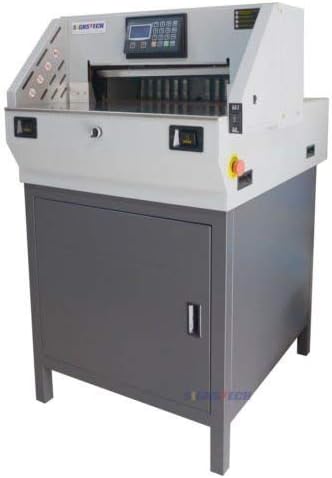
Figure 2.1: Front view of the 19.3 inch Electric Stack Paper Cutter. This image displays the overall structure of the machine, including the control panel at the top, the cutting bed, and the sturdy base cabinet.
Key Features:
- LCD Display: Provides full status information and facilitates self-check system diagnostics.
- Programmable Cutting: Allows for setting up precise cutting sizes with ease, supporting 9 groups of 8 sections plus an additional 5 groups of 8 sections for versatile operations.
- Independent Clamp Technology: Ensures paper stacks are held firmly and precisely, contributing to perfect cutting accuracy.
- High Performance: Capable of high-speed cutting with significant force, handling a maximum thickness of 60mm (approximately 2.36 inches) to meet diverse cutting needs.
- External Blade Adjustment: Blade and blade sticker adjustments can be performed conveniently from outside the machine.
- Automatic Paper Ejecting: After a cut is completed, the machine automatically ejects the cut paper.
- Durable Blade: Equipped with a high-quality alloy blade designed for extended use, capable of more than 12,000 cuts.
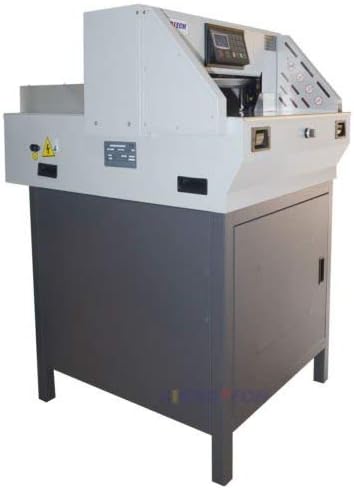
Figure 2.2: Side view of the Electric Stack Paper Cutter. This image provides a perspective on the machine's depth and its compact industrial design.
3. Setup
Proper setup is crucial for the safe and efficient operation of your paper cutter. Due to its weight (approximately 500 pounds), professional assistance and appropriate lifting equipment are recommended for unpacking and placement.
3.1 Unpacking and Placement
- Carefully remove the machine from its packaging. Inspect for any shipping damage.
- Place the paper cutter on a stable, level surface capable of supporting its weight. Ensure adequate clearance around the machine for operation and maintenance.
- Verify that the power supply matches the machine's requirements (refer to the electrical specifications label on the machine).
3.2 Included Accessories
The following accessories are typically included with your paper cutter to assist with setup and maintenance:
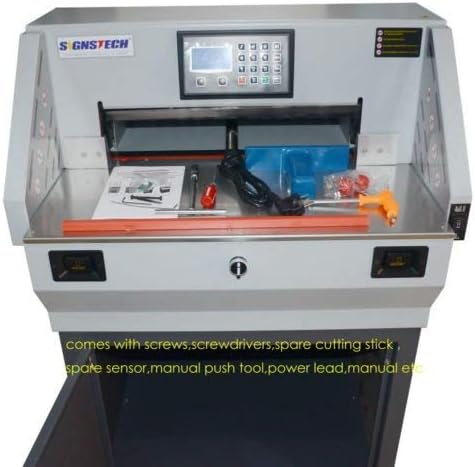
Figure 3.1: Included accessories. This image shows various items such as screws, screwdrivers, a spare cutting stick, a spare sensor, a manual push tool, a power lead, and the user manual.
- Screws and Screwdrivers for assembly or adjustments.
- Spare Cutting Stick for replacement when the current one wears out.
- Spare Sensor (if applicable) for potential replacement.
- Manual Push Tool for specific operations or adjustments.
- Power Lead for connecting the machine to the electrical supply.
- User Manual (this document or a similar printed version).
3.3 Initial Power Connection
- Connect the power lead to the machine and then to a grounded electrical outlet.
- Turn on the main power switch, usually located on the side or back of the machine.
- The LCD display should illuminate, indicating the machine is receiving power.
4. Operating Instructions
The 490R paper cutter is designed for user-friendly operation with its programmable features and intuitive LCD display.

Figure 4.1: Close-up of the cutting bed and control panel. This image highlights the working surface and the digital interface for programming cuts.
4.1 Basic Operation
- Power On: Ensure the machine is connected to power and the main switch is on. The LCD display will show the current status.
- Load Paper: Place the stack of paper to be cut onto the cutting bed, aligning it against the back gauge. Ensure the stack does not exceed the maximum cutting thickness of 60mm.
- Set Cutting Size: Use the control panel and LCD display to input the desired cutting dimensions. The programmable system allows for storing multiple cutting programs (9 groups of 8 sections plus 5 groups of 8 sections). Refer to the on-screen prompts for specific programming steps.
- Clamp Paper: Activate the independent clamp mechanism. This will firmly secure the paper stack, preventing shifting during the cut and ensuring precision.
- Execute Cut: With both hands, simultaneously press the two-hand operation buttons. The blade will descend, perform the cut, and then retract.
- Paper Ejection: After the cut, the machine will automatically eject the cut paper.
- Repeat or Power Off: Repeat the process for additional cuts or power off the machine when finished.
4.2 Programming Cutting Dimensions
The programmable feature allows for precise and repeatable cuts. The LCD display guides the user through the programming process.
- Access the programming menu via the control panel.
- Select an empty program slot or an existing one to modify.
- Input the desired cutting length using the numeric keypad. The machine may offer options to switch between metric and imperial units (e.g., inches). Consult the on-screen menu for unit conversion settings.
- Save the program. Once saved, it can be recalled for future use, streamlining repetitive cutting tasks.
5. Maintenance
Regular maintenance ensures the longevity and optimal performance of your paper cutter. Always disconnect power before performing any maintenance.
5.1 Blade Maintenance
The high-quality alloy blade is designed for over 12,000 cuts, but proper care and timely replacement are essential.
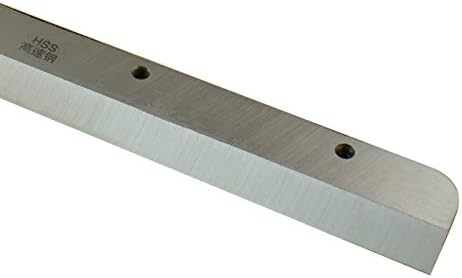
Figure 5.1: Close-up of the paper cutter blade. This image shows the high-speed steel (HSS) blade, highlighting its sharp edge and mounting points.
- Blade Adjustment: The blade and blade sticker can be adjusted from outside the machine. Refer to the specific instructions in the full technical manual for precise adjustment procedures. Proper adjustment ensures clean cuts and extends blade life.
- Blade Sharpening/Replacement: When cuts become ragged or require excessive force, the blade may need sharpening or replacement. Always use a qualified service technician for blade sharpening. Replace the blade with an original manufacturer-approved part.
- Blade Lubrication: Periodically apply a thin layer of non-corrosive lubricant to the blade surface to prevent rust and ensure smooth operation.
5.2 Cutting Stick Replacement
The cutting stick (also known as a cutting pad or strip) provides a surface for the blade to cut into, protecting the blade's edge.

Figure 5.2: A red rectangular cutting stick. This component is designed to be replaced periodically to maintain cutting quality and protect the blade.
- Inspect the cutting stick regularly for deep grooves or damage.
- Rotate the stick to an unused side when wear is visible. Once all sides are worn, replace it with a new one. Spare cutting sticks are readily available from various suppliers.
5.3 General Cleaning and Inspection
- Keep the cutting bed and surrounding areas clean from paper dust and debris. Use a soft cloth and mild cleaner.
- Periodically inspect all moving parts, electrical connections, and safety sensors for wear or damage.
- Ensure the internal motor and mechanisms are free from obstructions.
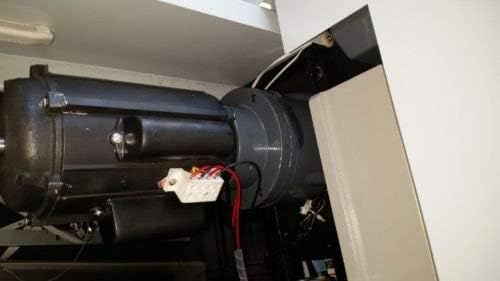
Figure 5.3: Internal view of the paper cutter's motor. This image shows the robust motor and associated wiring, which should be kept clean and inspected periodically.
6. Troubleshooting
This section provides solutions to common issues you might encounter. For problems not listed here, contact customer support.
| Problem | Possible Cause | Solution |
|---|---|---|
| Machine does not power on. | No power supply; main switch off; tripped circuit breaker. | Check power cord connection. Ensure main switch is on. Reset building's circuit breaker if tripped. |
| Blade does not descend or cut. | Safety guard obstructed; two-hand buttons not pressed simultaneously; blade latch engaged. | Clear light curtain path. Ensure both hands press buttons at the same time. Disengage blade latch. |
| Cuts are ragged or uneven. | Dull blade; worn cutting stick; improper paper clamping; incorrect blade adjustment. | Sharpen or replace blade. Rotate or replace cutting stick. Ensure paper is clamped firmly. Adjust blade as per maintenance section. |
| LCD display shows error message. | System fault; sensor error. | Note the error code and consult the full technical manual or contact customer support. Perform a system self-check if available. |
7. Specifications
Detailed technical specifications for the 19.3" Electric Stack Paper Cutter (Model 490R).
- Brand: Programmable full Electric Paper Cutter 490R
- Manufacturer: Easy Buy
- Item Model Number: 490R With Extra Blade and Pad
- Manufacturer Part Number: 19.3" Programmable
- Item Weight: Approximately 500 pounds (226.8 kg)
- Package Dimensions: 39 x 34 x 30 inches (99 x 86.4 x 76.2 cm)
- Maximum Cutting Thickness: 60mm (approximately 2.36 inches)
- Blade Type: High-quality alloy blade (HSS - High-Speed Steel)
- Safety Features: Light curtain safety guard, blade latch device, two-hand operation, infrared wall, air breaker protect, CE standard.
- Programmable Memory: 9 groups * 8 sections plus 5 groups * 8 sections
- First Available Date: August 9, 2012
8. Warranty and Support
For any questions, technical assistance, or warranty claims, please contact the manufacturer or your point of purchase.
- Returns Policy: This product typically offers a 30-day easy returns policy. Please refer to your purchase agreement for specific terms and conditions.
- Customer Support: For direct assistance, contact the seller "Easy Buy CA" or the manufacturer "Easy Buy".
- Product Information: For additional details, you may refer to the product listing on Amazon.com.


