
PWR+ PWR-TAJ190342
PWR+ 19V Power Adapter User Manual
Model: PWR-TAJ190342
Introduction
This manual provides essential information for the safe and effective use of your PWR+ 19V Power Adapter. Designed for compatibility with various Beelink Mini PCs, including SER5, SER5 MAX, SER4, SER3, SEi8, SEi10, and SEi11 models, this power supply ensures reliable and efficient charging. Please read this manual thoroughly before use and retain it for future reference.
Safety Information and Precautions
Your PWR+ power adapter is designed with multiple safety features to protect your devices and ensure safe operation. Adhere to the following precautions:
- UL Safety Certified: This product is UL Listed, indicating it has been tested and approved by Underwriters Laboratories for safety standards.
- Indoor Use Only: Do not expose the adapter to rain, moisture, or extreme temperatures. Use only in dry, indoor environments.
- Proper Ventilation: Ensure adequate airflow around the adapter during operation to prevent overheating. Do not cover the adapter.
- Avoid Physical Damage: Do not drop, disassemble, or attempt to repair the adapter. Keep it away from sharp objects and excessive force.
- Correct Voltage: Only connect the adapter to power outlets within the specified input voltage range (100-240V).
- Cable Care: Do not bend, pinch, or place heavy objects on the power cord. Always grasp the plug, not the cord, when disconnecting from the outlet or device.
- Built-in Safety Protections: The adapter includes Short Circuit Protection (SCP), Over Current Protection (OCP), Over Voltage Protection (OVP), and Over Temperature Protection (OPT) for enhanced safety.


Setup and Connection
Follow these steps to properly connect your PWR+ power adapter to your Beelink Mini PC:
- Unpack: Carefully remove the power adapter and cables from its packaging.
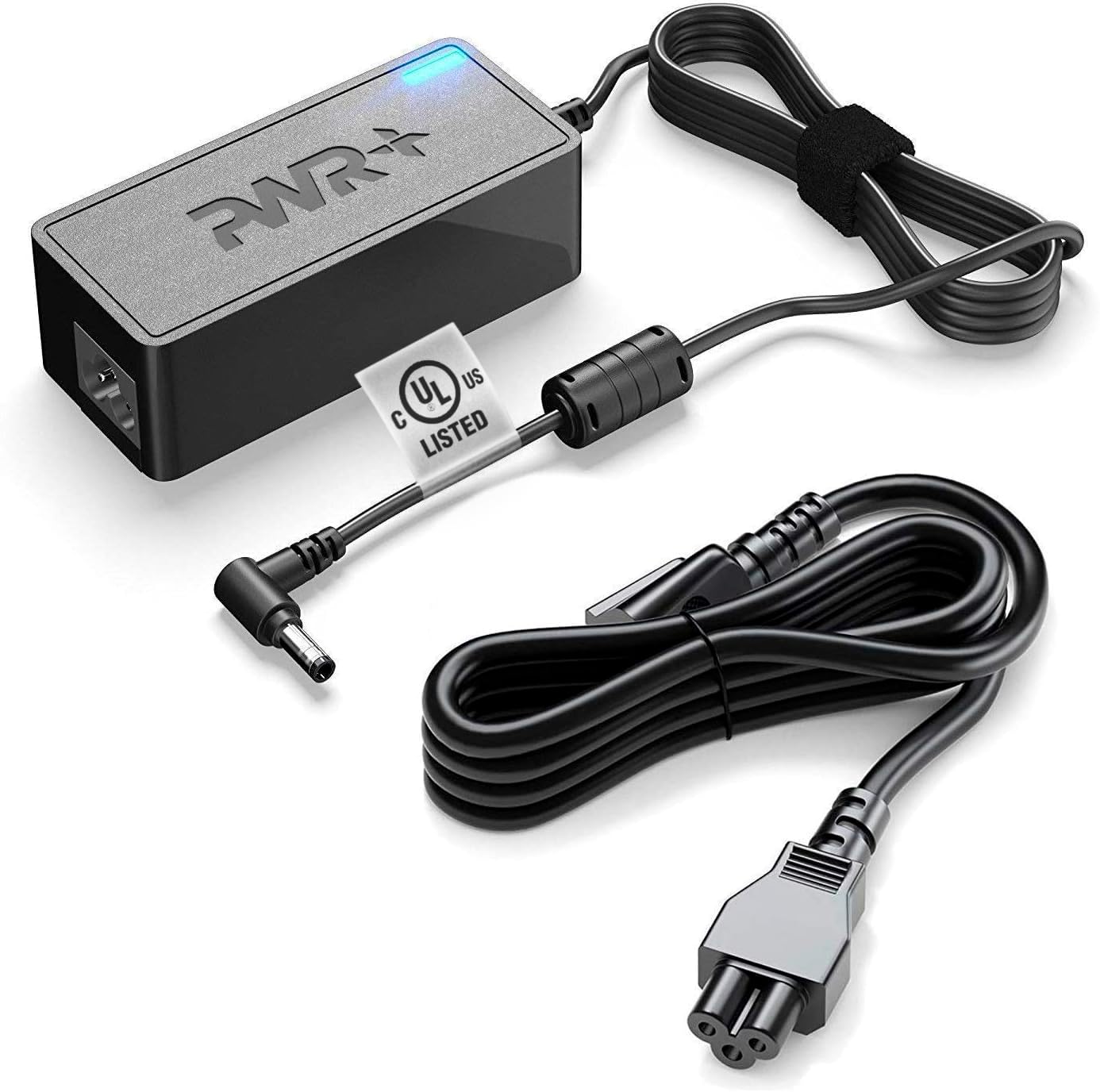
- Connect AC Cord: Plug the detachable AC power cord into the adapter's input port.
- Connect DC Output: Insert the DC output connector (barrel connector) into the power input port of your Beelink Mini PC. Ensure a snug fit.
- Plug into Outlet: Plug the AC power cord into a standard wall outlet (100-240V).
- Verify Connection: A charging indicator light on the adapter will illuminate, typically blue, to confirm power is being supplied.
Operating Instructions
Once connected, the PWR+ power adapter will automatically begin supplying power to your compatible Beelink Mini PC. It is designed for continuous operation within its specified limits.
- Power Indicator: The blue LED on the adapter indicates that it is receiving power and functioning correctly.
- Compatibility: This adapter is specifically compatible with Beelink SER5, SER5 MAX, SER4, SER3, SEi8, SEi10, and SEi11 Mini PCs.
- Long Cord: The extra-long 12-foot power cord provides flexibility in placement and connectivity.
Maintenance and Care
To ensure the longevity and optimal performance of your PWR+ power adapter, follow these maintenance guidelines:
- Cleaning: Disconnect the adapter from the power outlet and your device before cleaning. Use a soft, dry cloth to wipe the surface. Do not use liquid cleaners or aerosols.
- Storage: When not in use, store the adapter in a cool, dry place, away from direct sunlight and extreme temperatures. Avoid tightly winding the cables.
- Inspection: Periodically inspect the adapter and cables for any signs of damage, such as frayed wires, cracked casing, or bent connectors. If damage is found, discontinue use immediately and contact support.
Troubleshooting
If you encounter issues with your PWR+ power adapter, refer to the following common troubleshooting steps:
| Problem | Possible Cause | Solution |
|---|---|---|
| Adapter not powering device / No indicator light |
|
|
| Adapter feels hot |
|
|
| Device not charging or charging slowly |
|
|
If the problem persists after attempting these solutions, please contact PWR+ customer support for further assistance.
Specifications
| Feature | Detail |
|---|---|
| Brand | PWR+ |
| Model Number | PWR-TAJ190342 |
| Input Voltage Range | 100-240V |
| Output Max | 19V 3.42A (2.5A Compatible) |
| Power Source | Corded Electric |
| Connectivity Technology | Barrel Connector |
| Cable Length | Extra Long 12 Ft Total Cord Length |
| Safety Certification | UL Listed |
| Included Components | Power adapter and cables |
| Compatible Devices | Beelink SER5 Mini PC, SER5 MAX Mini, SER4, SER3, SEi8, SEi10, SEi11 |
Warranty and Support
PWR+ stands behind the quality of its products. Your power adapter comes with comprehensive support:
- Warranty: Enjoy a 30-day refund policy and a 24-month exchange warranty from the date of purchase.
- Customer Support: PWR+ is a WA, USA-based company with dedicated customer support experts ready to assist you. For any inquiries or issues, please refer to the contact information provided with your purchase or visit the official PWR+ website.
Related documentsPWR-TAJ190342


Ask a question about this manual
Ask about setup, troubleshooting, compatibility, parts, safety, or missing instructions. Manuals+ will review the question and use this page’s manual context to help answer it.