
Generac 76832
Generac GP6500 Portable Generator User Manual
Model: 76832 | Brand: Generac
1. Product Overview
The Generac GP6500 portable generator is engineered to provide reliable power for emergencies, recreational activities, and various outdoor needs. Featuring COsense™ technology for enhanced safety and PowerRush™ advanced technology for increased starting capacity, this unit combines durability with performance.
Key features include:
- Powerful Performance: Delivers over 40% more starting capacity with PowerRush Advanced Technology, ideal for heavy electrical loads.
- Smart and Reliable: Integrated COsense technology provides protection against hazardous carbon monoxide by automatically shutting off the unit when increased CO is detected.
- Extended Runtime: Equipped with a long-lasting OHV engine and a large-capacity 7.9-gallon steel fuel tank, offering up to 10.5 hours of runtime at 50% load.
- Built for Durability: Features covered outlets, a rugged 1.25-inch steel-tube cradle, and heavy-duty, never-flat wheels for easy transportation and resilience in tough environments.
- Maintenance Made Easy: Includes an hour meter to track maintenance intervals and a low-oil level shutdown feature to safeguard the engine.

Figure 1.1: Generac GP6500 Portable Generator, 6,500 watts.

Figure 1.2: Illustrates the versatility of the GP6500 for power outages, DIY projects, outdoor events, and RV use.
2. Safety Information
Always read and understand this manual before operating the generator. Failure to follow instructions can result in serious injury or death.
- Carbon Monoxide Hazard: Generators produce carbon monoxide (CO), an odorless, colorless, poisonous gas. Operate the generator outdoors only, far away from windows, doors, and vents. Never operate indoors or in enclosed spaces.
- Fire Hazard: Gasoline is highly flammable. Store fuel in approved containers in a well-ventilated area. Do not refuel while the engine is running or hot.
- Electrical Shock Hazard: Do not operate the generator in wet conditions. Ensure all electrical connections are secure and properly grounded.
- Hot Surfaces: The generator's engine and muffler become very hot during operation and remain hot for a period after shutdown. Avoid contact.
- Moving Parts: Keep hands, feet, and clothing away from moving parts.
3. Components
Familiarize yourself with the main components of your Generac GP6500 generator:
- Engine: The power source of the generator.
- Fuel Tank: Large capacity steel tank for gasoline.
- Control Panel: Contains outlets, switches, and the hour meter.
- Frame: Durable steel-tube cradle providing structural support.
- Wheels and Handle: Heavy-duty, never-flat wheels and an easy fold-down handle for portability.

Figure 3.1: Diagram highlighting key features including PowerRush, GFCI Outlets, and COsense Technology.
4. Setup
4.1 Unpacking and Inspection
Carefully remove the generator from its packaging. Inspect for any damage that may have occurred during shipping. Report any damage to your dealer immediately.
4.2 Wheel and Handle Assembly
The GP6500 comes with a handle and wheel kit for easy transport. Attach the wheels and handle according to the detailed instructions in the included owner's manual. Ensure all bolts are securely tightened.
4.3 Adding Engine Oil
The generator is shipped without engine oil. Before first use, add the recommended engine oil (included) using the provided oil funnel. Refer to the oil capacity and type specifications in Section 6. Do not overfill. The low-oil level shutdown feature will prevent the engine from starting or running if the oil level is insufficient.
4.4 Adding Fuel
Fill the fuel tank with fresh, unleaded gasoline. Ensure the generator is on a level surface and the engine is off and cool before refueling. Do not overfill. The large 7.9-gallon tank allows for extended operation.

Figure 4.1: The generator features a 6.9-gallon gas tank, providing up to 10.5 hours of run time at 50% load.
5. Operating Instructions
5.1 Starting the Generator
- Ensure the generator is on a level surface outdoors, away from any structures.
- Turn the fuel valve to the 'ON' position.
- Move the choke lever to the 'FULL CHOKE' position (if the engine is cold).
- Turn the engine switch to the 'ON' position.
- Firmly pull the recoil starter handle until the engine starts.
- Once the engine starts, gradually move the choke lever to the 'RUN' position.
5.2 Connecting Electrical Loads
Once the generator is running smoothly, you can connect your electrical devices. The control panel features multiple outlets, including 120V 20A Duplex and 120V/240V 30A outlets. Always ensure the total wattage of connected devices does not exceed the generator's running wattage (6500 Watts) or starting wattage (8125 Watts) for momentary loads.

Figure 5.1: Guide to estimate power needs for common household appliances.
5.3 COsense™ Technology
The integrated COsense™ technology continuously monitors carbon monoxide levels. If unsafe levels are detected, the generator will automatically shut down to protect users. If a shutdown occurs, move the generator to an open-air location and allow it to ventilate before attempting to restart.
5.4 Shutting Down the Generator
- Disconnect all electrical loads from the generator.
- Allow the generator to run for a few minutes without load to cool down.
- Turn the engine switch to the 'OFF' position.
- Turn the fuel valve to the 'OFF' position.
6. Maintenance
Regular maintenance is crucial for the longevity and optimal performance of your generator. The hour meter helps track necessary upkeep intervals.
6.1 Regular Checks (Before Each Use)
- Check engine oil level.
- Inspect air filter for dirt or debris.
- Check fuel level.
- Inspect for any visible damage or loose parts.
6.2 Oil Change
Change the engine oil after the first 20 hours of operation, and then every 50 hours or annually, whichever comes first. Refer to the owner's manual for detailed steps and recommended oil type.
6.3 Air Filter Inspection and Cleaning
Inspect the air filter regularly and clean or replace it as needed, especially when operating in dusty conditions. A clogged air filter can reduce engine performance.
6.4 Spark Plug Inspection
Inspect the spark plug annually or every 100 hours. Clean or replace if necessary to ensure reliable starting and efficient engine operation.
6.5 Storage
For extended storage, drain the fuel system or add a fuel stabilizer. Run the engine until it stops from lack of fuel. Change the oil and clean the generator thoroughly. Store in a dry, well-ventilated area.
7. Troubleshooting
This section provides solutions for common issues. For more complex problems, consult a qualified service technician.
| Problem | Possible Cause | Solution |
|---|---|---|
| Engine will not start | No fuel; Low oil level; Choke not set correctly; Spark plug issue | Add fuel; Add oil; Adjust choke; Inspect/replace spark plug |
| No power output | Circuit breaker tripped; Overload; Faulty connection | Reset circuit breaker; Reduce load; Check connections |
| Engine runs rough | Stale fuel; Clogged air filter; Dirty spark plug | Drain and replace fuel; Clean/replace air filter; Clean/replace spark plug |
| COsense™ shutdown | High carbon monoxide levels detected | Move generator to open-air location; Allow ventilation before restarting |
8. Specifications
Detailed technical specifications for the Generac GP6500 Portable Generator:
| Specification | Value |
|---|---|
| Brand | Generac |
| Model Name | 76832 |
| Starting Wattage | 8125 Watts |
| Running Wattage | 6500 Watts |
| Fuel Type | Gasoline |
| Tank Volume | 7.9 Gallons |
| Runtime (at 50% load) | 10.5 hours (as per feature bullets) / 11 hours (as per specifications) |
| Engine Type | 4 Stroke OHV |
| Engine Displacement | 389 Cubic Centimeters |
| Ignition System Type | Electric (Pull Start) |
| Voltage | 120V, 240V |
| Frequency | 50 Hz |
| Total Power Outlets | 5 |
| Product Dimensions (L x W x H) | 27.2"L x 27"W x 26.5"H |
| Item Weight | 178.1 pounds |
| Included Components | Oil funnel, handle & wheel kit, Engine oil, owner's manual |
| Special Feature | Portable, COsense Technology, PowerRush Advanced Technology |
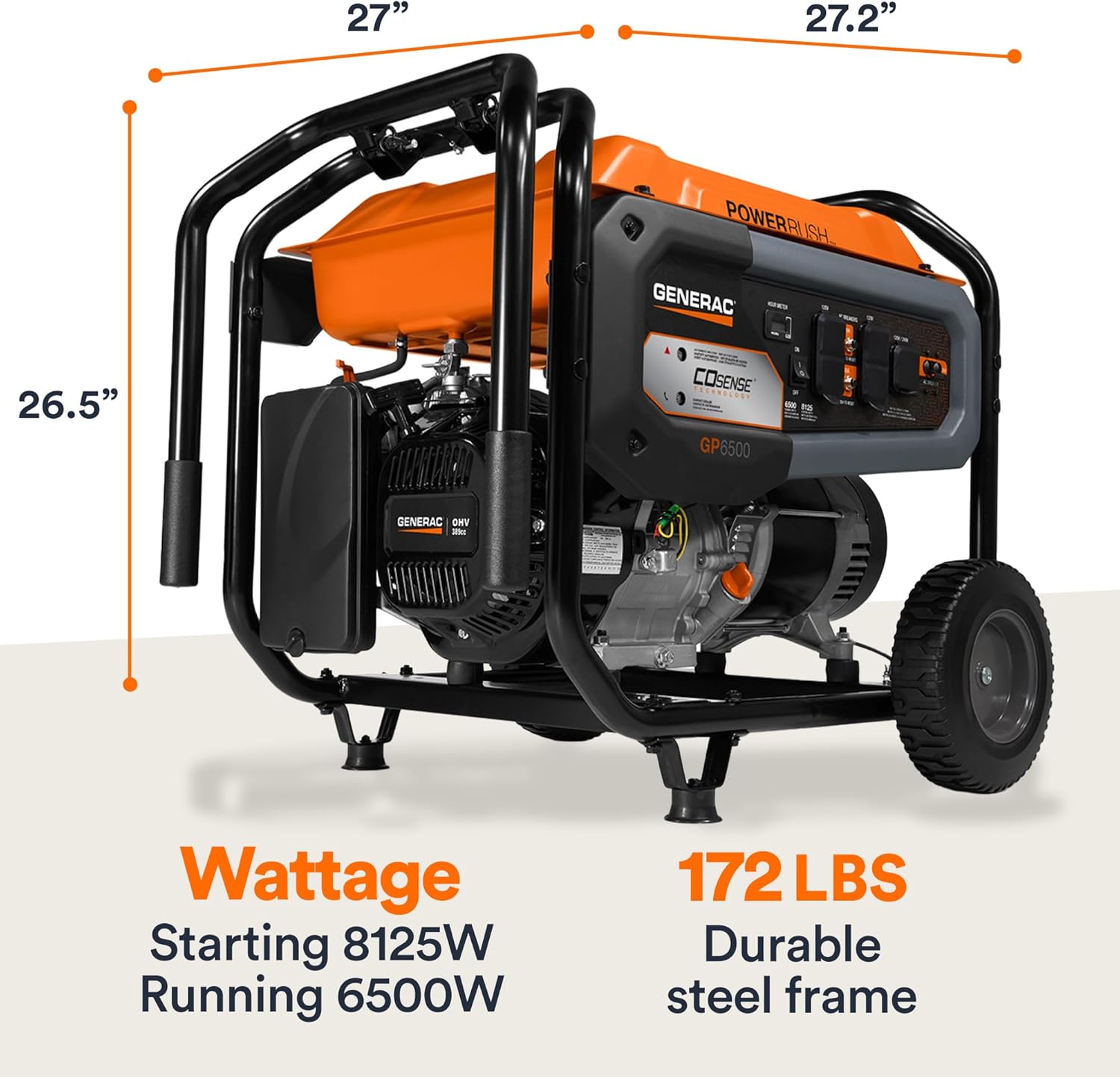
Figure 8.1: Dimensions and weight of the Generac GP6500 generator.
9. Warranty and Support
For detailed warranty information, please refer to the warranty card included with your product or visit the official Generac website. For technical assistance, parts, or service, please contact Generac customer support. Contact information can typically be found in your owner's manual or on the Generac website.
Related documents76832


Ask a question about this manual
Ask about setup, troubleshooting, compatibility, parts, safety, or missing instructions. Manuals+ will review the question and use this page’s manual context to help answer it.