
1. Introduction
Thank you for purchasing the MOOER Reecho Digital Delay Pedal. This compact and versatile pedal offers three distinct delay modes: Analog, Real Echo, and Tape Echo, providing a wide range of delay effects for your guitar. Its small footprint and true bypass design make it an excellent addition to any pedalboard.
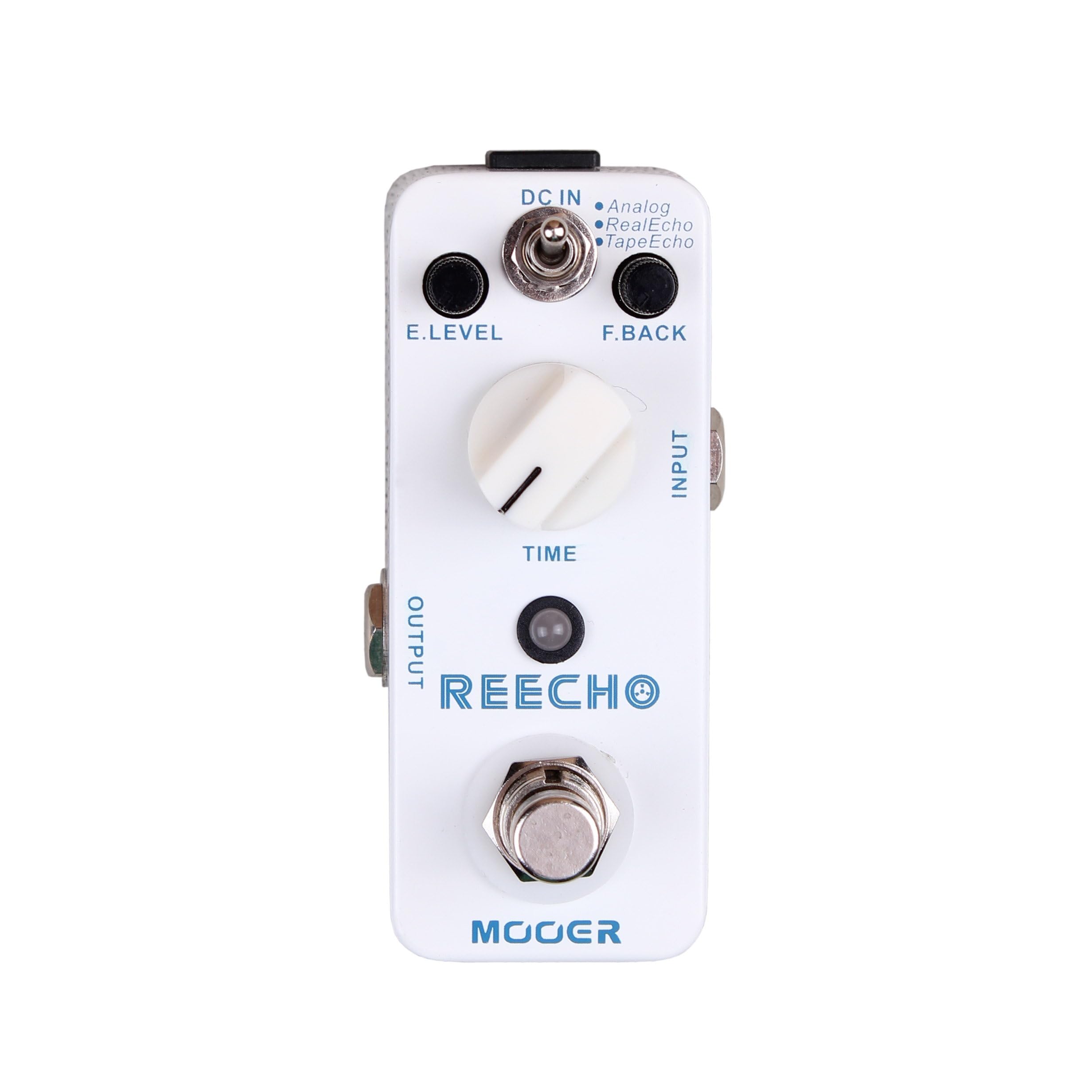
Figure 1: Front view of the MOOER Reecho Digital Delay Pedal. This image shows the compact white enclosure with the E.LEVEL knob, TIME knob, mode toggle switch, input/output jacks, and footswitch.
2. Key Features
- Three Delay Modes: Choose between Analog, Real Echo, and Tape Echo for diverse sonic textures.
- Wide Delay Time Range: Offers a delay time from 5ms to 780ms, suitable for various musical styles.
- Full Metal Shell: Durable and robust construction for reliable performance.
- Compact Design: Very small and exquisite, optimizing pedalboard space.
- True Bypass: Ensures signal integrity when the effect is disengaged.
3. Controls and Functions
Familiarize yourself with the controls of your Reecho pedal:
Figure 2: Detailed view of the MOOER Reecho pedal's controls, including E.LEVEL, TIME, and the mode switch. The image highlights the input and output jacks, DC input, and footswitch.
- E.LEVEL Knob: (Effect Level) Controls the mix of the delayed signal with the dry signal. Turn clockwise to increase the effect level, counter-clockwise to decrease it.
- TIME Knob: Adjusts the delay time, from a very short slapback to a longer, more ambient delay. Turn clockwise for longer delay times, counter-clockwise for shorter times.
- Mode Toggle Switch: Selects one of the three delay modes:
- Analog: Emulates classic analog delay pedals, offering a warm, natural decay.
- Real Echo: Provides a clear, pristine digital delay with accurate repeats.
- Tape Echo: Simulates the characteristics of vintage tape echo units, including subtle modulation and decay.
- INPUT Jack: Connect your instrument or the output of another pedal here.
- OUTPUT Jack: Connect this to your amplifier or the input of the next pedal in your signal chain.
- DC IN Jack: Connect a 9V DC power adapter (center negative) here.
- Footswitch: Engages or disengages the effect. This pedal features true bypass, ensuring your tone remains unaffected when the pedal is off.
4. Setup Guide
- Power Connection: Connect a standard 9V DC power adapter (center negative) to the DC IN jack on the side of the pedal. Ensure the power supply meets the pedal's requirements to prevent damage.
- Input Connection: Connect your guitar or the output of a preceding effect pedal to the INPUT jack on the right side of the Reecho pedal using a standard 1/4-inch instrument cable.
- Output Connection: Connect the OUTPUT jack on the left side of the Reecho pedal to your amplifier's input or the input of the next effect pedal in your chain using a standard 1/4-inch instrument cable.
- Initial Settings: Before powering on, set the E.LEVEL and TIME knobs to their minimum positions (fully counter-clockwise) and the mode switch to your desired initial delay type (e.g., Real Echo).
- Power On: Once all connections are secure, power on your amplifier and then the pedal.
Note: Always connect and disconnect cables with your amplifier turned off or on standby to avoid loud pops and potential damage to your equipment.
5. Operating Instructions
Using the MOOER Reecho pedal is straightforward. Follow these steps to achieve various delay effects:
- Engage the Effect: Press the footswitch to turn the delay effect on. The LED indicator will illuminate. Press it again to bypass the effect (LED off).
- Select Delay Mode: Use the toggle switch to select one of the three delay modes:
- Analog: For warm, vintage-style delays.
- Real Echo: For clear, modern digital delays.
- Tape Echo: For delays with a characteristic tape saturation and subtle warble.
- Adjust Delay Time: Rotate the TIME knob to set the duration of the delay repeats. Experiment with different settings to find the perfect rhythm for your playing.
- Set Effect Level: Use the E.LEVEL knob to control how prominent the delayed signal is in your overall sound. Start with a lower setting and gradually increase it to avoid overwhelming your dry signal.
Experiment with different combinations of the TIME and E.LEVEL knobs within each delay mode to discover the full range of sounds the Reecho pedal can produce. From subtle ambience to rhythmic repeats, the possibilities are extensive.
6. Maintenance
- Cleaning: Use a soft, dry cloth to clean the pedal's exterior. Avoid using abrasive cleaners or solvents, as they may damage the finish.
- Storage: When not in use for extended periods, store the pedal in a cool, dry place away from direct sunlight and extreme temperatures.
- Power Supply: Always use a regulated 9V DC, center-negative power supply. Incorrect power can damage the unit and void the warranty.
- Avoid Moisture: Keep the pedal away from water and excessive humidity.
7. Troubleshooting
| Problem | Possible Cause | Solution |
|---|---|---|
| No sound when pedal is engaged. | Incorrect cable connection, no power, E.LEVEL knob set to minimum. | Check all cable connections. Ensure power supply is connected and functional. Increase E.LEVEL knob. |
| No effect, but dry signal passes through. | E.LEVEL knob set to minimum, pedal bypassed. | Increase E.LEVEL knob. Press footswitch to engage effect (LED should be on). |
| Unwanted noise or hum. | Faulty power supply, ground loop, interference from other equipment. | Use a high-quality, regulated power supply. Try isolating the pedal's power. Check other cables and equipment. |
| Delay repeats are too short/long. | TIME knob setting. | Adjust the TIME knob to your desired delay duration. |
8. Specifications
- Brand: MOOER
- Model: Reecho
- Delay Modes: Analog, Real Echo, Tape Echo
- Delay Time Range: 5ms ~ 780ms
- Input: 1/4" mono audio jack (Impedance: 470k Ohms)
- Output: 1/4" mono audio jack (Impedance: 100 Ohms)
- Power Requirements: 9V DC, center negative (Power consumption: 128mA)
- Dimensions: 93.5mm (D) × 42mm (W) × 52mm (H)
- Weight: 160g (0.16 Kilograms)
- Material: Full metal shell
9. Warranty and Support
MOOER products are designed for reliability and performance. For warranty information and technical support, please refer to the official MOOER website or contact your local distributor. Keep your purchase receipt as proof of purchase for warranty claims.
For further assistance, visit the MOOER Store on Amazon or the official MOOER website.


