Introduction
This user manual provides detailed instructions for the installation, programming, and operation of the Legrand AlphaRex D21 Digital Weekly Timer. Please read this manual carefully before using the device to ensure proper functionality and safety. Keep this manual for future reference.
Safety Information
Always observe the following safety precautions:
- Installation and maintenance should only be performed by qualified personnel in accordance with national wiring regulations.
- Disconnect power before installation or any maintenance work.
- Do not expose the device to moisture or extreme temperatures.
- Ensure the device is securely mounted on a DIN rail.
- The device is designed for indoor use only.
Product Overview
The Legrand AlphaRex D21 is a single-channel digital weekly timer designed for DIN rail mounting. It offers precise control over electrical loads with up to 56 programmable switching cycles.

Figure 1: Front-side view of the Legrand AlphaRex D21 Digital Weekly Timer. Shows the display, control buttons, and terminal connections.

Figure 2: Front view of the timer, highlighting the digital display and the control buttons (Menu, OK, Plus, Minus).
Key Features:
- Digital Weekly Timer: Provides precise time-based control for various applications.
- 56 Switching Programs: Allows for extensive customization of ON/OFF cycles throughout the week.
- Flexible Programming: Programs can be set directly on the device or via PC using AlphaSoft software (requires optional PC adapter 412873 and data key 412872).
- Advanced Functions: Includes automatic summer/winter time change, holiday program, random program, 1-hour test function, PIN code lock for security, operating hour counter, and backlight for display visibility.
- High Accuracy: Features a 5-year power reserve and a time accuracy of +/- 0.1 seconds per day.
- Zero-Crossing Switching: Extends the life of the relay and connected loads.
Setup and Installation
The AlphaRex D21 timer is designed for mounting on a standard DIN rail.
Mounting
Ensure the DIN rail is securely installed within an electrical enclosure. Align the timer with the DIN rail and press firmly until it clicks into place. The device occupies 2 modules (2TE) of space.
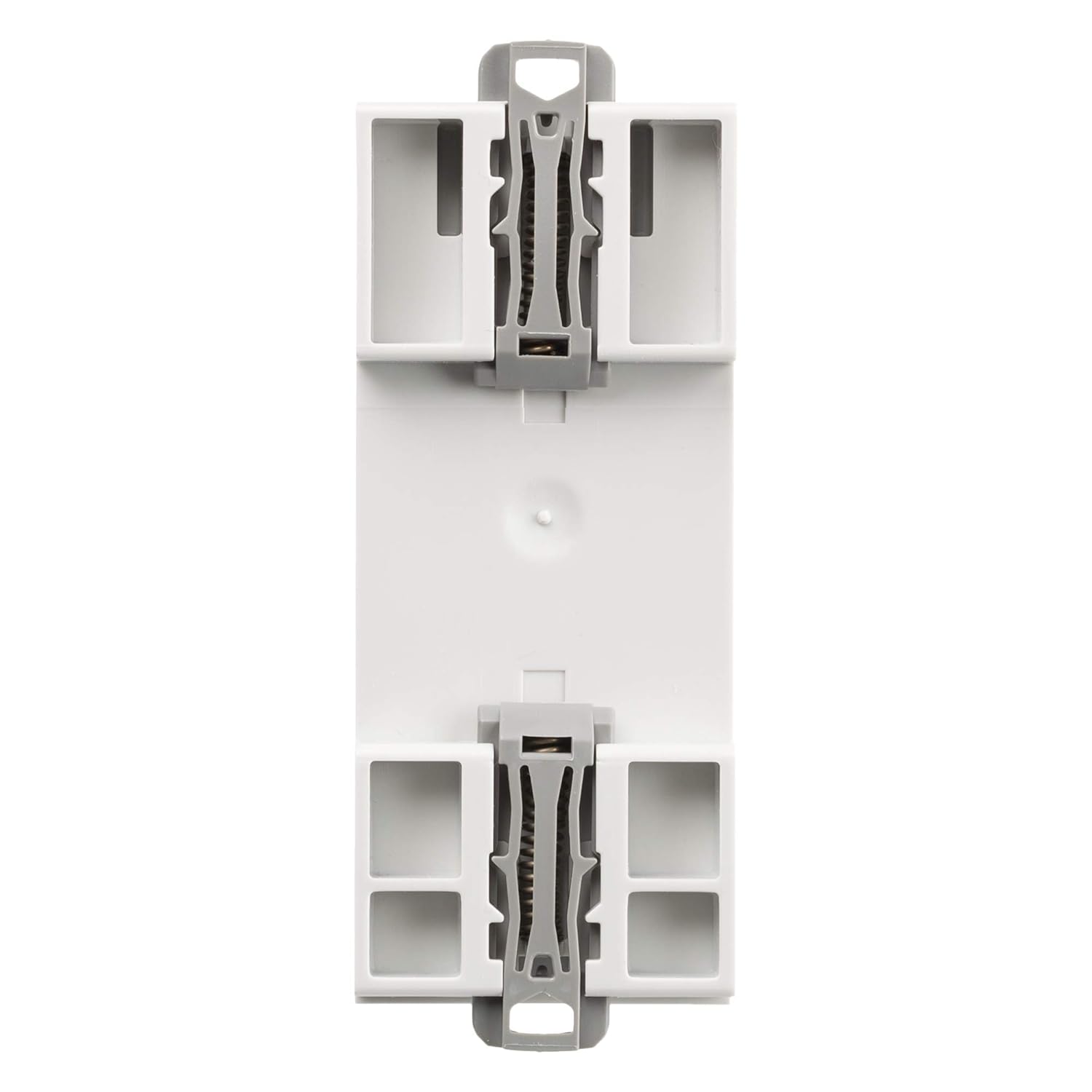
Figure 3: Bottom view of the timer, showing the integrated clips for DIN rail mounting.

Figure 4: Top view of the timer, showing the corresponding clips for secure DIN rail attachment.
Wiring
Connect the timer to the electrical circuit as follows:
- L (Line): Connect the phase conductor (230V AC, 50/60Hz).
- N (Neutral): Connect the neutral conductor.
- Output (1, 2, 4): The timer has one changeover output.
- Terminal 1: Common contact.
- Terminal 2: Normally Closed (NC) contact.
- Terminal 4: Normally Open (NO) contact.
Ensure all connections are secure and correctly polarized. Refer to the wiring diagram on the device for specific terminal assignments.

Figure 5: Side view of the timer, displaying the model number (412631) and barcode (3245064126311), along with electrical ratings.
Operating Instructions
Initial Setup
- Upon first power-up, the display will show "NO MAINS" and the current date/time.
- Use the + and - buttons to set the current time and date.
- Press OK to confirm each setting.
- Select your preferred language.
Programming Switching Cycles
The timer allows for up to 56 switching programs. Each program consists of an ON time and an OFF time for specific days of the week.
- Press the Menu button (usually represented by a square icon with lines).
- Navigate to "Programs" using the + or - buttons and press OK.
- Select an empty program slot or an existing one to edit.
- Set the desired ON time (hour and minute) and press OK.
- Set the desired OFF time (hour and minute) and press OK.
- Select the days of the week for which this program should be active (e.g., Mon-Fri, Sat-Sun, or individual days).
- Confirm the program by pressing OK.
- Repeat for all desired switching cycles.
Special Functions
- Automatic Summer/Winter Time Change: This function automatically adjusts the time for daylight saving. Enable or disable this in the settings menu.
- Holiday Program: Set a specific period during which all regular programs are suspended.
- Random Program: Introduces slight variations to switching times for security purposes (e.g., simulating presence).
- PIN Code Lock: Protects settings from unauthorized changes. Set a 4-digit PIN in the security menu.
- Operating Hour Counter: Tracks the total operating hours of the connected load.
Maintenance
The Legrand AlphaRex D21 timer requires minimal maintenance.
- Keep the device clean and free from dust. Use a dry, soft cloth for cleaning.
- Do not use abrasive cleaners or solvents.
- The internal battery provides a 5-year power reserve for timekeeping during power outages. Battery replacement should be performed by a qualified technician if necessary.
Troubleshooting
| Problem | Possible Cause | Solution |
|---|---|---|
| Display shows "NO MAINS" | No power supply to the device. | Check power connections (L and N terminals). Ensure circuit breaker is ON. |
| Timer does not switch load | Incorrect programming; Load wiring issue; Overload. | Verify program settings. Check wiring to the load (terminals 1, 2, 4). Ensure load current does not exceed 16A. |
| Time is inaccurate | Internal battery low (after many years); Extreme temperature fluctuations. | Contact qualified technician for battery check/replacement. Ensure operating environment is within specified temperature range. |
| Cannot access settings | PIN code lock is active. | Enter the correct PIN code. If forgotten, refer to the full technical manual for reset procedures (may require factory reset). |
Specifications
| Parameter | Value |
|---|---|
| Model Number | 412631 |
| Brand | Legrand |
| Supply Voltage | 230 V AC, 50/60 Hz |
| Number of Channels | 1 |
| Number of Programs | 56 |
| Shortest Switching Time | 1 second |
| Output Type | 1 Changeover (16A 250V~) |
| Power Reserve | 5 years |
| Time Accuracy | +/- 0.1 sec/day |
| Mounting | DIN Rail (2TE) |
| Dimensions (W x D x H) | 3.6 x 6 x 8.5 cm |
| Weight | 99.79 grams |
| Material | Polycarbonate |
| Color | Grey |
| Country of Origin | Germany |

Figure 6: Dimensions of the Legrand AlphaRex D21 timer, showing width (6cm), depth (3.6cm), and height (8.5cm).
What's in the Box
The product package for the Legrand AlphaRex D21 Digital Weekly Timer typically includes:
- Legrand AlphaRex D21 Digital Weekly Timer (Model 412631)
- Commissioning Instructions
- AlphaSoft Installation CD (for PC programming software)

Figure 7: The retail packaging for the Legrand AlphaRex D21 timer, indicating model D21 and part number 412631.
Warranty and Support
For warranty information and technical support, please refer to the official Legrand website or contact your local Legrand distributor. Keep your purchase receipt as proof of purchase.
Manufacturer: Legrand
Country of Origin: Germany
Website: www.legrand.com