1. Introduction
Thank you for choosing the Power Acoustik PD-740NB 7-inch Single-DIN Motorized Flip-Up Multimedia Receiver. This unit is designed to provide a comprehensive in-car entertainment experience, featuring a 7-inch TFT/LCD display, DVD playback, Bluetooth connectivity, iPod control, and USB/SD card support. This manual provides essential information for the proper installation, operation, and maintenance of your new multimedia receiver.
2. Safety Information
- Installation: Ensure professional installation to prevent damage to the unit or vehicle. Incorrect wiring can cause fire or electric shock.
- Driving Safety: Do not operate the unit's complex functions or view videos while driving. Always prioritize road safety.
- Power Supply: Connect the unit only to a 12V DC negative ground power supply.
- Ventilation: Do not block ventilation openings. Ensure adequate airflow around the unit.
- Moisture: Keep the unit away from moisture and water to prevent electric shock.
3. Product Overview
The Power Acoustik PD-740NB features a motorized 7-inch TFT/LCD touchscreen that retracts into the single-DIN chassis. The front panel includes essential control buttons and ports for media access.
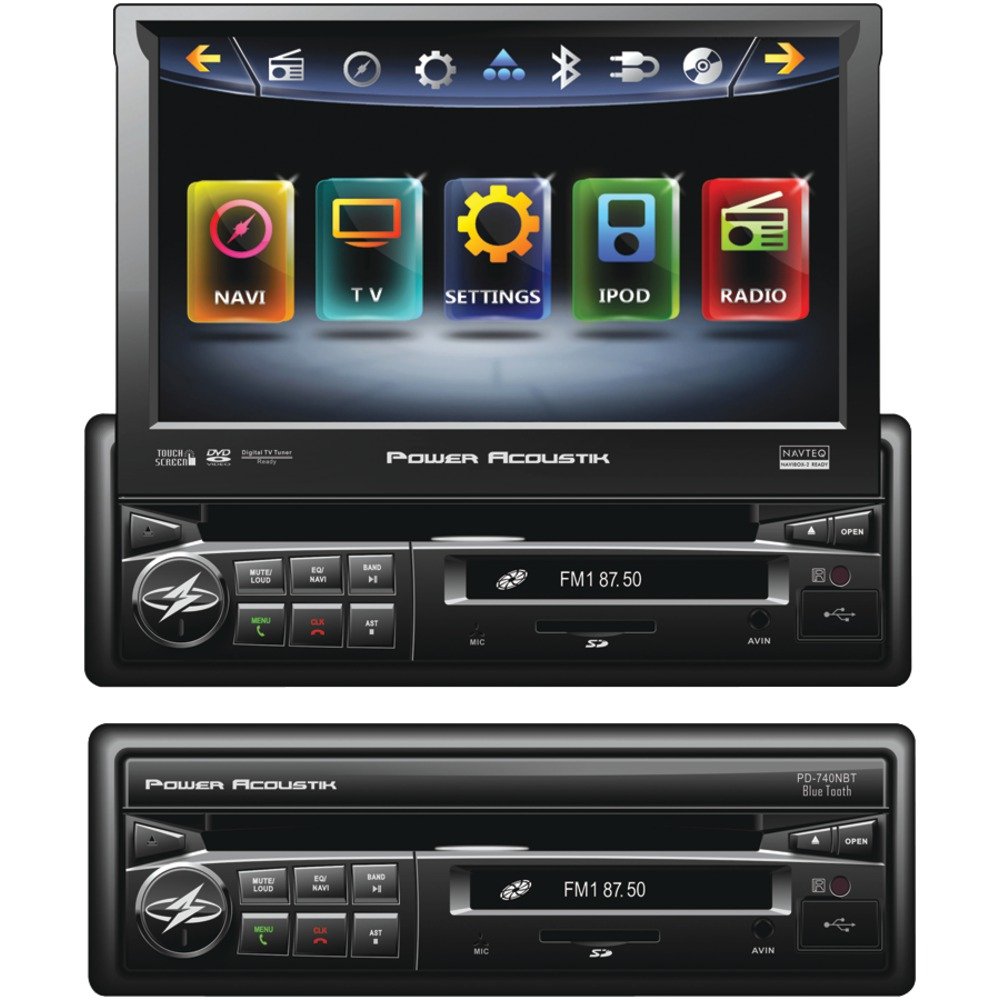
Figure 3.1: Front view of the Power Acoustik PD-740NB with the 7-inch screen extended. This image shows the main display and primary control buttons.
Key Components:
- 7-inch Motorized TFT/LCD Touchscreen: Provides visual interface for all functions.
- Control Panel: Buttons for power, volume, mode selection, and menu access.
- Disc Slot: For DVD/CD playback.
- USB Port: For connecting USB storage devices.
- SD Card Slot: For inserting SD memory cards.
- Auxiliary Input: For connecting external audio sources.
4. Setup and Installation
Proper installation is crucial for optimal performance. It is highly recommended to have this unit installed by a qualified professional.
4.1 Wiring Diagram (General)
Below is a general description of typical wiring connections. Refer to the detailed wiring diagram included with your product packaging for precise connections.
- Yellow (Constant 12V+): Connect to the vehicle's constant 12V power supply.
- Red (Accessory 12V+): Connect to the vehicle's ignition switch (switched 12V).
- Black (Ground): Connect to a clean chassis ground point in the vehicle.
- Blue (Remote Turn-On): Connect to the remote turn-on lead of an external amplifier or power antenna.
- Orange (Illumination): Connect to the vehicle's illumination circuit.
- Green/Purple/White/Gray (Speaker Outputs): Connect to the corresponding vehicle speakers (e.g., Green to Left Rear Speaker +, Green/Black to Left Rear Speaker -).
- Light Green (Parking Brake): Connect to the vehicle's parking brake switch. This connection is essential for video playback safety.
- Brown (Reverse Gear): Connect to the vehicle's reverse light circuit for automatic rear camera display (if applicable).
- RCA Outputs: For connecting to external amplifiers (Front, Rear, Subwoofer).
4.2 Mounting
The PD-740NB is a single-DIN unit. Install it into the vehicle's dashboard opening using the supplied mounting sleeve and hardware. Ensure the unit is securely fastened to prevent movement.
4.3 Initial Power On
After installation, turn on the vehicle's ignition. The unit should power on. Follow any on-screen prompts for initial setup, such as language selection or clock setting.
5. Operating Instructions
5.1 Basic Controls
- Power Button: Press to turn the unit on/off.
- Volume Knob/Buttons: Adjust audio output level.
- Mode Button: Cycle through available sources (Radio, DVD, USB, SD, Bluetooth, AUX).
- Menu Button: Access the main menu or system settings.
5.2 Screen Operation
The 7-inch screen is motorized. Use the designated buttons (usually on the front panel or remote) to extend or retract the screen. The screen is touch-sensitive for navigating menus and controlling functions.
5.3 Radio Tuner
- Band Selection: Select AM or FM band.
- Seek/Scan: Automatically search for strong stations.
- Manual Tuning: Fine-tune frequencies.
- Presets: Store and recall up to 12 AM and 18 FM stations.
5.4 DVD/CD Playback
- Insert Disc: Gently insert a DVD or CD into the disc slot with the label side up. The unit will automatically load and begin playback.
- Playback Controls: Use on-screen controls or physical buttons for Play, Pause, Stop, Skip Track, Fast Forward, and Rewind.
5.5 USB/SD Card Playback
- Insert Media: Insert a USB drive into the USB port or an SD card into the SD card slot.
- File Navigation: Use the touchscreen to browse folders and select audio or video files.
- Playback: The unit supports various audio and video formats.
5.6 Bluetooth Operation
- Pairing: Enable Bluetooth on your mobile device. Search for "PD-740NB" (or similar name) and pair. Enter PIN "0000" if prompted.
- Hands-Free Calling: Make and receive calls directly through the unit.
- Audio Streaming (A2DP): Play music from your paired device wirelessly.
5.7 iPod Control
Connect your iPod using a compatible IC-3 cable (sold separately). The unit will allow direct control and playback of your iPod's music library.
5.8 Auxiliary Input
Connect external audio devices (e.g., MP3 players) to the unit's auxiliary input using a 3.5mm stereo cable.
5.9 System Settings
Access the system settings menu to adjust audio parameters (equalizer, balance, fader, subwoofer output), display settings (brightness, contrast), and other general system configurations.
6. Maintenance
- Cleaning the Screen: Use a soft, dry, lint-free cloth to gently wipe the screen. Do not use abrasive cleaners or solvents.
- Cleaning the Unit: Wipe the exterior of the unit with a soft, dry cloth.
- Disc Care: Handle discs by their edges. Keep them clean and free of scratches. Store discs in their cases when not in use.
- Software Updates: Periodically check the manufacturer's website for any available firmware updates for improved performance or new features.
7. Troubleshooting
| Problem | Possible Cause | Solution |
|---|---|---|
| No power | Blown fuse; incorrect wiring; loose connection. | Check fuses; verify wiring connections (constant 12V, accessory 12V, ground). |
| No sound | Volume too low; incorrect source selected; speaker wiring issue. | Increase volume; select correct source; check speaker connections. |
| Disc error | Dirty or scratched disc; incompatible disc format. | Clean disc; try a different disc; ensure disc format is supported. |
| Bluetooth not connecting | Bluetooth not enabled on device; unit not in pairing mode; interference. | Ensure Bluetooth is on; put unit in pairing mode; try re-pairing. |
| Screen not extending/retracting | Obstruction; motor malfunction. | Check for obstructions; if problem persists, contact support. |
8. Specifications
- Display: 7-inch TFT/LCD Motorized Flip-Up Touchscreen
- Power Output: 52 Watts x 4 Channels
- Tuner: AM/FM with 12 AM / 18 FM Presets
- Media Playback: DVD, CD, USB, SD Card
- Connectivity: Bluetooth (Hands-Free & Audio Streaming), iPod Control (with IC-3), Auxiliary Input
- Pre-amp Outputs: 2V Variable Subwoofer Output
- Compatibility: Navibox-2 Ready
- Dimensions (Approximate):
- Length: 12.60 inches
- Width: 9.50 inches
- Height: 4.70 inches
9. Warranty Information
This Power Acoustik product is covered by a limited manufacturer's warranty. Please refer to the warranty card included in your product packaging for specific terms, conditions, and duration of coverage. Retain your proof of purchase for warranty claims.
10. Support
For technical assistance, troubleshooting beyond this manual, or warranty inquiries, please contact your authorized Power Acoustik dealer or visit the official Power Acoustik website for customer support contact information.


