
Yamaha DTX450K
Yamaha DTX450K Electronic Drum Kit
Instruction Manual
Model: DTX450K | Brand: Yamaha
1. Introduction
The Yamaha DTX450K Customizable Electronic Drum Kit offers a comprehensive drumming experience with advanced features for musical expression and practice. This deluxe model includes the new TP70S snare pad that allows playing snare head, open rimshot, and closed rimshot voices in each of the three zones for more musical expression. Your feet will appreciate the genuine Yamaha bass drum pedal that provides authentic feel for the kick drum, and the HH65 adjustable hi-hat controller pedal. Three 10" cymbals are mounted to chrome cymbal stands on a steel rack system to provide a solid foundation for your rhythm sessions. The high-quality drum voices are taken from Yamaha's DTX900/700/500 series and DTX-MULTI 12, and you can customize the entire kit anytime you want to try a different set of sounds.

Figure 1.1: Fully assembled Yamaha DTX450K Electronic Drum Kit.
2. Key Features
- FREE iOS Apps allow easy customization, song importing, and training programs.
- 297 high-quality sounds and 10 customizable kits.
- TP70S 3-zone snare pad for head, rim-shot, side-stick.
- Large 10-Inch Ride and Crash cymbals and 10-Inch Hi-Hat cymbal.
- Yamaha FP6110A real kick pedal with KP65 kick pad.
3. Setup and Assembly
The DTX450K is designed for straightforward assembly. Follow these general steps for initial setup:
- Unpack all components and verify against the packing list.
- Assemble the steel rack system according to the included quick setup guide.
- Attach the drum pads (snare, toms) and cymbal pads (hi-hat, crash, ride) to the rack.
- Connect the HH65 hi-hat controller pedal and the FP6110A bass drum pedal.
- Mount the DTX module to the rack and connect all pads and pedals using the provided cables.
- Connect headphones or an external amplifier to the module's output.
- Connect the power adapter and turn on the module.

Figure 3.1: Front view of the DTX450K, showing pad and pedal placement.

Figure 3.2: Top-down view, illustrating the overall layout of the kit.
4. Components Overview
The DTX450K features high-quality components designed for durability and realistic feel:

DTX Module
The central brain of the kit, featuring controls for kit selection, song playback, training modes, tempo, and volume. It houses 297 high-quality sounds and 10 customizable drum kits.

Module Connectivity
The rear of the module includes a USB TO HOST port for computer connectivity, AUX IN for external audio devices, PHONES/OUTPUT for headphones or amplifier, and 12V DC IN for power.

TP70S Snare Pad
A 3-zone pad allowing for distinct head, open rimshot, and closed rimshot sounds, enhancing expressive play.
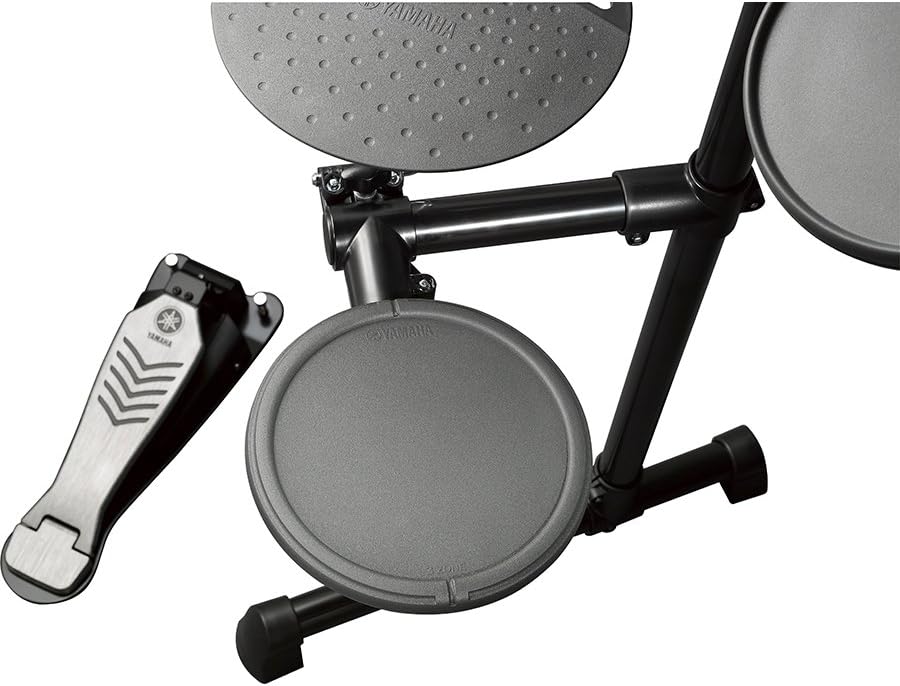
FP6110A Kick Pedal & KP65 Kick Pad
Provides an authentic bass drum feel, crucial for developing proper foot technique.

10-Inch Cymbal Pads
Includes large 10-inch Ride and Crash cymbals, along with a 10-inch Hi-Hat cymbal, offering a realistic playing surface.
5. Operating the DTX450K
5.1 Drum Kits and Sounds
The DTX450K comes with 10 preset drum kits and 297 high-quality drum and percussion sounds. You can easily switch between kits using the dedicated buttons on the module. The sounds are derived from Yamaha's professional DTX series, ensuring excellent audio quality.
Customization is a key feature. You can create your own unique drum kits by assigning any of the 297 sounds to any pad. This allows for endless creative possibilities and tailoring the kit to your specific musical needs.
Video 5.1: Learn how to create your own sounds and customize kits using the DTX400 Touch App from Yamaha. This video demonstrates the app's interface and functionality for sound editing and kit creation.
5.2 Playing Along with Songs
The module includes 10 built-in songs across various styles, allowing you to practice and play along. You can adjust the tempo and mute the drum track to focus on your performance. For additional songs, you can download new MIDI files from the Yamaha MusicSoft website and transfer them via the USB TO HOST port.
To play along with external audio, connect your smartphone, MP3 player, or CD player to the AUX IN jack on the module. The audio will mix with your drum sounds, allowing you to jam along to your favorite tracks.
5.3 Training and Practice Functions
The DTX450K is equipped with 10 "Groove Tools" training exercises designed to improve your timing, rhythm, and overall drumming skills. These exercises are suitable for drummers of all levels, from beginners to advanced players.
- Groove Check: Provides visual feedback on your timing, indicating if you are playing ahead, behind, or right on the beat.
- Rhythm Gate: An auditory training tool where drum sounds are only produced when you play in time, helping to develop precise timing.
- Fast Blast: A fun exercise that challenges you to play as many strokes as possible within a 10-second timeframe, providing a score at the end.
- Easy Session: Ideal for beginners, this mode allows you to hit any pad in time to create a basic drum beat, making practice immediately rewarding.
Video 5.2: A detailed overview of the Yamaha DTX-450K Electronic Drum Kit, including demonstrations of various drum kits, song play-along features, and the interactive training exercises.
6. Maintenance
To ensure the longevity and optimal performance of your Yamaha DTX450K, follow these maintenance guidelines:
- Cleaning: Wipe down pads, cymbals, and the module with a soft, dry cloth. For stubborn dirt, use a slightly damp cloth and then dry thoroughly. Avoid abrasive cleaners or solvents.
- Storage: Store the drum kit in a cool, dry place away from direct sunlight, extreme temperatures, and high humidity. If disassembling for storage, ensure all components are clean and properly packed.
- Cable Management: Periodically check all cables for wear and tear. Ensure cables are not kinked or pinched, which can lead to signal loss or damage.
- Pad Care: Avoid striking the pads with excessive force, as this can reduce their lifespan.
7. Troubleshooting
If you encounter issues with your DTX450K, try these basic troubleshooting steps:
- No Sound:
- Check power connection to the module.
- Ensure headphones or amplifier are properly connected and volume is up.
- Verify all pad cables are securely connected to the correct inputs on the module.
- Check the module's master volume and individual pad volumes.
- Inconsistent Pad Response:
- Ensure pad cables are fully inserted.
- Check for any physical damage to the pads or cables.
- Adjust trigger settings in the module's utility menu (refer to the full owner's manual for detailed instructions).
- Module Not Responding:
- Power cycle the module (turn off, wait 10 seconds, turn on).
- If connected to a computer, try disconnecting the USB cable and restarting the module.
For more complex issues, please refer to the comprehensive owner's manual or contact Yamaha customer support.
8. Specifications
| Attribute | Value |
|---|---|
| Model Number | DTX450K |
| Brand | Yamaha |
| Color | Black |
| Body Material | Alloy Steel |
| Item Weight | 8.8 pounds (4 Kilograms) |
| Product Dimensions (L x W x H) | 52.2 x 35.2 x 16.9 inches |
| Connector Type | USB |
| UPC | 686751471742, 642892782673, 086792964829, 133587078800 |
| Date First Available | August 27, 2012 |
9. Warranty and Support
For detailed warranty information and customer support, please refer to the documentation included with your product or visit the official Yamaha website. You may also find helpful resources and FAQs on the Yamaha brand store page.
Figure 9.1: Customer Support contact information.
Related Documents - DTX450K
 |
Yamaha DTX400K/DTX430K/DTX450K Electronic Drum Kit Owner's Manual This owner's manual provides detailed instructions for setting up, operating, and maintaining the Yamaha DTX400K, DTX430K, and DTX450K electronic drum kits, covering assembly, techniques, and troubleshooting. |
 |
Choosing a Drum Kit for Religious Services: A Yamaha Guide Learn how to select the right drum kit for your religious services with this comprehensive guide from Yamaha, covering drum parts, woods, configurations, hardware, and electronic drum options. |
 |
Yamaha MSS8200, MTS8200, and MBS8200 Marching Drum Stand Owner's Manual Comprehensive user manual for the Yamaha MSS8200, MTS8200, and MBS8200 marching drum stands. Includes safety precautions, assembly, setup, and mounting instructions for snare, tenor, and bass drums. |
 |
Yamaha DTXPRESS II Drum Trigger Module Owner's Manual & Reference Guide This comprehensive manual for the Yamaha DTXPRESS II Drum Trigger Module guides users through its features, operation, editing capabilities for drum kits and voices, song recording, trigger setup, and MIDI functions. |
 |
Yamaha DD-50 Digital Drum Set Owner's Manual This owner's manual provides comprehensive instructions for setting up, operating, and maintaining the Yamaha DD-50 Digital Drum Set. It covers features like drum kits, songs, recording, MIDI connectivity, and troubleshooting. |
 |
Yamaha DTX-PRO Drum Trigger Module Reference Manual This reference manual provides detailed information on the Yamaha DTX-PRO Drum Trigger Module, covering its features, settings, effects, and operational procedures for musicians and producers. |
Ask a question about this manual
Ask about setup, troubleshooting, compatibility, parts, safety, or missing instructions. Manuals+ will review the question and use this page’s manual context to help answer it.