
Introduction
Thank you for purchasing the Aluratek Adjustable Tablet & Smartphone Stand. This stand is designed to provide a stable and adjustable viewing solution for your tablets and smartphones, enhancing your experience whether for typing, reading, or watching videos. Its compact, foldable design makes it highly portable.
Product Features
Universal Compatibility: Ideal for 7-10 inch tablets and various smartphones.
Portable Design: Compact and foldable, making it easy to transport in a bag or backpack.
Versatile Viewing: Supports both portrait and landscape modes for optimal viewing.
Adjustable Angle: Two support legs allow for adjustment to achieve the perfect angle for typing, reading, or video watching.
Setup
Unfold the Stand: Gently unfold the stand from its compact, closed position. The stand is designed to open smoothly.

Image: The Aluratek ATST01F stand shown in its folded, compact configuration, ready for transport or storage.
Extend Support Legs: Extend the two support legs at the base of the stand. These legs will provide the primary support for your device.
Adjust Viewing Angle: The stand features adjustable components to set your desired viewing angle. Experiment with the leg positions to find the most comfortable angle for your activity (typing, viewing, etc.).
Operating Instructions
The Aluratek Adjustable Tablet & Smartphone Stand is simple to use. Follow these steps to position your device:
Place Your Device: Carefully place your tablet or smartphone onto the extended support legs of the stand.

Image: The Aluratek ATST01F stand supporting an iPad in portrait orientation, demonstrating a typical viewing setup.
Select Orientation: The stand allows for both portrait and landscape orientations. Simply rotate your device to your preferred viewing mode.
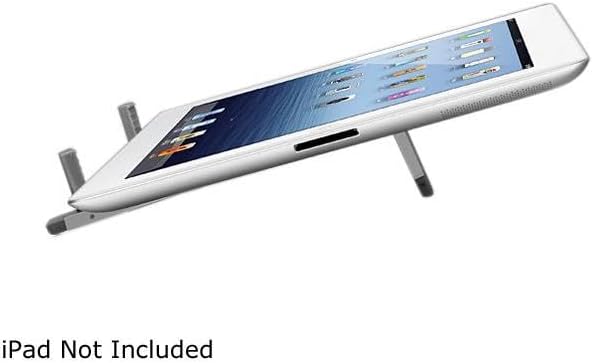
Image: The Aluratek ATST01F stand holding an iPad in landscape orientation, angled for comfortable typing or video viewing.
Ensure Stability: Before use, gently tap your device to ensure it is securely seated on the stand and stable.
Maintenance
Cleaning: Wipe the stand with a soft, dry cloth to remove dust and fingerprints. For stubborn marks, a slightly damp cloth can be used, followed by immediate drying.
Storage: When not in use, fold the stand into its compact form for easy storage. This protects the stand and saves space.
Avoid Harsh Chemicals: Do not use abrasive cleaners or solvents, as these can damage the finish of the stand.
Handle with Care: While durable, avoid dropping the stand or applying excessive force to its adjustable parts to prevent damage.
Troubleshooting
Stand is unstable or wobbles:
Check Surface: Ensure the stand is placed on a flat, stable surface.
Device Placement: Verify that your tablet or smartphone is centered and properly seated on the support legs.
Leg Extension: Confirm that both support legs are fully extended and locked into position (if applicable to the design).
Device does not fit:
Compatibility: This stand is designed for 7-10 inch tablets and most smartphones. Larger devices may not fit securely.
Case Interference: If your device has a bulky case, it might interfere with proper seating. Try removing the case to see if it improves fit.
Specifications
| Feature | Detail |
|---|---|
| Model Number | ATST01F |
| Brand | Aluratek |
| Product Dimensions (Folded) | 8.8 x 3.4 x 0.9 inches |
| Item Weight | 8.8 ounces |
| Color | Silver |
| Form Factor | Foldable |
| Compatible Devices | Smartphones, Tablets (Ideal for 7-10 inch tablets) |
Warranty Information
For detailed warranty information regarding your Aluratek Adjustable Tablet & Smartphone Stand (ATST01F), please refer to the warranty card included with your purchase or visit the official Aluratek website. Keep your proof of purchase for warranty claims.
Technical Support
If you encounter any issues or have questions about your Aluratek Adjustable Tablet & Smartphone Stand (ATST01F) that are not covered in this manual, please contact Aluratek customer support. Contact information can typically be found on the Aluratek website or on the product packaging.


