
1. Important Safety Instructions
Please read all instructions carefully before using the Harper AK80RED Food Processor. Keep this manual for future reference.
- Always ensure the appliance is unplugged before assembly, disassembly, or cleaning.
- Do not immerse the motor unit in water or any other liquid. Clean with a damp cloth only.
- Keep hands, hair, clothing, as well as spatulas and other utensils away from moving parts during operation to prevent injury.
- Do not operate the appliance with a damaged cord or plug, or after the appliance malfunctions or has been dropped or damaged in any manner.
- This appliance is not intended for use by persons (including children) with reduced physical, sensory or mental capabilities, or lack of experience and knowledge, unless they have been given supervision or instruction concerning use of the appliance by a person responsible for their safety.
- Children should be supervised to ensure that they do not play with the appliance.
- Use only attachments recommended or sold by the manufacturer.
- Do not use outdoors.
- Place the appliance on a stable, flat, and dry surface.
- Never leave the appliance unattended while it is operating.
2. Product Overview
The Harper AK80RED Food Processor is a versatile kitchen appliance designed for mixing, kneading, and whisking. It features a powerful 1000W motor and planetary mixing action for thorough results.

Image: The Harper AK80RED Food Processor, showcasing its main unit, stainless steel mixing bowl, and transparent splash guard.
Components:
- Motor Unit: The main body containing the motor and control panel.
- Tilt-Head: Allows easy access to the mixing bowl and attachments.
- Stainless Steel Mixing Bowl: 5-liter capacity for various recipes.
- Splash Guard: Prevents ingredients from splashing out during operation.
- Attachments: Whisk, Beater, Dough Hook.
- Speed Control Dial/Buttons: For selecting desired speed.
- Release Lever: To tilt the motor head.
- Non-slip Feet: For stability during operation.
3. Setup
Follow these steps to set up your food processor before first use.
3.1 Unpacking and Initial Cleaning
- Carefully remove all components from the packaging.
- Wash the mixing bowl, splash guard, whisk, beater, and dough hook in warm, soapy water. Rinse thoroughly and dry.
- Wipe the motor unit with a damp cloth. Do not immerse it in water.
- Ensure all parts are completely dry before assembly.
3.2 Assembly
- Place the motor unit on a clean, flat, and stable surface.
- Press the release lever to tilt the motor head upwards.
- Place the stainless steel mixing bowl onto the base, turning it clockwise until it locks securely into place.
- Select the desired attachment (whisk, beater, or dough hook). Insert the attachment into the shaft and turn it slightly until it locks.

Image: The food processor with its head tilted back, showing the whisk attachment being inserted into the shaft.
- Attach the splash guard by aligning it with the grooves on the motor head and pressing it down.
- Lower the motor head by pressing the release lever again and gently pushing the head down until it clicks into place.
- Ensure the appliance is securely assembled before plugging it into a power outlet.
4. Operating Instructions
This section details how to use your Harper AK80RED Food Processor for various tasks.
4.1 General Operation
- Ensure the appliance is correctly assembled and plugged into a 230V power outlet.
- Add your ingredients to the mixing bowl. Do not overfill the bowl beyond its maximum capacity.
- Select the desired speed using the control panel. The AK80RED features 4 electronic speed settings.

Image: Close-up view of the control panel with speed settings (1-4) and an ON/OFF button.
- Press the ON/OFF button to start the appliance.
- Monitor the mixing process. You can add ingredients through the opening in the splash guard if needed.
- Once finished, press the ON/OFF button to stop the appliance and unplug it from the power outlet.
- Tilt the motor head up, remove the attachment, and then remove the mixing bowl.

Image: The food processor in operation, mixing flour and other ingredients in the stainless steel bowl.
4.2 Using Attachments
- Whisk: Use for whipping cream, egg whites, light batters, and meringues. Use higher speeds (3-4).

Image: The whisk attachment, ideal for aerating ingredients.
- Beater (Mixing Paddle): Suitable for mixing cakes, cookies, frostings, and mashed potatoes. Use medium speeds (2-3).
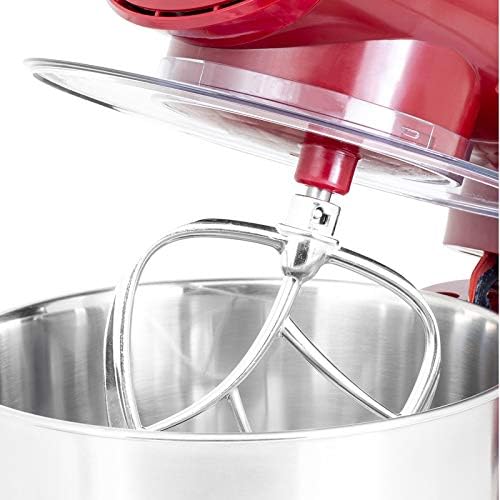
Image: The beater attachment, designed for general mixing tasks.
- Dough Hook: Designed for kneading heavy doughs like bread, pizza, or pasta dough. Use lower speeds (1-2).

Image: The dough hook attachment, used for kneading heavy doughs.
5. Maintenance and Cleaning
Proper cleaning and maintenance will ensure the longevity and optimal performance of your food processor.
5.1 Cleaning
- Always unplug the appliance before cleaning.
- Remove the mixing bowl, splash guard, and attachments.
- The mixing bowl, splash guard, whisk, beater, and dough hook are dishwasher safe. Alternatively, wash them in warm, soapy water, rinse, and dry thoroughly.
- Wipe the exterior of the motor unit with a soft, damp cloth. Do not use abrasive cleaners or scourers.
- Never immerse the motor unit in water or any other liquid.
- Ensure all parts are completely dry before storing or reassembling.
5.2 Storage
Store the food processor in a dry, clean place, away from direct sunlight and out of reach of children.
6. Troubleshooting
If you encounter any issues with your Harper AK80RED Food Processor, please refer to the following table before contacting support.
| Problem | Possible Cause | Solution |
|---|---|---|
| Appliance does not start. | Not plugged in; power outage; motor head not locked down. | Check power connection; check circuit breaker; ensure motor head is fully lowered and locked. |
| Attachments not mixing properly. | Attachment not correctly installed; too much or too little ingredient. | Ensure attachment is securely locked; adjust ingredient quantity according to recipe. |
| Loud noise during operation. | Overload; improper assembly. | Reduce load; check that all parts are correctly assembled and locked. |
| Burning smell. | Motor overload; new appliance smell. | Immediately turn off and unplug. Reduce load. If smell persists after cooling, contact support. A slight smell is normal for new motors. |
7. Specifications
Detailed technical specifications for the Harper AK80RED Food Processor.
- Model Name: AK80RED
- Power: 1000 Watts
- Voltage: 230 Volts
- Bowl Capacity: 5 Liters
- Number of Speeds: 4 (Electronic Variable)
- Material: Metal (body), Stainless Steel (bowl), Metal (blade material)
- Dimensions (L x W x H): Approximately 43.8 x 33.8 x 39.2 cm
- Item Weight: 5.8 Kilograms
- Included Components: Whisk, Beater, Dough Hook
- Special Features: Easy to Use, Robust, Planetary Mixing Action, Tilt-Head Design, Splash Guard, Non-slip Feet
- Dishwasher Safe Parts: Bowl, Whisk, Beater, Dough Hook, Splash Guard
8. Warranty
This Harper AK80RED Food Processor comes with a 1-year warranty from the date of purchase. This warranty covers manufacturing defects under normal household use. It does not cover damage resulting from misuse, neglect, accident, alteration, or improper maintenance.
Please retain your proof of purchase for any warranty claims.
9. Support
For further assistance, technical support, or warranty inquiries, please refer to the contact information provided with your purchase documentation or visit the official Harper website.
When contacting support, please have your product model number (AK80RED) and proof of purchase readily available.