
Introduction
This manual provides detailed instructions for the setup, operation, and maintenance of your iLive ISB212B Bluetooth Speaker. This compact speaker delivers audio wirelessly from compatible Bluetooth devices and also supports wired connections. Please read this manual thoroughly before using your speaker.
Package Contents
- iLive ISB212B Bluetooth Speaker
- Mini-USB to USB Charging Cable
Product Features
- Wireless audio streaming via Bluetooth
- LED pairing indicator for connection status
- Compact, cylindrical design
- Rechargeable battery with approximately 2 hours of playback
- Mini-USB port for battery recharging
- 3.5mm Audio Input for wired connections
Controls and Indicators
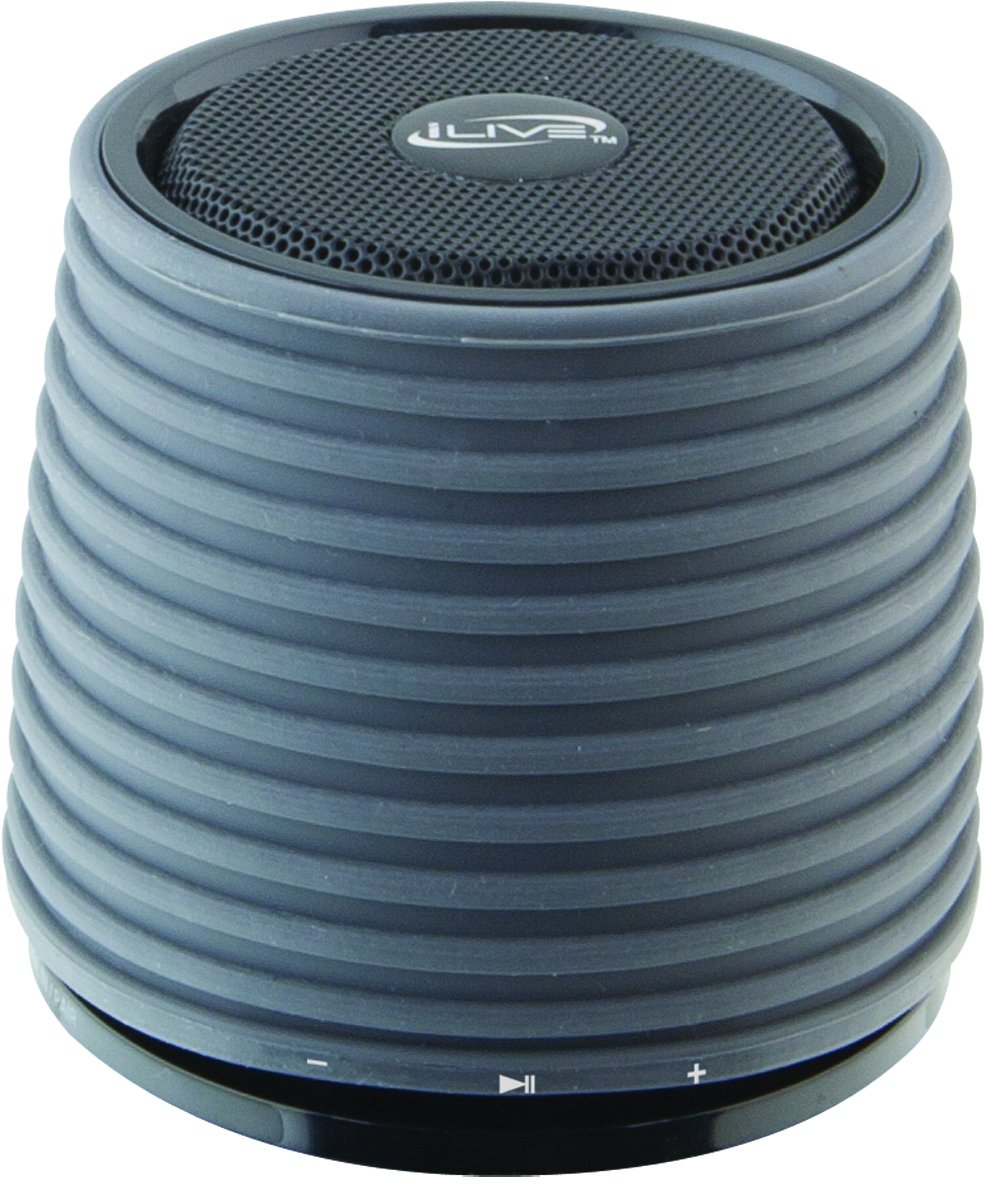
This image displays the iLive ISB212B Bluetooth Speaker. It features a cylindrical shape with a textured grey body and a black speaker grille on top. A band around the middle shows control buttons for play/pause, volume up/next track, and volume down/previous track.
- Power Button: Press and hold to power on/off.
- Play/Pause Button: Controls audio playback.
- Volume Up / Next Track Button: Short press for volume up, long press for next track.
- Volume Down / Previous Track Button: Short press for volume down, long press for previous track.
- LED Pairing Indicator: Shows Bluetooth connection status.
- Mini-USB Port: For charging the internal battery.
- 3.5mm Audio Input: For connecting external audio devices via an auxiliary cable (not included).
Setup
1. Charging the Battery
- Connect the small end of the included Mini-USB to USB charging cable to the Mini-USB port on the speaker.
- Connect the large end of the USB charging cable to a powered USB port (e.g., computer, USB wall adapter).
- The LED indicator will illuminate during charging and turn off or change color when fully charged.
- A full charge provides approximately 2 hours of playback time.
2. Powering On/Off
- To power on, press and hold the Power button until the LED indicator illuminates.
- To power off, press and hold the Power button again until the LED indicator turns off.
Operating Instructions
1. Bluetooth Pairing
- Ensure the speaker is powered on and within 30 feet of your Bluetooth device.
- The LED pairing indicator will flash, indicating it is in pairing mode.
- On your Bluetooth device (smartphone, tablet, etc.), enable Bluetooth and search for new devices.
- Select "iLive ISB212B" from the list of available devices.
- Once paired, the LED pairing indicator will become solid, and you may hear an audible confirmation.
- If pairing fails, power off the speaker and your device, then repeat the steps.
2. Playing Audio
- After successful Bluetooth pairing, begin playing audio on your connected device.
- Use the Play/Pause button on the speaker to control playback.
- Use the Volume Up/Down buttons for volume adjustment. Long press for track navigation.
3. Using the 3.5mm Audio Input
- Connect one end of a 3.5mm audio cable (not included) to the 3.5mm Audio Input port on the speaker.
- Connect the other end of the cable to the headphone jack or audio output of your external audio device.
- The speaker will automatically switch to auxiliary input mode.
- Adjust volume using your external device and the speaker's volume controls.
Maintenance
- Clean the speaker with a soft, dry cloth. Do not use abrasive cleaners or solvents.
- Keep the speaker away from water, moisture, and extreme temperatures. This product is not waterproof.
- Store the speaker in a cool, dry place when not in use for extended periods.
- Do not attempt to disassemble or modify the speaker. This will void the warranty.
Troubleshooting
| Problem | Solution |
|---|---|
| Speaker does not power on. | Ensure the battery is charged. Connect the speaker to a power source using the Mini-USB cable. |
| Cannot pair with Bluetooth device. |
|
| No sound or low volume. |
|
| Short battery life. | Ensure the speaker is fully charged before use. Battery life can vary based on volume level and usage. |
Specifications
| Feature | Detail |
|---|---|
| Model Number | ISB212B |
| Connectivity | Bluetooth, 3.5mm Auxiliary, Mini-USB (charging) |
| Speaker Output Power | 3 Watts |
| Battery Type | 1 Lithium Ion (included) |
| Battery Life (approx.) | 2 Hours |
| Product Dimensions | 7.8 x 7.8 x 7.01 cm |
| Item Weight | 295 g |
| Country of Origin | China |
| Waterproof | No |
Warranty and Support
This iLive ISB212B Bluetooth Speaker comes with a 90-day warranty from the date of purchase. This warranty covers manufacturing defects. For technical support or warranty claims, please refer to the contact information provided with your product packaging or visit the official iLive website.


